
Updated:
Get Form Now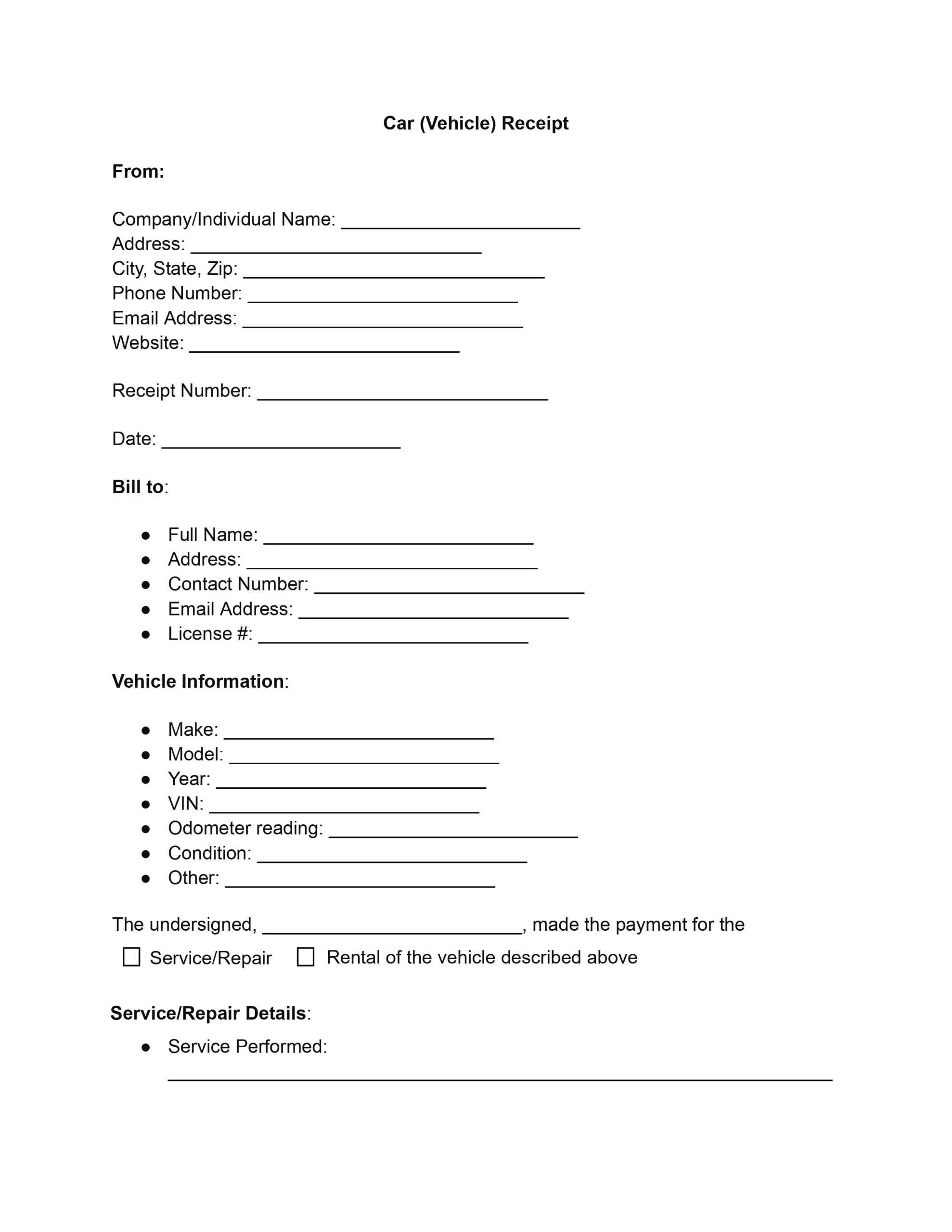
A car receipt, also called an automobile receipt or vehicle receipt, is a written record of what was paid for a car-related service, repair, or rental. A car receipt template gives you a ready layout for the company, the customer, the vehicle, the work or rental, the payment, and the signature, so every receipt looks the same and is easy to find later.
One of the most significant advantages of using a standardized car receipt template is its consistency in record-keeping. Following a structured format lets all parties quickly identify and understand the transaction’s key components without sifting through inconsistently formatted documents. This uniformity is especially beneficial for businesses that handle many vehicle transactions, allowing them to streamline paperwork and reduce administrative costs.
Furthermore, these templates provide legal protection to both the issuer and the check recipient. In the event of a dispute or legal issues, a well-documented receipt can serve as critical evidence outlining the specifics of the transaction, such as the services agreed upon, the vehicle’s condition, and the payment terms. This clarity aids in conflict resolution and protects all parties’ rights and obligations.
A complete car receipt template also keeps every job or rental in one familiar layout. It helps in a few everyday ways:
A car receipt answers the questions a customer or a company may ask after the visit: who did the work, who received it, which vehicle it was, what was done, and what it cost. Each item below is a field on this car receipt template, and the steps further down explain how to fill each one in.
Filling out the automobile receipt template with careful attention to each section ensures that all transaction details are recorded accurately. Gather the vehicle information, the work or rental records, and the payment record before you start. The seven steps below follow the order of the fields on the template, from the company name at the top to the customer’s signature at the bottom.
Begin by entering the name of the company or individual issuing the receipt into the “Company/Individual Name” field. Follow this by filling out the address, including city, state, and ZIP code. Provide a contact phone number, email address, and, if applicable, a website. This section ensures all parties know who provides or receives payment for services or rentals.
Input the unique receipt number and transaction date for internal tracking. This step is crucial for record-keeping and future reference.
In the “Bill to” section, record the full name of the customer receiving the service or rental. If necessary, include their address, contact number, email address, and license number. This information should be accurate to ensure clear communication.
Provide a full description of the vehicle:
Specify the vehicle’s condition and any other pertinent information. This clarity is vital for both legal reasons and customer satisfaction.
Choose between service/repair or rental, then detail the specifics of the transaction.
For a service or repair, list:
For a rental, include:
If you handle only one kind of job, FormsPal also has an auto repair receipt and a car rental receipt built for it.
Record the payment method, whether cash, credit, check, or another form. Include the transaction ID or check number for further verification and payment tracking.
Finally, have the customer sign the receipt to acknowledge receipt of the services or rental and their agreement to the terms and conditions. Include the date of the customer’s signature to finalize the document. Give the customer a copy and keep a signed copy for your files.
This sample shows how a finished car receipt can look, using made-up names, amounts, and prices that you can replace with your own information. Use it as a guide for how much to write under each field of the template.
Maple Street Auto Care, 456 Oak Street, Springfield. Receipt No. 1001, dated October 10. Customer: Anna Baker, 123 Main Street. Vehicle: 2019 Honda Civic, odometer 48,200 miles.
| Item | Qty or hours | Rate | Amount |
|---|---|---|---|
| Oil and filter change | 1 | $45.00 | $45.00 |
| Front brake pads (parts) | 1 | $62.00 | $62.00 |
| Labor | 1.5 hours | $80.00 | $120.00 |
| Subtotal | $227.00 | ||
| Sales tax (sample rate of 6%) | $13.62 | ||
| Total due | $240.62 |
The top lines identify the company, the customer, and the vehicle. The table lists each item with its quantity or hours, its rate, and its amount, and the last rows show the subtotal, the tax, and the total due. The payment line and the signature close out the car receipt template.
Payment: credit card ending in 4821, settled in full. Customer signature: Anna Baker, October 10. A copy was given to the customer.
Most problems with a receipt come from missing or vague entries. A few simple habits keep a car receipt clear and easy to read months after the visit, when the customer or the company needs to look up what was done.
An invoice asks the customer to pay, while a receipt confirms that the payment was made. Some companies send an invoice first and issue the receipt once the customer pays.
Yes. This car receipt template has one part for service or repair work and one for rentals, so you fill in only the part that fits the job.
Yes, when the receipt covers work on a specific vehicle. The Vehicle Identification Number (VIN) ties the receipt to one car, which helps when the same vehicle returns or the owner looks through old records.
Show how the customer paid and what the payment covered:
No. A receipt confirms a payment and lists what it covered, while a rental agreement sets out the terms of the rental before it starts.
Hand it over when the customer pays, so the date, the amounts, and the signature all match the payment. Keep the signed copy with your records for that job.
Give the customer a copy and keep a signed copy for your own files. A printed copy works at pickup, and a PDF copy is easy to email and store with your other records.
General information, not legal or tax advice.
