
Updated:
Get Form Now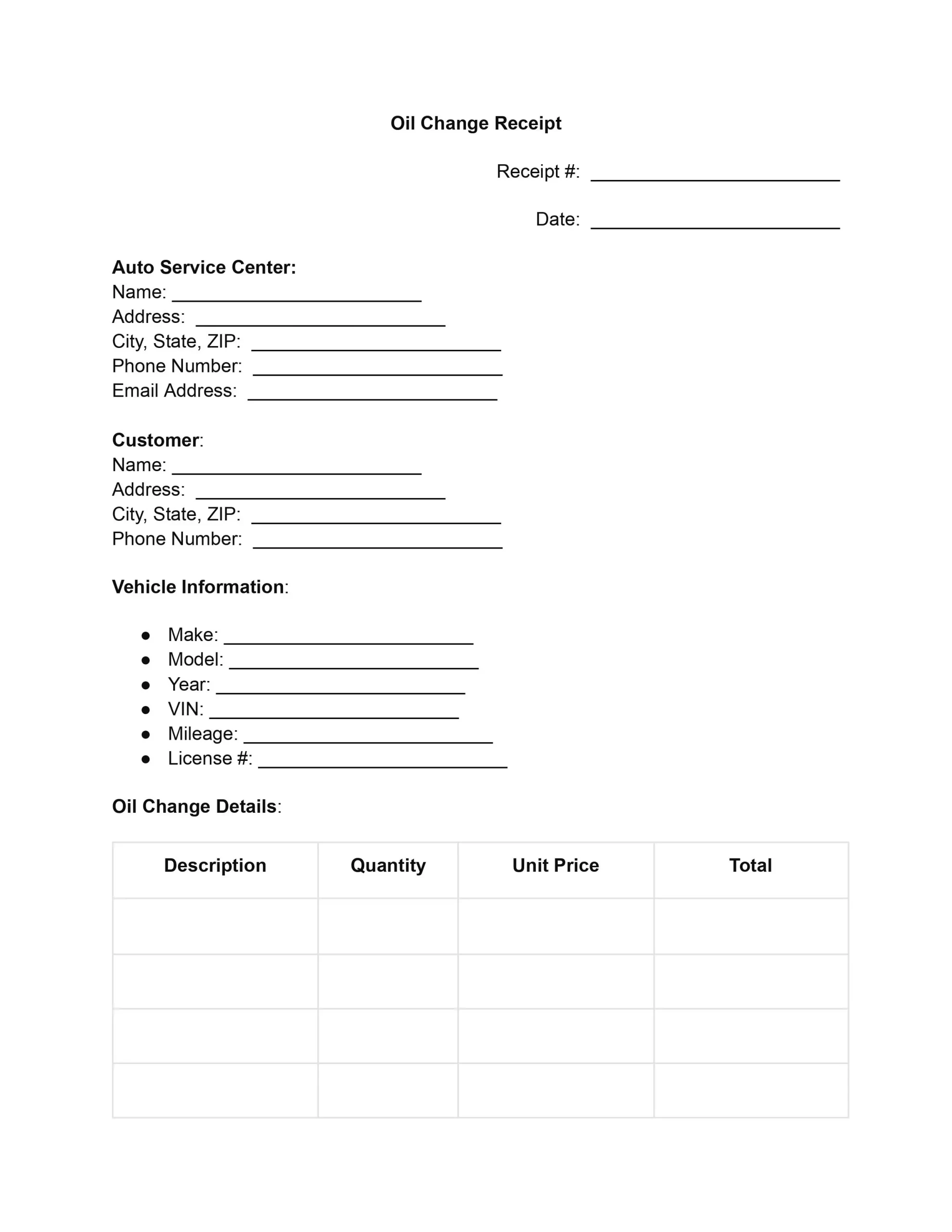
An oil change receipt is a record a service center gives a vehicle owner after an oil change. It lists the date, the vehicle, the oil and filter used, the charges, and the payment. An oil change receipt template puts those fields in a clear order, so you only fill in the details and keep a copy for your maintenance records.
An oil change receipt is a short document that shows what was done during an oil change visit and what it cost. It usually lists the service center, the customer, the vehicle, the oil and filter used, the labor, the taxes, and the payment method. A complete receipt covers four things:
Regular oil changes keep an engine running smoothly, because fresh oil lubricates the moving parts and helps prevent overheating. The receipt is the proof that each change was done, so it belongs in your maintenance history.
Vehicle owners keep the receipt with their service records. Service providers keep a copy for their own books. Both sides can then look back at what was done and when.
A stack of receipts also shows how the vehicle has been cared for over time. That helps when you plan the next oil change or when you talk with a buyer.
A template gives service providers and vehicle owners the same set of fields every time. Each receipt comes out clear and consistent, and nobody has to design a new document for every job. The main advantages are:
Prospective buyers often seek assurance that the vehicle they are considering has been well-maintained, and a history of oil changes can provide just that. An oil change record sheet can also be critical for warranty claims, proving that you have adhered to the manufacturer’s maintenance requirements.
Oil change forms can sometimes have legal and tax implications, particularly for businesses. They can serve as financial records for tax deductions related to vehicle maintenance or as evidence in legal situations. A standardized oil change invoice template’s clarity and detail are crucial in these contexts.
Work through the template from top to bottom. The ten steps below follow the order of the fields, from the receipt number to the signature. You can open the PDF in the FormsPal PDF editor and type in each field, or print it and write by hand.
Start by entering the unique receipt number for the transaction. This number helps track and reference the specific oil change service in future records or queries.
Record the date when the oil change service was performed. It gives a clear service timeline and helps schedule future maintenance tasks.
Enter the full name of the auto service center where the oil change is being done. Include the service center’s complete address, city, state, and ZIP code. Also, fill in the contact details, including the phone number and email address.
Fill out the customer’s name and address, including city, state, and ZIP code. Add the customer’s phone number for any follow-up or communication about the service.
Describe the vehicle so the receipt matches one car and one service history. Fill in these details:
Describe the specifics of the oil change on separate lines, so the customer can see what each item cost:
Separate lines keep the charges easy to read and easy to check.
Tally the costs of all services and parts listed in the oil change details to find the subtotal. This step involves adding up the totals for each item or service provided. Then, calculate and record the applicable taxes based on the subtotal. This amount will vary depending on local tax rates.
Add the subtotal and the taxes to get the amount due for the oil change service. This figure is the complete cost for the customer.
Mark the customer’s payment method: cash, credit card, check, or other. Then add any relevant details, such as the check number or the last four digits of the card. These details make the payment easy to match to a bank or card statement later.
The customer signs the receipt to acknowledge the services received and the accuracy of the payment information. The date of this acknowledgment is also recorded, which completes the record of the transaction. Hand the customer a copy and keep a signed copy for your files.
This sample shows how a finished receipt can look. The names, numbers, and prices are made up. Use it as a guide for the level of detail to add under each heading of the template.
Baker’s Quick Lube, 123 Main Street, Springfield. Receipt No. 1001, dated October 10. Customer: Anna Baker, 456 Oak Street. Vehicle: 2018 Honda Civic, mileage 62,400.
| Item | Qty | Unit price | Amount |
|---|---|---|---|
| Oil change labor | 0.5 hr | $80.00 | $40.00 |
| Synthetic motor oil | 5 qt | $9.00 | $45.00 |
| Oil filter | 1 | $12.00 | $12.00 |
| Subtotal | $97.00 | ||
| Tax (7%) | $6.79 | ||
| Total due | $103.79 | ||
Payment: credit card. Signed by Anna Baker on October 10.
Take a minute to review the receipt before the customer leaves. A quick check catches typing mistakes and missing details that are harder to fix later. Go through this list for each job:
Service providers and vehicle owners often ask these questions about oil change receipts. Each answer is short. You can check one detail, such as what to include or where to write the mileage, and then get back to filling out the receipt.
A complete receipt covers these parts:
Not quite. An invoice is a bill that asks the customer to pay, while a receipt shows that payment was made. Many service centers use one document for both, so this template works either way.
Receipts build a service history for the vehicle. That history shows prospective buyers how the car was cared for, and it helps answer questions about earlier service.
Yes, separate lines are easier to read. List the oil with its quantity and unit price, then list the filter with its price. Add any other part or service on its own line.
Enter it in the vehicle information section, next to the make, model, and VIN. The mileage ties the oil change to a point in the vehicle’s service history.
Add each extra part or service as its own line in the oil change details. For larger jobs, use an auto repair receipt instead.
General information, not legal or tax advice.
