
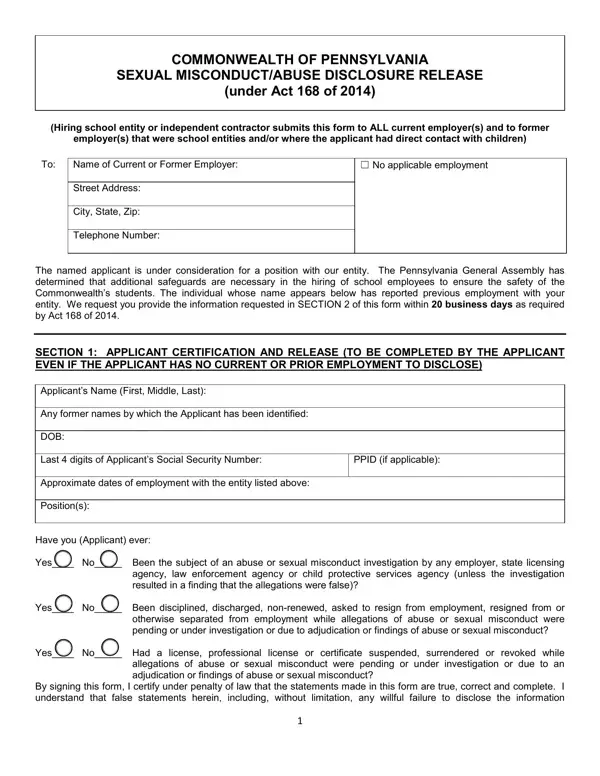
The Commonwealth of Pennsylvania enacted Act 168 of 2014 to protect students across the state's educational institutions. This law requires a careful vetting process for anyone seeking a position with direct contact with children. It covers both school employees and independent contractors who need background verification before working with students.
The core document under this legislation is the Sexual Misconduct/Abuse Disclosure Release form. This form contains two main parts. The applicant section requires job candidates to acknowledge and consent to a review of their past employment history. The employer section requires current and former employers to verify whether the applicant has any history of abuse or sexual misconduct investigations. Related Pennsylvania educator requirements include the Act 24 PDE 6004 form for professional educators.
Pennsylvania law sets legal consequences for applicants who knowingly provide false information on the Act 168 form. School employers use this form together with other required clearances to make fully informed hiring decisions. This framework builds transparency and accountability into Pennsylvania's school hiring process, with student safety as the central priority. For a full set of hiring-related documents, see our employment forms library.
| Question | Answer |
|---|---|
| Form Name | Act 168 Online Form |
| Form Length | 3 pages |
| Fillable? | Yes |
| Fillable fields | 36 |
| Avg. time to fill out | 45 sec |
| Other names | act 168 form, pa act 168 clearance form, pa act 168, act 168 clearance |
| Applicable to | School applicants and independent contractors with direct student contact in Pennsylvania |
| Authorized by | Pennsylvania Department of Education, Act 168 of 2014 |
| Related clearances | Act 34 criminal background check, Act 151 child abuse history, FBI fingerprint clearance |
Act 168 Online Form isn’t the one you’re looking for?