
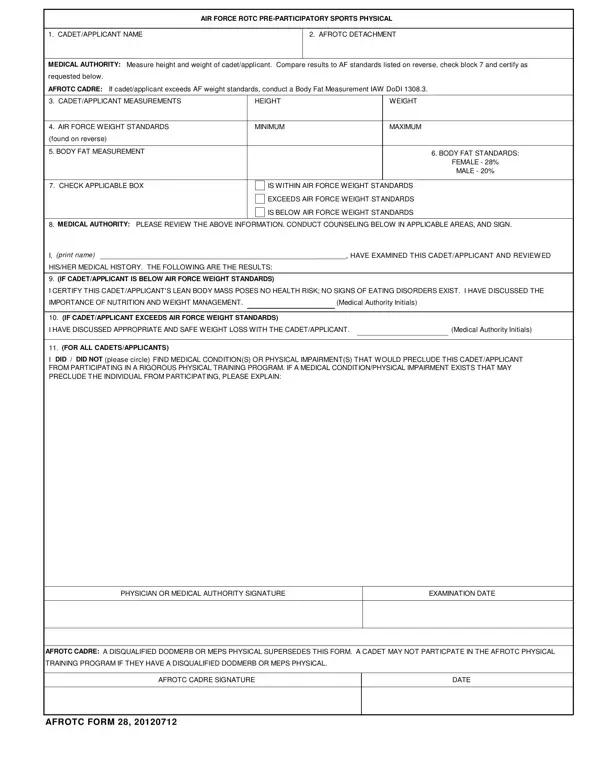
The AFROTC Form 28 is the standard Air Force ROTC Pre-Participatory Sports Physical form required for all cadets and applicants before joining physically demanding ROTC training activities. Medical authorities use this form to confirm that participants meet Air Force weight and body fat standards before allowing them to take part in any strenuous exercise programs.
During the physical evaluation, a physician or medical authority records the cadet's height, weight, and body fat percentage. If the cadet does not meet the standard weight for their height, the medical authority measures body fat using Air Force-approved methods. Specific standards apply for both male and female participants. The physician then determines whether the cadet meets, exceeds, or falls short of these standards.
The form also includes a section for evaluating medical conditions or physical impairments that could prevent safe participation in rigorous training. Conditions identified during this review may result in a temporary or permanent disqualification from ROTC physical activities. A disqualified DD Form 2808 (Report of Medical Examination) can overrule clearance given by this form, so the evaluation process is thorough and multilayered.
Cadets who do not meet weight or body fat standards receive counseling on nutrition, healthy weight management, and safe weight loss practices before re-evaluation. The AFROTC cadre reviews and signs the completed form to confirm the evaluation outcome.
Related Air Force ROTC documents you may need include the AFROTC Form 16 for officer training records and the AFROTC Form 48 for academic planning documents. Cadets undergoing a standard pre-participation physical for athletic activities may also reference the sports physical form for additional guidance.
| Question | Answer |
|---|---|
| Form Name | Afrotc Form 28 |
| Form Length | 2 pages |
| Fillable? | Yes |
| Fillable fields | 18 |
| Avg. time to fill out | 15 sec |
| Other names | air force form 28, afrotc form 28, rotc physical form, air force rotc pre participatory sports physical |
Afrotc Form 28 isn’t the one you’re looking for?