
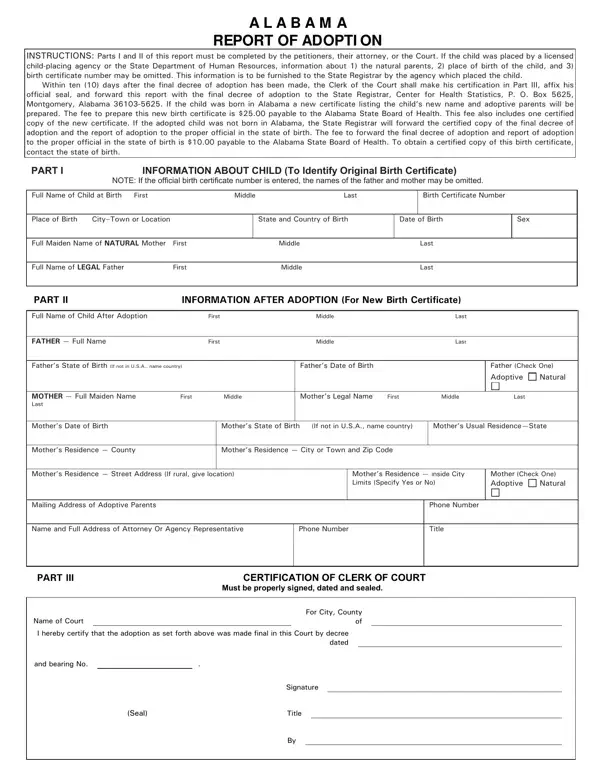
The Alabama Adoption Report form documents the legal completion of an adoption in Alabama. Parts I and II are completed by the petitioner, their attorney, or the court. These sections capture the child's birth information, the natural parents' names, and the birth certificate number. When a licensed child-placing agency or the State Department of Human Resources arranged the placement, some natural parent details may be omitted from the form.
Part III is completed by the Clerk of the Court and must be submitted to the Alabama State Registrar within ten days of the final adoption decree. For children born in Alabama, the completed form triggers issuance of a new birth certificate listing the adoptive parents and the child's updated name. For children born in another state, the form and supporting documentation are forwarded to the registrar of that state so the appropriate records can be updated there.
Adoptive families managing records across jurisdictions may also need a birth certificate form or a certificate of adoption to complete the documentation process. Families comparing requirements across states can reference the Kansas Report of Adoption or the New York adoption form for a side-by-side understanding of how adoption reporting requirements vary by state.
| Question | Answer |
|---|---|
| Form Name | Alabama Adoption Report Form |
| Form Length | 2 pages |
| Fillable? | No |
| Fillable fields | 0 |
| Avg. time to fill out | 30 sec |
| Other names | alabama report of adoption, hs rev alabama, alabama adoption form, alabama report adoptive online |
Alabama Adoption Report Form isn’t the one you’re looking for?