
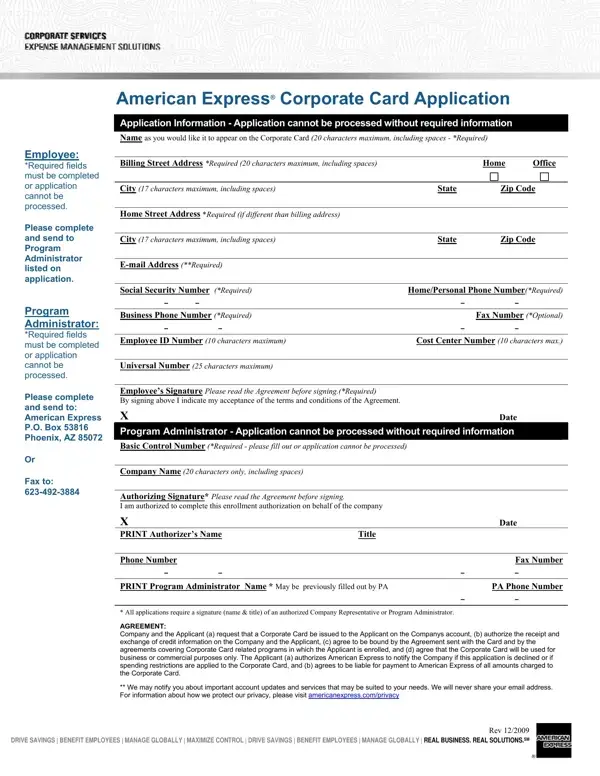
The American Express Corporate Application form collects business and employee details needed to issue a corporate card. Understanding each section helps you submit a complete, accurate application.
Employee information required: The form asks for the employee's legal name, billing address, home address, social security number, and phone number. An email address is also required. All fields marked as required must be filled in correctly.
Company information required: You will need your organization's basic control number (BCN), which American Express assigns to your company. An authorized company representative must provide a signature, confirming the request is made on behalf of the organization.
Agreement and intended use: Signing the form confirms the card will be used for business purposes only. Read and accept the enclosed cardholder agreement before submitting.
How to submit: Mail the completed form to American Express, Global Card and Client Group, P.O. Box 981546, El Paso, TX 79998. You can also fax it to 1-800-543-7754. Keep a copy for your records before sending.
For related business documents, see our credit card authorization form, the business credit application template, or the American Express name change form.
| Question | Answer |
|---|---|
| Form Name | American Express Corporate Application Form |
| Form Length | 1 pages |
| Fillable? | No |
| Fillable fields | 0 |
| Avg. time to fill out | 15 sec |
| Other names | american express paycheck protection, paycheck protection program, american express card coporate application, american express corporate application form |
American Express Corporate Application Form isn’t the one you’re looking for?