
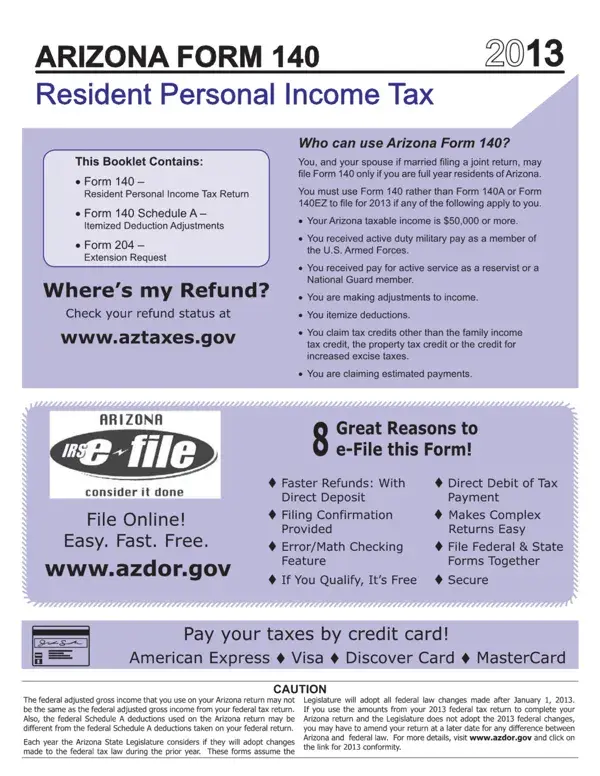

AZ Form 140 at a glance
What it is: Arizona Form 140 is the Resident Personal Income Tax Return for calendar year 2025.
Who signs: Enter YOUR SIGNATURE, DATE and OCCUPATION. Enter SPOUSE'S SIGNATURE, DATE and SPOUSE'S OCCUPATION.
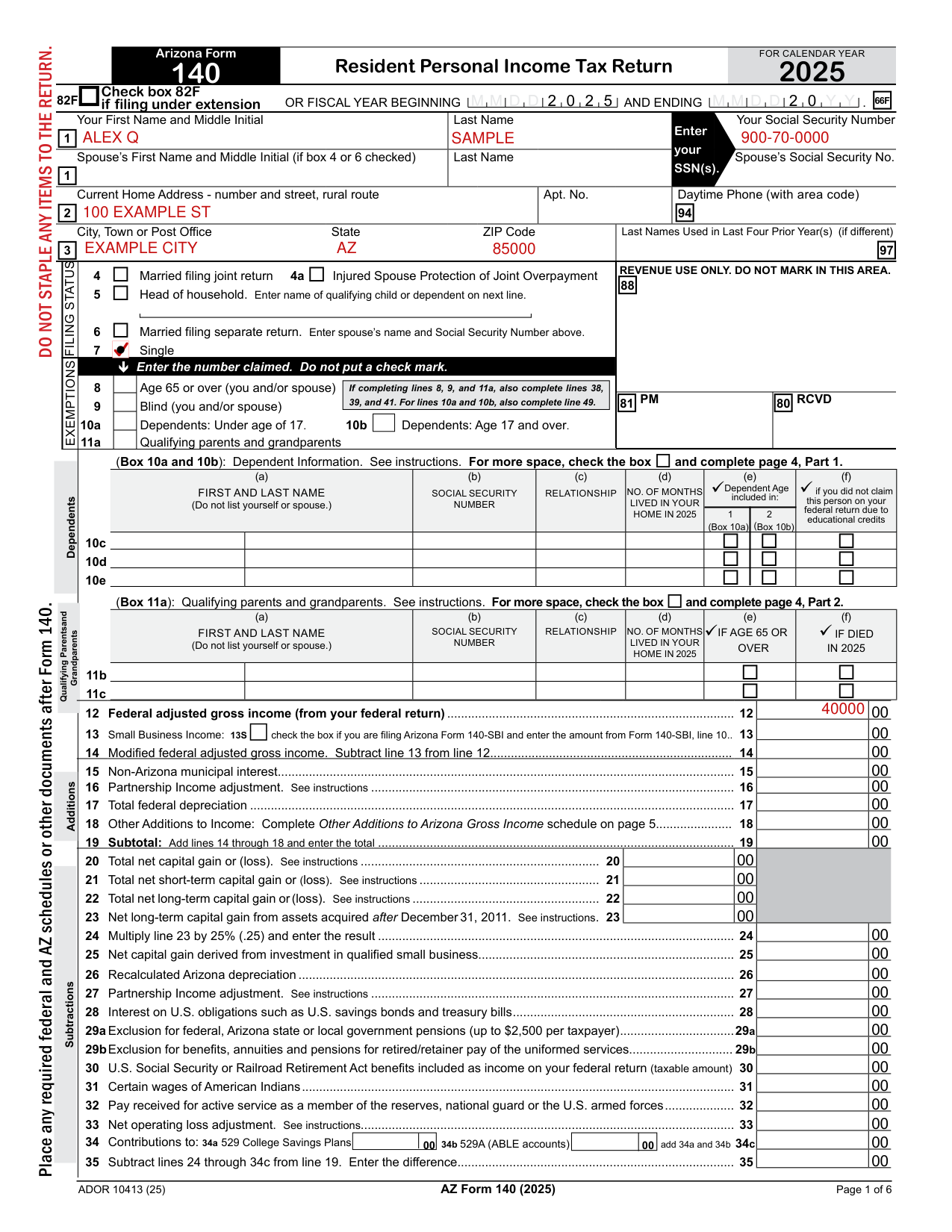
A filled-in AZ Form 140 example: a single resident enters federal adjusted gross income
How to fill out AZ Form 140, box by box
Check box 82F if filing under extension

Check box 82F if filing under extension.
Your name, address and Social Security Number
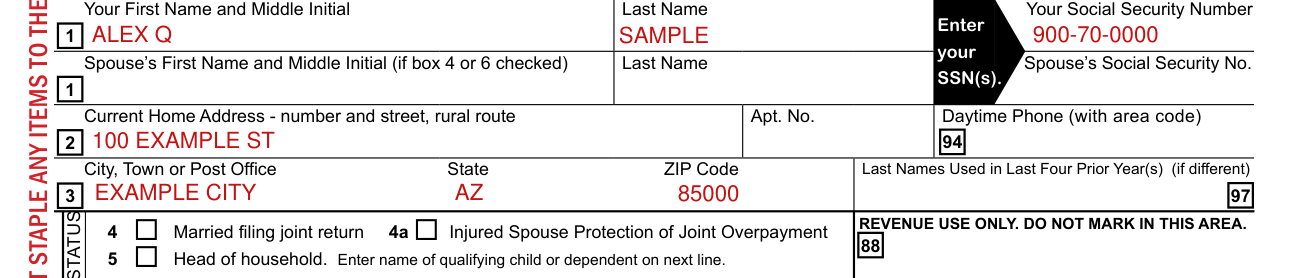
Enter Your First Name and Middle Initial, Last Name and Your Social Security Number.
Enter your SSN(s).
Enter Spouse's First Name and Middle Initial, Last Name and Spouse's Social Security No. if box 4 or 6 is checked.
Enter Current Home Address - number and street, rural route, Apt. No. and Daytime Phone (with area code).
Enter City, Town or Post Office, State, ZIP Code and Last Names Used in Last Four Prior Year(s) (if different).
Married filing joint return, Head of household, Married filing separate return and Single

Box 4 is Married filing joint return. Box 4a is Injured Spouse Protection of Joint Overpayment. Box 5 is Head of household: enter name of qualifying child or dependent on next line.
Box 6 is Married filing separate return: enter spouse's name and Social Security Number above. Box 7 is Single.
Age 65 or over, Blind, Dependents and Qualifying parents and grandparents
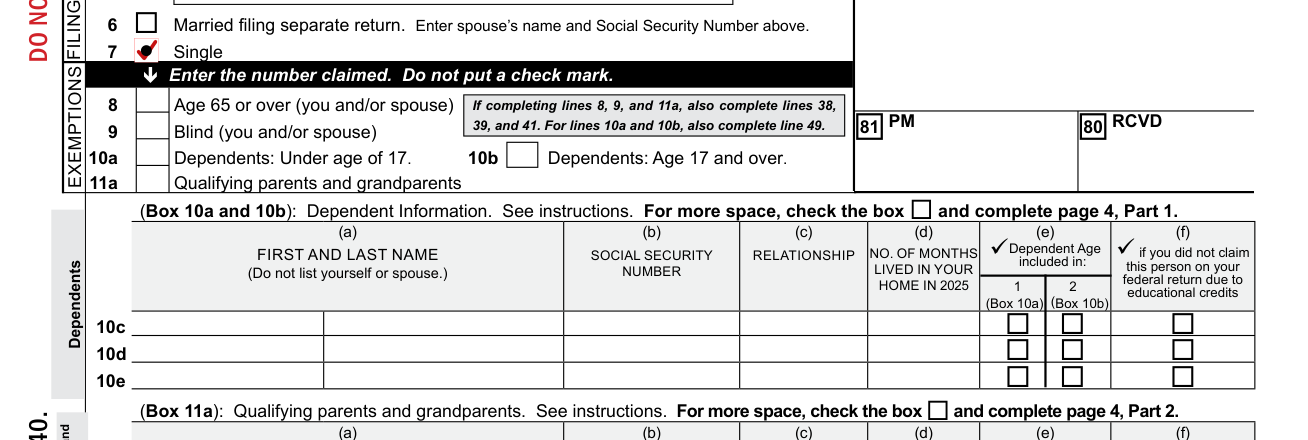
Enter the number claimed. Do not put a check mark.
Box 8 is Age 65 or over (you and/or spouse). Box 9 is Blind (you and/or spouse). Box 10a is Dependents: Under age of 17. Box 10b is Dependents: Age 17 and over. Box 11a is Qualifying parents and grandparents.
If completing lines 8, 9, and 11a, also complete lines 38, 39, and 41. For lines 10a and 10b, also complete line 49.
Box 10a and 10b: Dependent Information. See instructions. For more space, check the box and complete page 4, Part 1. Do not list yourself or spouse.
Box 11a: Qualifying parents and grandparents. See instructions. For more space, check the box and complete page 4, Part 2. Do not list yourself or spouse.
Income lines 12 to 35
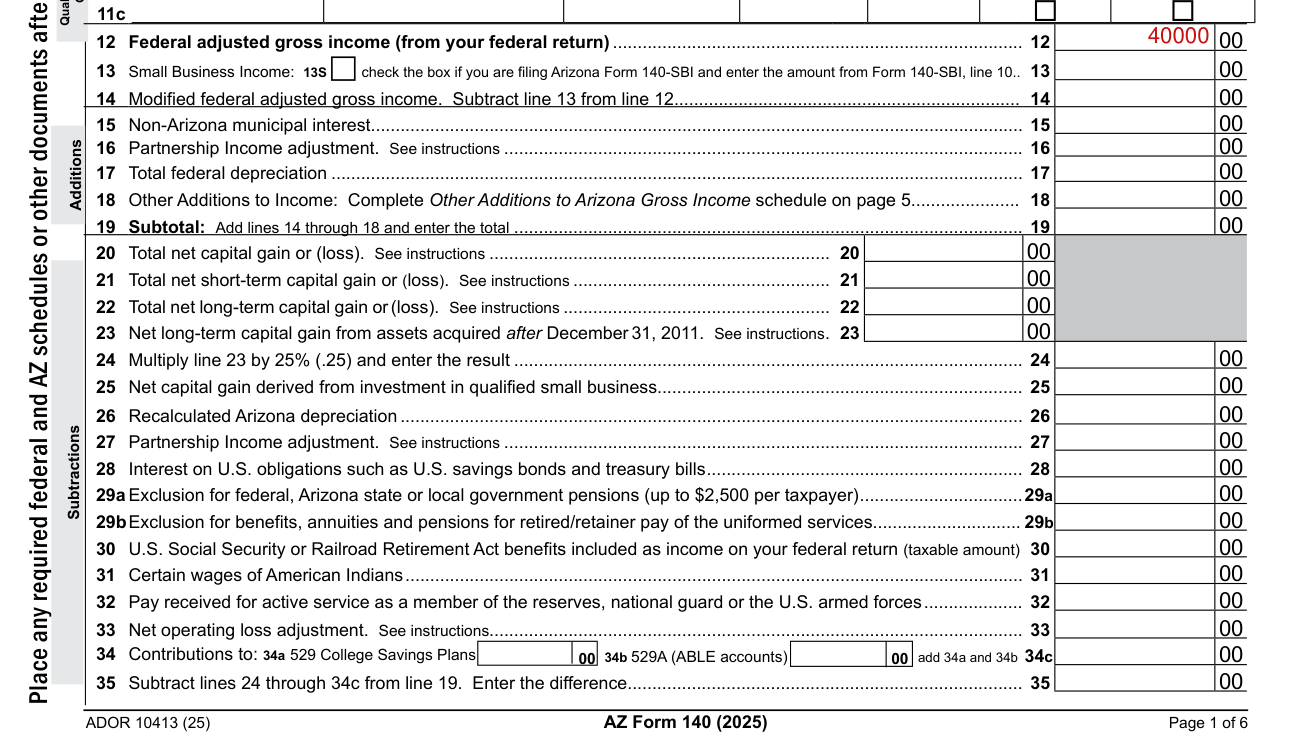
Line 12 is Federal adjusted gross income (from your federal return).
Line 13 Small Business Income: check the box if you are filing Arizona Form 140-SBI and enter the amount from Form 140-SBI, line 10.
Line 35: Subtract lines 24 through 34c from line 19. Enter the difference.
Other Subtractions from Income, Deductions, Tax and Payments lines 36 to 63
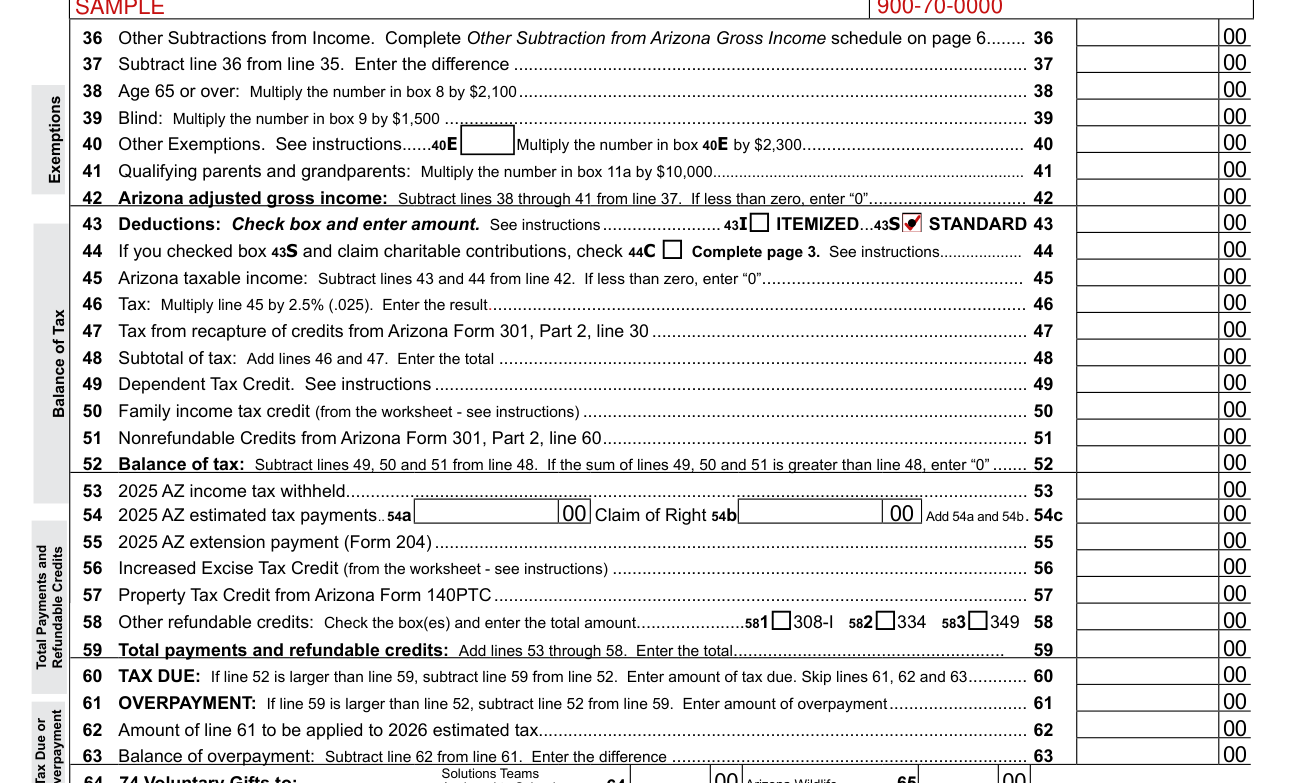
Line 36 Other Subtractions from Income: Complete Other Subtraction from Arizona Gross Income schedule on page 6. Line 37: Subtract line 36 from line 35. Enter the difference. Line 38 Age 65 or over: Multiply the number in box 8 by $2,100 (checked November 2, 2026). Line 39 Blind: Multiply the number in box 9 by $1,500 (checked November 2, 2026). Line 40 Other Exemptions. See instructions. 40E Multiply the number in box 40E by $2,300 (checked November 2, 2026). Line 41 Qualifying parents and grandparents: Multiply the number in box 11a by $10,000 (checked November 2, 2026). Line 42 Arizona adjusted gross income: Subtract lines 38 through 41 from line 37. If less than zero, enter “0”. Line 43 Deductions: Check box and enter amount. See instructions. 43I ITEMIZED. 43S STANDARD. Line 44: If you checked box 43S and claim charitable contributions, check 44C. Complete page 3. See instructions. Line 45 Arizona taxable income: Subtract lines 43 and 44 from line 42. If less than zero, enter “0”. Line 46 Tax: Multiply line 45 by 2.5% (.025). Enter the result. Line 47 Tax from recapture of credits from Arizona Form 301, Part 2, line 30. Line 48 Subtotal of tax: Add lines 46 and 47. Enter the total. Line 49 Dependent Tax Credit. See instructions. Line 50 Family income tax credit (from the worksheet - see instructions). Line 51 Nonrefundable Credits from Arizona Form 301, Part 2, line 60. Line 52 Balance of tax: Subtract lines 49, 50 and 51 from line 48. If the sum of lines 49, 50 and 51 is greater than line 48, enter “0”. Line 53 is 2025 AZ income tax withheld. Line 54: enter 2025 AZ estimated tax payments on 54a and Claim of Right on 54b. Add 54a and 54b and enter the total on 54c. Line 55 is 2025 AZ extension payment (Form 204). Line 56 Increased Excise Tax Credit (from the worksheet - see instructions). Line 57 Property Tax Credit from Arizona Form 140PTC. Line 58 Other refundable credits: Check the box(es) and enter the total amount. 581308-I 582334 583349. Line 59 Total payments and refundable credits: Add lines 53 through 58. Enter the total. Line 60 TAX DUE: If line 52 is larger than line 59, subtract line 59 from line 52. Enter amount of tax due. Skip lines 61, 62 and 63. Line 61 OVERPAYMENT: If line 59 is larger than line 52, subtract line 52 from line 59. Enter amount of overpayment. Line 62 is Amount of line 61 to be applied to 2026 estimated tax. Line 63 Balance of overpayment: Subtract line 62 from line 61. Enter the difference.
Penalty, Refund and Amount Owed lines 75 to 80
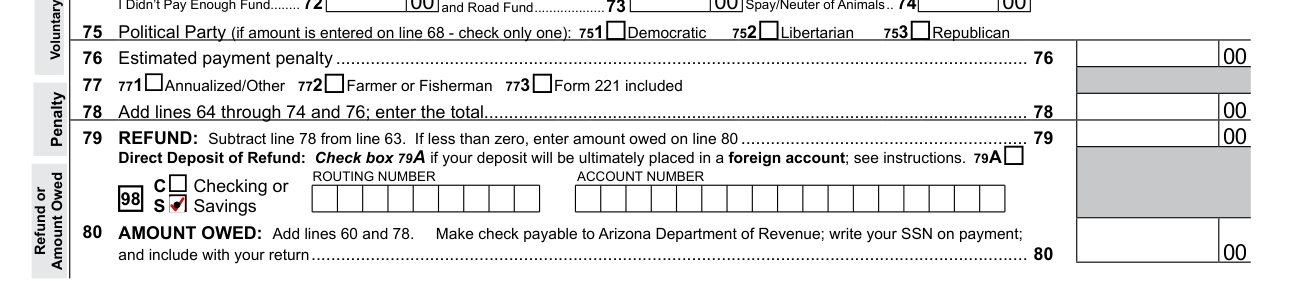
Line 75 Political Party (if amount is entered on line 68 - check only one): 751Democratic 752Libertarian 753Republican. Line 76 is Estimated payment penalty. Line 77: 771Annualized/Other 772Farmer or Fisherman 773Form 221 included. Line 78: Add lines 64 through 74 and 76; enter the total. Line 79 REFUND: Subtract line 78 from line 63. If less than zero, enter amount owed on line 80. Direct Deposit of Refund: Check box 79A if your deposit will be ultimately placed in a foreign account; see instructions. ROUTING NUMBER, ACCOUNT NUMBER. Line 80 AMOUNT OWED: Add lines 60 and 78. Make check payable to Arizona Department of Revenue; write your SSN on payment; and include with your return.
PLEASE SIGN HERE
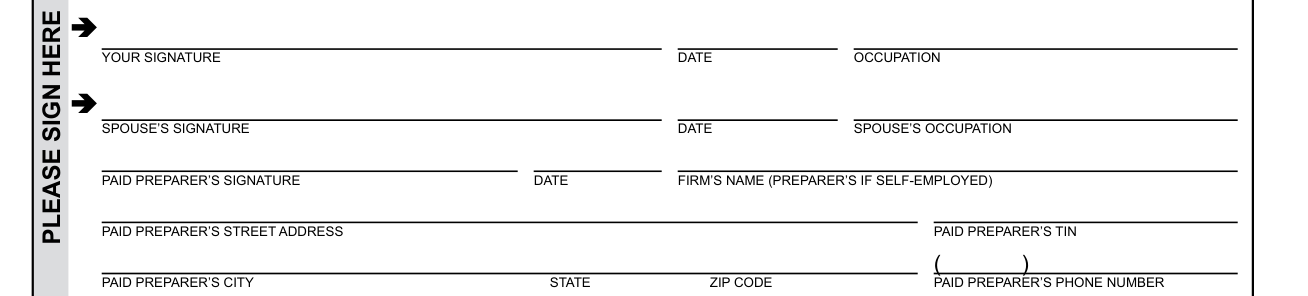
Under penalties of perjury, you declare that you have read this return and any documents with it, and to the best of your knowledge and belief, they are true, correct and complete.
Declaration of preparer (other than taxpayer) is based on all information of which preparer has any knowledge.
Enter YOUR SIGNATURE, DATE and OCCUPATION.
Enter SPOUSE'S SIGNATURE, DATE and SPOUSE'S OCCUPATION.
Enter PAID PREPARER'S SIGNATURE, DATE and FIRM'S NAME (PREPARER'S IF SELF-EMPLOYED), PAID PREPARER'S STREET ADDRESS and TIN, CITY, STATE, ZIP CODE and PHONE NUMBER.
2025 Form 140 - Standard Deduction Increase for Charitable Contributions
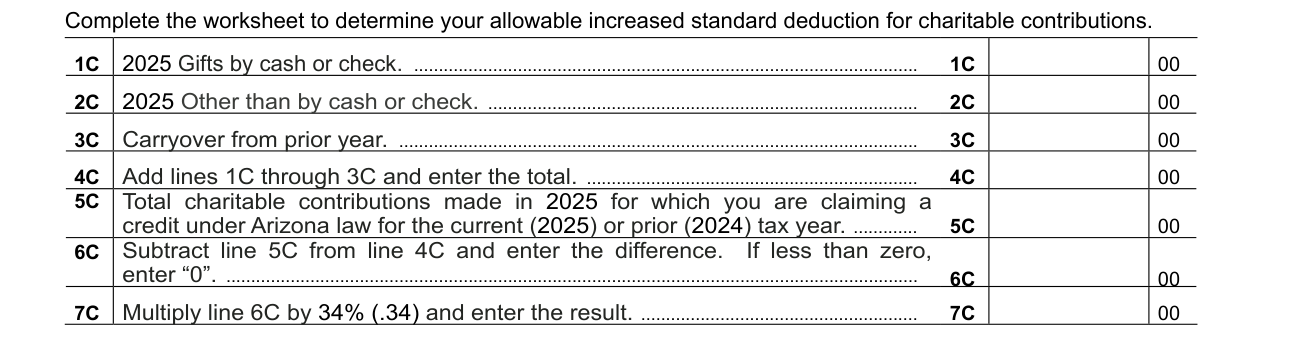
You must complete this worksheet if you are taking an increased standard deduction for charitable contributions.
Include the completed worksheet with your tax return, when filed.
If you do not include the completed worksheet, your standard deduction will not be increased.
Enter the amount shown on line 7C on page 2, line 44.
Be sure to check box 43S for Standard Deduction on line 43.
Check box 44C for charitable contributions on line 44. If you do not check this box, you may be denied the increased standard deduction.
More rules for AZ Form 140
Include page 4 with your return if: You are listing additional dependents (for box 10a and 10b) from page 1. You are listing additional qualifying parents and grandparents (for box 11a) from page 1. You are claiming Other Exemptions on page 2, line 40.
Complete and include this schedule with your tax return only if you are making any adjustments increasing your Arizona Gross Income. If you are making any adjustments reducing your Arizona Gross Income complete page 6.
T Total Other Additions: Add all amounts and enter the total here and on page 1, line 18.
Common questions about AZ Form 140
What is Arizona form 140?
Arizona Form 140 is the Resident Personal Income Tax Return for calendar year 2025. Place any required federal and AZ schedules or other documents after Form 140. DO NOT STAPLE ANY ITEMS TO THE RETURN.
Where do I file it?
If you are sending a payment with this return, mail to Arizona Department of Revenue, PO Box 52016, Phoenix, AZ 85072-2016. Include the payment with Form 140. If you are expecting a refund or owe no tax, or owe tax but are not sending a payment, mail to Arizona Department of Revenue, PO Box 52138, Phoenix, AZ 85072-2138.
Sources
[1] AZ Form 140 (2025), Arizona Form 140 Resident Personal Income Tax Return, Arizona Department of Revenue (the Official source link on this page).