
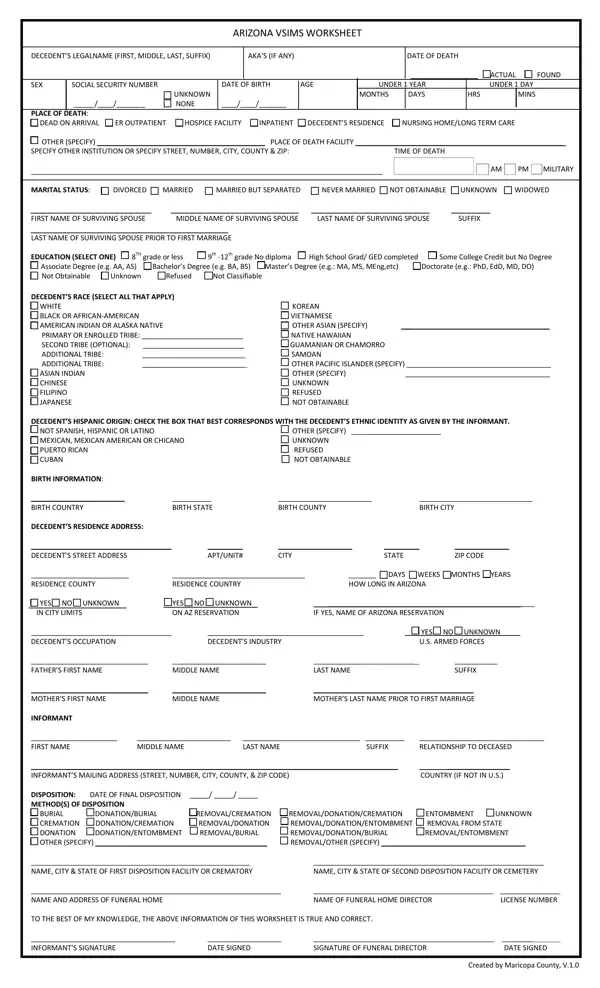
Arizona VSIMS Worksheet at a glance
What it is: The Arizona VSIMS Worksheet is a worksheet created by Maricopa County, V.1.0.
Who signs: The informant's signature and the signature of funeral director each have a date signed.
A filled-in Arizona VSIMS Worksheet example: a funeral director fills in the worksheet
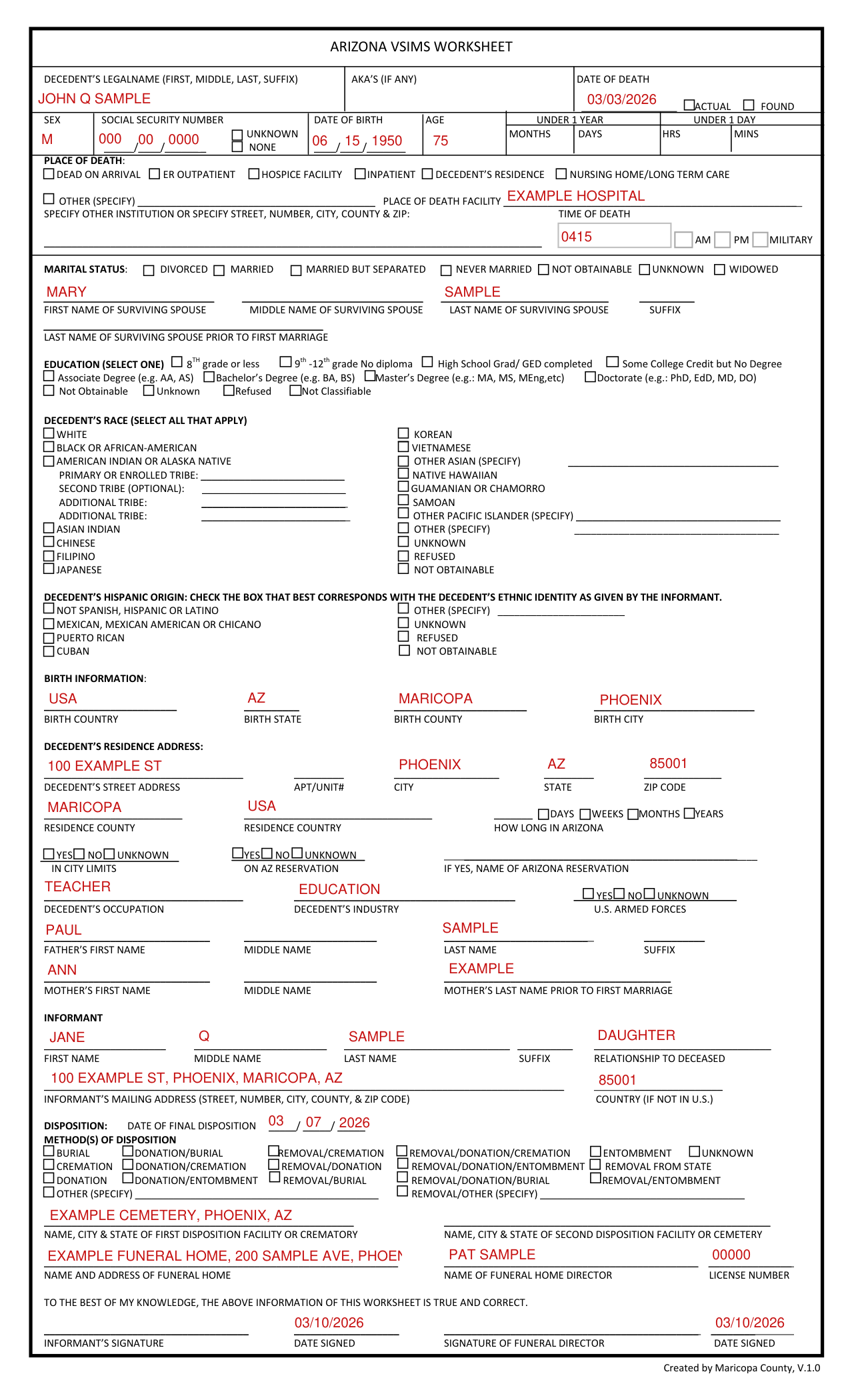
How to fill out Arizona VSIMS Worksheet, box by box
Decedent's legal name, date of death and sex

Enter the decedent's legalname (first, middle, last, suffix), AKA's (if any), date of death and sex.
For the date of death, the form prints actual and found.
Social security number, date of birth and age

Enter the social security number, or mark unknown or none, and enter the date of birth.
Under age, the form prints under 1 year, under 1 day, months, days, hrs and mins.
Place of death and time of death

Under place of death, the form prints dead on arrival, ER, outpatient, hospice facility, inpatient, decedent's residence, nursing home/long term care and other (specify).
Enter the place of death facility, then specify other institution or specify street, number, city, county & zip.
Enter the time of death and mark AM, PM or military.
Marital status and surviving spouse

Under marital status, the form prints divorced, married, married but separated, never married, not obtainable, unknown and widowed.
Enter the first name, middle name, last name and suffix of the surviving spouse, and the last name of the surviving spouse prior to first marriage.
Birth information

Under birth information, enter the birth country, birth state, birth county and birth city.
Decedent's residence address

Under decedent's residence address, enter the decedent's street address, apt/unit#, city, state, zip code, residence county and residence country.
For how long in Arizona, the form prints days, weeks, months and years.
Mark yes, no or unknown for in city limits and for on AZ reservation, and give the name of Arizona reservation if yes.
Decedent's occupation and industry

Enter the decedent's occupation and the decedent's industry, and mark yes, no or unknown for U.S. armed forces.
Father's and mother's names

Enter the father's first name, middle name, last name and suffix, and the mother's first name, middle name and mother's last name prior to first marriage.
Informant and relationship to deceased

Under informant, enter the first name, middle name, last name, suffix and relationship to deceased.
Enter the informant's mailing address (street, number, city, county, & zip code) and the country (if not in U.S.).
Disposition and date of final disposition

Under disposition, enter the date of final disposition (month, day and year).
The method(s) of disposition are burial, cremation, donation, entombment, unknown, removal from state and donation/burial, donation/cremation, donation/entombment, removal/burial, removal/cremation, removal/donation, removal/entombment, removal/donation/burial, removal/donation/cremation and removal/donation/entombment, or other (specify) and removal/other (specify).
For the disposition facility info, give the name, city & state of first disposition facility or crematory and the name, city & state of second disposition facility or cemetery.
Funeral home, funeral director and license number

Enter the name and address of funeral home, the name of funeral home director and the license number.
Signatures and date signed

By signing, the informant and the funeral director state: to the best of my knowledge, the information of this worksheet is true and correct.
The informant's signature and the signature of funeral director each have a date signed.
More rules for Arizona VSIMS Worksheet
Under education (select one), the form prints 8TH grade or less, 9th -12th grade No diploma, High School Grad/ GED completed, Some College Credit but No Degree, Associate Degree, Bachelor's Degree, Master's Degree, Doctorate, Not Obtainable, Unknown, Refused and Not Classifiable.
Under decedent's race (select all that apply), the form prints white, black or African-American, American Indian or Alaska Native, native Hawaiian, Guamanian or Chamorro, Samoan, Asian Indian, Chinese, Filipino, Japanese, Korean, Vietnamese, unknown, refused and not obtainable.
Enter the primary or enrolled tribe, then the second tribe (optional) and any additional tribe.
For other Asian, other Pacific Islander or other, write it on the line marked (specify).
For decedent's Hispanic origin, check the box that best corresponds with the decedent's ethnic identity as given by the informant.
The boxes are not Spanish, Hispanic or Latino, Mexican, Mexican American or Chicano, Puerto Rican, Cuban, other (specify), unknown, refused and not obtainable.
Sources
[1] Arizona VSIMS Worksheet, Created by Maricopa County, V.1.0 (served file; no issuer file published) (the Official source link on this page).