
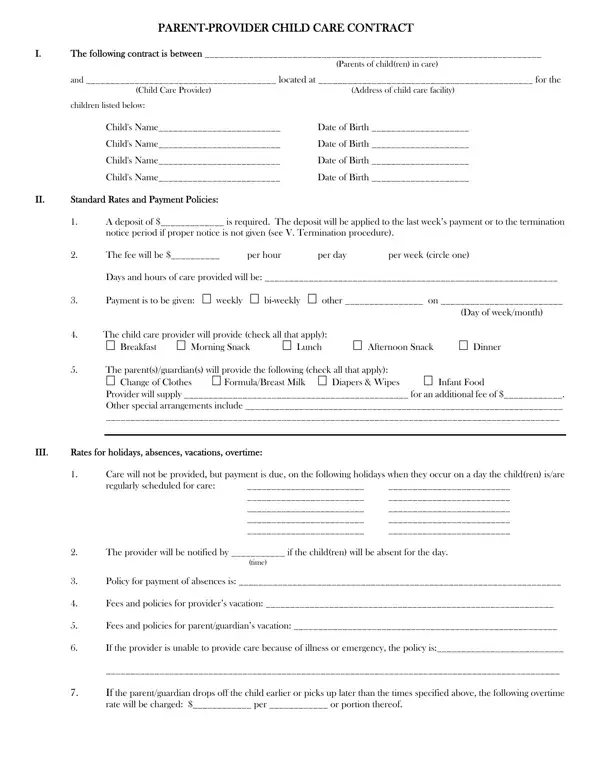
A child parent provider care contract is a formal written agreement that establishes the terms of care between parents or guardians and a child care provider. Completing this document before care begins protects all parties by documenting expectations, payment terms, and procedures in advance.
This contract addresses all the essential elements of a care arrangement. Each section covers a distinct part of the agreement:
Before signing a child care contract, review every section carefully. Confirm that payment amounts and schedules match your verbal agreement. Clarify what counts as an absence and whether payment is owed during holidays. Ask the provider to explain the termination policy, including how much advance notice is required from each side.
Make sure both parents or co-guardians sign the agreement if both will be involved. Keep a signed copy for your own records alongside any other child care paperwork.
A written contract protects you as a provider by documenting the payment and care terms both parties agreed upon. Fill in all sections completely before presenting the document for signatures. Specify your policies on deposits, late fees, and returned checks clearly. Review the termination section with parents before signing so expectations are clear from the start.
Depending on your situation, you may also need these related documents:
Does a child care contract need to be notarized to be valid?
Notarization is not required for a child parent provider care contract to be legally binding. A written contract signed by all parties is enforceable in most states without notarization. Both parties should retain signed copies for their records.
What happens if the provider cannot care for the child on a given day?
The contract includes a section where the provider specifies their policy for unavailability. This typically covers notice requirements and whether payment is owed during unplanned provider absences.
Can the contract terms be changed after signing?
Yes. Both parties may agree to modify the terms at any time. Any change should be written, signed, and dated by both the parents or guardians and the child care provider. Verbal changes that are not documented in writing may be difficult to enforce later.
| Question | Answer |
|---|---|
| Form Name | Child Parent Provider Care Contract Form |
| Form Length | 2 pages |
| Fillable? | No |
| Fillable fields | 0 |
| Avg. time to fill out | 30 sec |
| Other names | child development council contract, council parent contract, ny council parent provider contract, ny parent provider contract |
Child Parent Provider Care Contract Form isn’t the one you’re looking for?