
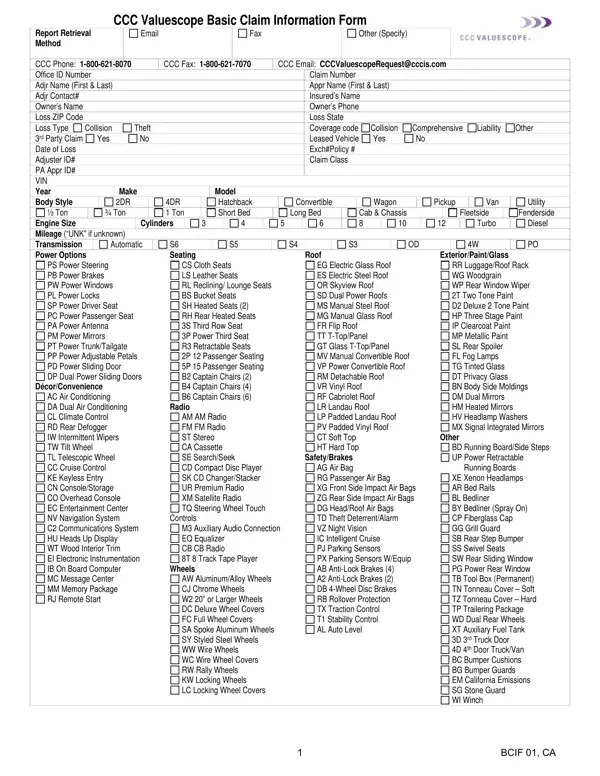
Whenever you need to fill out a claim form online, you don't have to download any applications. Our tool lets you access, complete, and submit your insurance claim form faster than with traditional paper methods. With some simple steps, you can begin PDF editing right away.
Step 1: Hit the "Get Form" button above. It'll open our editor so you can begin filling in your form.
Step 2: With this advanced PDF editor, you may accomplish more than merely fill out blanks. Make your forms look professional with customized text, or fine-tune the file's original content to excellence. You can also insert photos and sign the document off.
It's easy to finish the claim form with this helpful tutorial! Here's what you need to do:
1. The claim form requires particular information to be typed in. Make certain the next fields are finalized:
2. Your next part is to complete all of the following blank fields: PS Power Steering PB Power Brakes, DécorConvenience, AC Air Conditioning DA Dual Air, CS Cloth Seats LS Leather Seats RL, Radio, AM AM Radio FM FM Radio ST Stereo, Controls, M Auxiliary Audio Connection EQ, Wheels, AW AluminumAlloy Wheels CJ Chrome, EG Electric Glass Roof ES Electric, SafetyBrakes AG Air Bag RG, RR LuggageRoof Rack WG Woodgrain, Other, and BD Running BoardSide Steps UP.
3. The following section will be focused on AW AluminumAlloy Wheels CJ Chrome, XE Xenon Headlamps AR Bed Rails BL, and BCIF CA - fill in these fields.
4. It is time to proceed to this fourth part! In this case you have all these CCC Valuescope Basic Claim, Claim Number, Office ID Number REFURBISHMENTS, Restored, Purchase Price Purchase Price, Purchase Price Purchase Price, Mileage of Tires Custom Date Date, Basic, Standard, Date Painted, Purchase Price, Engine, Purchase Price, Mileage, and Leather Carpet Kit fields to complete.
5. This form should be concluded with this particular section. Below there is an extensive listing of form fields that must be filled in with correct information to allow your claim form usage to be faultless: PackageSpecial FeaturesAdditional, Add Add Deductible Add Add, and Deduct Deduct.
As for Deduct Deduct and Add Add Deductible Add Add, make certain you review things here. These could be the key ones in the PDF.
Step 3: Prior to finishing your document, double-check that all form fields were filled out the right way. Once you establish that it is complete, press "Done." Get hold of your claim form after you sign up at FormsPal for a 7-day free trial. Conveniently use the form in your personal cabinet, with any edits and adjustments being automatically saved. We don't sell or share the information you enter when working with documents at FormsPal.
What Information Does This Claim Form Require
The CCC Valuescope claim form is used by insurance agencies and adjusters to track all relevant claim details. To complete the form accurately, you will need to provide:
- Basic claim data: Office ID number, claim number, adjuster name, and contact information
- Insured and owner details: Names, contact numbers, and policy coverage codes
- Vehicle information: VIN, year, make, model, body style, engine size, and mileage
- Loss details: ZIP code, state, loss type (collision, theft, or other), and condition ratings
- Financial data: Refurbishments, special features, and pre-tax and post-tax adjustments
Who Uses This Form and When
Auto insurance adjusters and appraisers use this form when processing vehicle damage claims. Insurance agencies rely on the data within it to determine payout amounts and coverage applicability. Common scenarios include:
- Documenting collision damage for reimbursement claims
- Recording total loss or theft assessments
- Tracking vehicle condition before and after a loss event
- Supporting claims submitted within standard policy review timelines
For related forms, you may also need a combined insurance claim form, an automobile insurance application, or a standard claim form.
Frequently Asked Questions
What is this form used for?
This standardized document allows insurance companies and agencies to record and track all data related to a vehicle or property claim. It ensures adjusters can access the information they need to evaluate and process your claim faster.
How do I submit the completed form?
Once you complete the form online, download it as a PDF and submit it by email or fax to your insurance provider. Check your policy documents to confirm the preferred submission method for your coverage type.
Can this form be used for any type of claim?
This CCC Valuescope form is designed for vehicle damage claims. For other insurance claim types, check with your provider about which form applies to your specific policy.
