
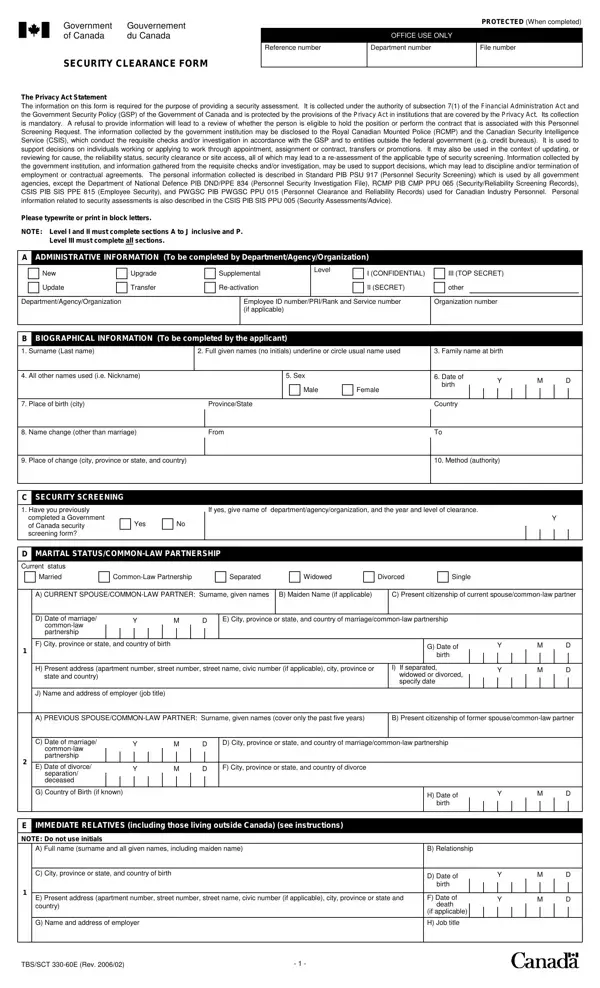
Clearance Security 330 60E Form PDF Details

The TBS/SCT 330-60E is a Canadian government document used for personnel security screening. It was created under the Privacy Act to protect both national security interests and individual privacy rights. Government departments use this form before granting security clearances to employees, contractors, and applicants for sensitive positions.

The form collects a wide range of personal information. Applicants must provide their biographical details, family background, employment history, and educational records. The form also asks about foreign employment, assets held outside Canada, and any criminal convictions both inside and outside the country. Spouses and common-law partners must also be identified, along with their citizenship status and employment details. Each section is designed to support a thorough and consistent review of the applicant's background.

Data collection is governed by several legal frameworks, including the Financial Administration Act and the Government Security Policy. These frameworks ensure that gathered information is used only for security assessment purposes. The form applies to decisions about employment, transfers, promotions, and the granting of specific clearance levels. For related government documents, see also the advance security application form and the background check consent form.

QuestionAnswer
Form NameClearance Security 330 60E Form
Also Known AsTBS/SCT 330-60E, application for security clearance form, government of canada security clearance form
Form Length6 pages
Fillable?No
Fillable fields0
Avg. time to fill out20-45 min
Other namestbs 330 60, 330 tbs, sct clearance security, tbs sct 330 60e, form 330 60, 330 23, security clearance application form canada, 330 60e security clearance form

How to Edit Clearance Security 330 60E Form Online for Free

About the 330-60E Security Clearance Form

The TBS/SCT 330-60E is an official Government of Canada document used to gather personal and professional information for security assessments. This form applies to anyone applying for a position or contract that requires access to protected or classified government information. It is also known as the application for security clearance form and the 330 60e security clearance form.

Dealing with PDF files online can be easy with our PDF editor. You can fill out application for security clearance forms here painlessly. Our editor lets you complete, sign, and download the form in minutes. To make our editor better and more convenient to use, we regularly update its features based on user feedback.

How to Complete the TBS 330-60E Form Online

Follow these steps to fill out the form using the FormsPal online tool:

Step 1: Press the orange "Get Form" button above. It will open our editor so you can start completing your form right away.

Step 2: Once the tool is open, you will see the document ready to fill in. You can type into blank fields, add text, insert photos, and sign the document electronically.

Step 3: Work through the form section by section. Here is what each part requires:

1. Start with your Department, Agency, or Organization details. Enter your Employee ID number, rank, and organization number in the fields provided.

Writing segment 1 in 330 60e security clearance form

2. Complete the Biographical Information section. Enter your surname (last name), full given names (no initials), and your family name at birth. List all other names you have used, including nicknames. Provide your sex and place of birth, including the city and province or state.

330 60e security clearance form completion process detailed (stage 2)

3. Fill in the Current Spouse or Common-Law Partner section. This includes your partner's maiden name (if applicable), citizenship, date of marriage or start of common-law relationship, and their city, province or state, and country of birth. Provide their current address and employer details. If you are separated, widowed, or divorced, complete the Previous Spouse or Common-Law Partner section as well.

F City province or state and, E Date of divorce separation, and B Maiden Name if applicable of 330 60e security clearance form

Be especially careful when filling out the city, province or state, and country fields for your former partner. These fields are a common source of errors on this form.

4. Complete the remaining fields for employer information, job title, and the TBS/SCT 330-60E revision code if shown.

Step no. 4 for filling in 330 60e security clearance form

5. The final section covers Immediate Relatives. For each relative, provide their full name (surname and all given names), relationship to you, date of birth, city, province or state, current address, and employer details. Mark the form as PROTECTED when completed and add today's date.

Ways to complete 330 60e security clearance form portion 5

Step 4: Check all fields for accuracy. Click "Done" to save your completed form. You can access it anytime through your FormsPal account. FormsPal uses a secure system that does not record or share your personal data.

Tips for Completing the Form Accurately

The 330-60E form covers a broad range of personal data. Set aside 20 to 45 minutes to complete it carefully. Pay extra attention to the sections on foreign employment, assets outside Canada, and criminal history. Errors in these areas may delay your security assessment. If you are unsure about any field, refer to the printed instructions on the form.

For related Canadian government documents, you may also need the advance security application form or the background check consent form. Applicants working with government contractors can also check the authorization return form for Canada.

Frequently Asked Questions

What is the TBS/SCT 330-60E form used for?

The TBS/SCT 330-60E is used by Government of Canada departments to conduct personnel security assessments. It gathers biographical, family, and employment data to support decisions about security clearances. The form applies to new hires, contractors, transfers, and promotions involving access to protected or classified information.

Who needs to complete the Clearance Security 330 60E Form?

Anyone applying for a federal position or contract that requires access to protected or classified information must complete this form. This includes federal employees, contractors, and individuals sponsored by a government department for a security clearance review.

How long does it take to fill out the form?

The TBS/SCT 330-60E has 6 pages and covers detailed personal, family, and employment information. Most applicants need 20 to 45 minutes to complete it accurately. Using the FormsPal online editor can speed up this process by letting you type, correct errors, and save your work before printing.

Can I fill out this form online?

Yes. Use the FormsPal editor on this page to complete the 330 60e form online. Click the orange "Get Form" button, fill in all required fields, and download the completed PDF. FormsPal does not store your personal data after you close your session.

What other names does the TBS/SCT 330-60E go by?

This form is also referred to as the government of canada security clearance form, the application for security clearance form, the sct clearance security form, and the tbs sct 330 60e form. All these names refer to the same official document issued by the Treasury Board of Canada Secretariat.