
Cn22 Online Form PDF Details

The CN22 customs declaration is a mandatory document that postal services require you to attach to the outside of any package sent internationally through standard postal mail channels. Customs authorities at the destination country use it to assess the goods, determine the total declared value, and calculate any applicable import duties before releasing the package to the recipient. The CN22 is required when the total value of goods in the package does not exceed 300 Special Drawing Rights, which is approximately 400 US dollars or 270 British pounds depending on the current exchange rate.

When the declared value of your package exceeds the CN22 threshold, or when you are sending commercial goods above a certain weight limit, you must instead use a CN23 customs declaration. The CN23 captures more detailed information and accompanies heavier or higher-value shipments across international postal routes. If you are sending a package through the United States Postal Service, the US equivalent of the CN22 is PS Form 2976 for First-Class Mail International. Priority Mail International and Global Express shipments require PS Form 2976-A, which collects additional details including a description of contents and the total customs value per category of item.

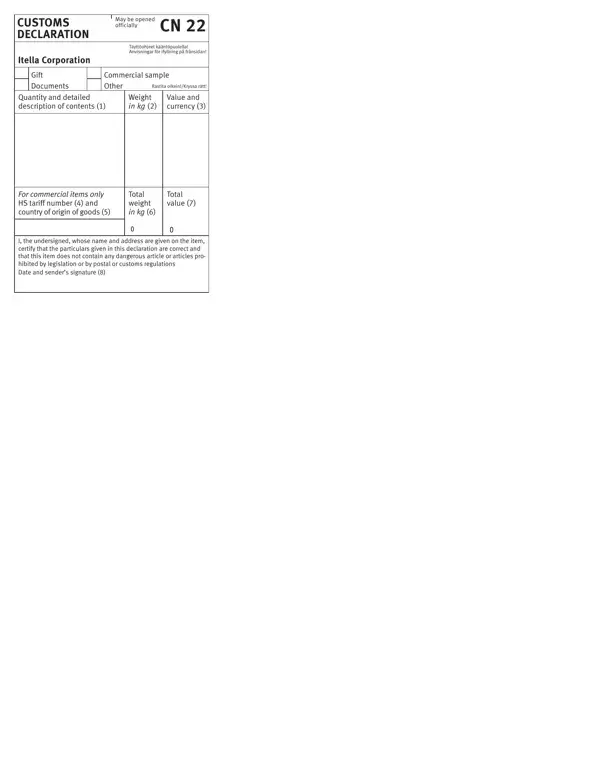
To fill out the CN22 correctly, you must enter specific information in each field. Required details include the sender's name and address, the recipient's full name and postal code, a clear description of goods using the correct category (gift, commercial sample, documents, or merchandise), the quantity and net weight of each type of item, and the total declared value in your local currency. Many destination countries also require a harmonized system tariff code, which is a 6-digit code used worldwide to classify goods for customs purposes. A vague description such as 'gifts' or 'goods' without a specific category can cause delays at the customs branch handling your package.

Accuracy on the CN22 matters because incorrect or incomplete information can result in your package being held at a customs office, assessed unexpected import duties, or returned to the sender. Before sending, always check whether the destination country has specific restrictions on the type of goods you are mailing. Prohibited or restricted items such as food products, plant material, or controlled substances require additional permits regardless of their total value. Retain a copy of the completed customs declaration and any tracking code provided by the post office for your records in case of disputes or delayed delivery to the recipient.

The United States Postal Service provides detailed guidance online and at post office locations on which customs forms apply to each sending service and destination country. Requirements can vary significantly based on the destination, the type of goods, and the postal service category selected. Senders are encouraged to consult the USPS website or speak with a branch representative before posting international packages to ensure compliance with all applicable customs regulations.

QuestionAnswer
Form NameCn22 Online Form
Form Length1 pages
Fillable?No
Fillable fields0
Avg. time to fill out15 sec
PurposeCustoms declaration for international mail packages and postal shipments
Value limitUp to 300 SDR (approximately $400 USD or £270 GBP)
Higher-value alternativeCN23 customs declaration form (for packages exceeding the CN22 value limit)
US equivalentPS Form 2976 / PS Form 2976-A (USPS international customs forms)
Other namescustoms declaration cn22 pdf, editable cn22 form, cn22 pdf, printable cn22

How to Edit Cn22 Online Form Online for Free

Through the online PDF tool by FormsPal, you can complete the CN22 customs declaration right here. Click the button above to launch the editor and fill in the required fields without installing any software.

When Do You Need to Submit the CN22?

You must attach a completed CN22 to any low-value package you send through international postal mail services. The declaration is required for standard postal items including small packets and parcels where the total declared value of goods does not exceed the CN22 threshold. Your local post office branch will check that the document is signed and correctly completed before accepting the package for sending to the destination country.

If your shipment exceeds the value limit or contains commercial goods above a certain weight, you will need a CN23 customs declaration instead. For shipments through the United States Postal Service, the equivalent document is the PS Form 2976-A. Senders shipping goods to Canada may also need a Canada Customs Invoice alongside the customs declaration. For items requiring additional customs reporting, see the Customs Form 4790.

How to Complete the Key Fields on the CN22

When filling in the CN22, provide specific and accurate information in each section. The description of goods field requires the actual type and category of item, for example 'electronics - 1 USB charger' rather than a generic term like 'goods'. Enter the total declared value in your local currency and the net weight for each type of item included. If the destination country requires it, add the 6-digit tariff code for the goods. Indicate whether the sending category is gift, commercial sample, documents, or merchandise, as this affects the duty calculation at the destination customs office. Always sign and date the CN22 declaration before handing it to your post office branch.

Step 1: Click the 'Get Form Button' in the top section of this page to launch the PDF editing tool. There you will find all the fields needed to complete the document.

How to fill out cn22 customs declaration form part 1

Step 2: Fill in the sender and recipient details, the description of goods per category, the quantity and weight of each item type, the total declared value, and the applicable tariff code if required. Avoid vague descriptions. Double-check that the postal code and country code for the recipient address are correct.

Filling in cn22 customs declaration fields part 2

Step 3: Review all entries carefully to confirm they are clear and accurate. Click 'Done' to download or print the completed CN22 customs declaration. After starting a 7-day free trial account with us, you can also email the document directly. FormsPal keeps your details protected throughout the process.