
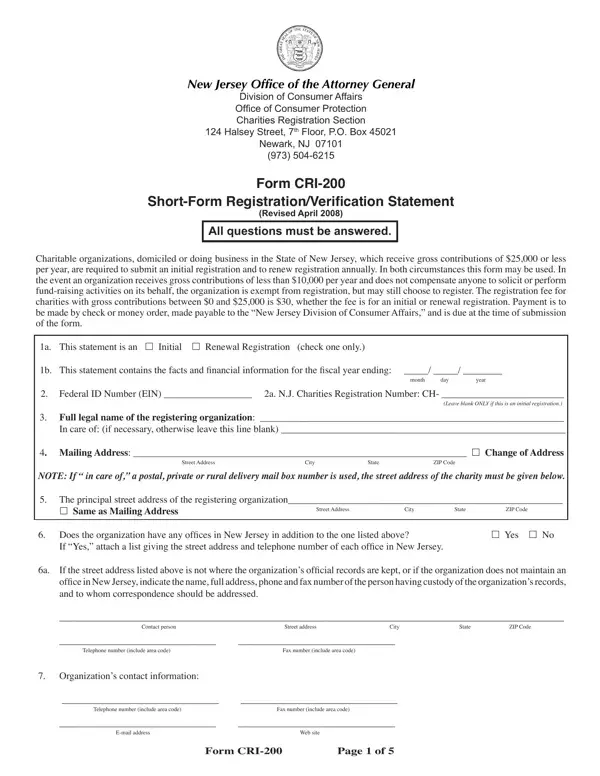
The CRI 200 NJ form is the Short-Form Registration and Verification Statement for charitable organizations in New Jersey. It is filed with the New Jersey Division of Consumer Affairs, Charities Registration Section. Organizations with gross annual contributions of $25,000 or less use this form for initial registration and annual renewal. This is a streamlined compliance option for smaller charities operating in the state.
New Jersey charitable organizations must register before soliciting contributions from the public. Organizations with gross contributions of $25,000 or less file the CRI 200 short form. Groups with contributions below $10,000 that do not pay for fund-raising activities are exempt from registration. Voluntary registration is available and encouraged for all eligible organizations in the state.
Organizations that commonly file the CRI 200 form include:
The CRI 200 short form collects key details about your charitable organization. You must provide contact information, IRS tax-exempt status, and a summary of financial activity. The form also asks about activities outside New Jersey and any leadership changes. Organizations must report changes in address or organizational structure each filing year.
A $30 filing fee accompanies each CRI 200 submission to the state. Before filing, many organizations prepare a charitable worksheet to organize their financial records. Groups that conduct public solicitation campaigns should also review the solicitation contributions form requirements. For documentation of donation requests, the AP charitable donation request form is a useful companion document.
New Jersey charitable organizations must file the CRI 200 form within six months of the close of their fiscal year. Late filings may result in penalties from the New Jersey Division of Consumer Affairs. Submit the completed form with the $30 fee to the Charities Registration Section in Trenton. Keep a copy of your completed registration for your organization's records.
| Question | Answer |
|---|---|
| Form Name | CRI 200 NJ Form |
| Form Length | 5 pages |
| Fillable? | No |
| Fillable fields | 0 |
| Avg. time to fill out | 1 min 15 sec |
| Other names | form charities any form, cri 200 short form registration, new jersey form cri 200, nj form cri |
| Filing fee | $30 |
| State | New Jersey |
| Administered by | NJ Division of Consumer Affairs |
| Form type | Short-form charitable registration |
Cri 200 Nj Form isn’t the one you’re looking for?