Csa Dental Form PDF Details
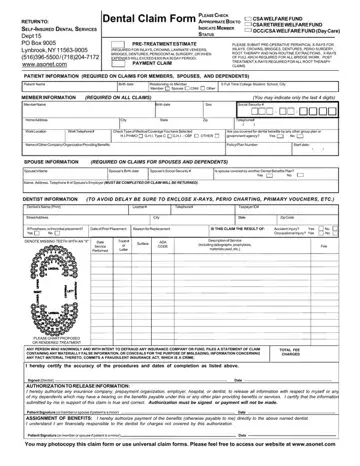
The CSA Dental Claim Form covers a wide range of dental procedures for eligible members. Active welfare beneficiaries and retirees enrolled in the CSA plan can use this form to receive reimbursement or arrange direct payment to their treating dentist. Understanding the documentation requirements before you send your claim ensures faster administrative processing.
Covered Dental Procedures
Eligible procedures include inlays, crowns, bridges, dentures, root canal therapy, and periodontal surgery. For any treatment expected to cost more than $300 within a 90-day period, a pre-treatment estimate must be attached to the claim. The fund's administrative team reviews this documentation to manage benefit payments accurately and within established guidelines.
X-ray and Documentation Requirements
The CSA dental claim process requires specific X-ray documentation depending on the procedure. Pre-operative periapical X-rays must accompany claims for treatments exceeding $300. Post-treatment X-rays are required for root therapy, and full-arch diagnostic images are needed for all bridge work. Compiling this documentation before you send the form reduces the chances of a delayed or incomplete review.
Patient Data and Coordination of Benefits
You will need to enter your name, home address, member identification number, and current coverage information. A dedicated section asks whether you have additional dental coverage from another carrier. Accurate data in this coordination-of-benefits section helps the administrative office manage claims efficiently and prevents duplicate payments. The security of member data is protected through established fund protocols.
Accident and Injury Claims
If your dental treatment was the result of an accident or injury, enter the date, reasons, and relevant details in the designated section. The administrative team uses this information to apply the correct benefit provisions and determine eligibility for the claim.
Certification and Legal Compliance
The form includes a certification box where the member and dentist confirm that all submitted information is accurate. Providing false data may result in claim denial and legal consequences. Please review every entry carefully before signing.
Getting Help and Contacting the Fund
If you have questions about completing the form, you can contact the CSA Welfare Fund administrative office by email or phone. Their team can help you learn about covered services, explain documentation requirements, and provide access to plan materials. Members can also receive updated guidance by reviewing the benefit documents available from the fund.
| Question | Answer |
|---|
| Form Name | Csa Dental Form |
| Form Length | 1 pages |
| Fillable? | No |
| Fillable fields | 0 |
| Avg. time to fill out | 15 sec |
| Other names | csa retiree welfare fund forms, asonet dental claim form, asonet claim, csa welfare form |