
Da Form 4082 PDF Details

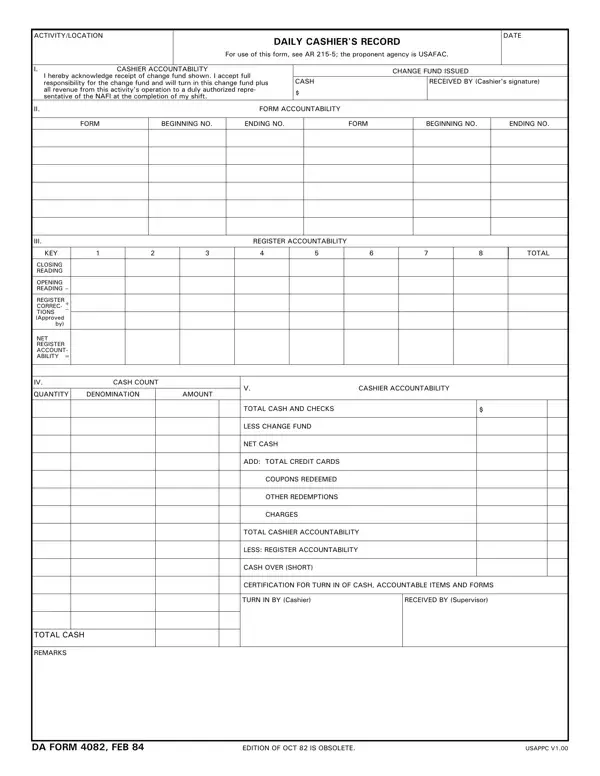
The DA Form 4082 is the U.S. Army’s official Daily Cashier’s Record form. Cashiers at Non-Appropriated Fund Instrumentality (NAFI) facilities complete it at the end of every shift to document all financial transactions. Army Regulation 215-5 governs the form, and USAFAC is the proponent agency responsible for its design and distribution.

The form tracks five accountability areas that together provide a complete picture of each cashier’s shift. Cashier accountability records the change fund amount issued at the start of the shift along with the cashier’s signed acknowledgment of financial responsibility for those funds. Form accountability tracks the beginning and ending serial numbers of all receipts, vouchers, and similar documents processed during the shift. Register accountability logs the total number and dollar amount of transactions processed through the register over the course of the shift. Cash count records the physical currency and check totals at shift end and reconciles them against the expected closing balance after accounting for the opening change fund and all transactions. Shift summary consolidates totals for cash, checks, and credit card transactions and identifies any overage or shortage that must be explained and signed off by the cashier before turning in funds to the NAFI supervisor.

NAFI facilities that rely on this form include Army recreation centers, food service operations, military retail outlets, and similar nonappropriated fund activities worldwide. The form’s primary purpose is to ensure every dollar from the opening change fund through the final cash count is fully accounted for at the end of every cashier’s shift, supporting both internal audits and command financial oversight.

QuestionAnswer
Form NameDa Form 4082
Form Length1 pages
Fillable?No
Fillable fields0
Avg. time to fill out15 sec
Other namesTIONS, USAPPC, NAFI, USAFAC

How to Edit Da Form 4082 Online for Free

FormsPal lets you fill in, save, and print this Army cashier accountability document directly in your browser. No software installation is needed. Follow the four steps below to complete the form accurately and submit a proper record of your shift.

Step 1: Open the Form and Enter Identifying Information

Click the “Fill Out” button on this page to open the interactive PDF editor. At the top of the form, enter the name and location of the NAFI facility, the date of the shift, and the shift period (for example, morning or evening). Then enter the cashier’s full name, rank, and employee ID number. This header information ties the record to a specific cashier and operational period for audit and accountability purposes.

Step 2: Document the Change Fund

Record the change fund amount issued to you at the start of the shift. The change fund is the cash provided by the NAFI supervisor to make change for customers throughout the shift. You must account for this exact amount at shift end. Enter the fund amount and sign the cashier accountability section to acknowledge your responsibility for the funds.

Step 3: Track Transactions During the Shift

Use the register accountability section to record beginning and ending form numbers for all receipts and vouchers processed. Log each transaction category as it occurs. Maintain accurate running totals for cash, checks, and credit card transactions. If a transaction is voided or refunded, document it in the appropriate field so the final reconciliation is accurate.

Step 4: Complete the Cash Count and Submit

At the end of your shift, perform a physical count of all cash and checks in the drawer. Enter the totals in the cash count section. Compare the physical total to the expected balance (opening change fund plus recorded receipts minus refunds). Record any overage or shortage in the shift summary and provide a written explanation if the discrepancy exceeds your facility’s threshold. Sign the completed form and submit it to your NAFI supervisor along with all funds and documentation.

For related Army documents, see the DA Form 3161 (Request for Issue or Turn-In), the DA Form 87 (Certificate), the Cash Drawer Count Sheet, or the Check Register Template for additional financial tracking.

Frequently Asked Questions

Who is required to complete this form?

Any cashier assigned to a NAFI facility must complete this record at the end of every shift. This includes cashiers at Army recreation centers, food service outlets, military retail stores, and other activities operating under Army Regulation 215-5. Both full-time and part-time NAFI employees who handle cash are subject to the requirement.

What should I do if my cash count does not match the expected total?

Record the discrepancy in the shift summary section and write a brief explanation in the remarks field. Your NAFI supervisor will review the variance. Small, infrequent discrepancies are common and generally handled through normal procedures. Repeated or unexplained shortages may trigger an audit of your shift records for the affected period.

Can I complete the form electronically?

Yes. FormsPal’s browser-based editor allows you to type directly into all fields, add signatures, and save a PDF copy. Download the completed form, print a copy for your supervisor, and retain a digital backup for your personal records in case questions arise about a particular shift at a later date.