
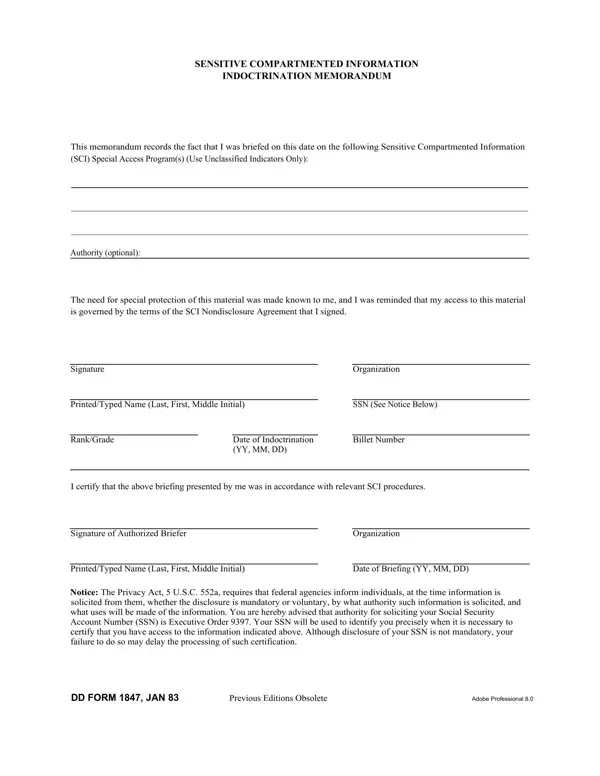
The Dd Form 1847 is the Sensitive Compartmented Information Indoctrination Memorandum. It is a Department of Defense document that records formal briefings for military and civilian personnel who receive access to Sensitive Compartmented Information (SCI) and Special Access Programs. Anyone being read into an SCI program or SAP must complete this form before accessing that information.
This indoctrination memorandum captures specific details about the briefing event and the individual being briefed. Each section must be completed accurately to create a valid official record.
These details together form an official record that the individual was properly informed of their obligations. They also confirm that the briefing was conducted by a person authorized to deliver it.
The form applies to active duty military members, Department of Defense civilian employees, and cleared contractors. Any person being read into a Special Access Program or SCI compartment must receive a formal briefing and sign this memorandum. The briefing officer completes a separate certification section on the same form.
This memorandum works alongside the SF 312 Classified Information Nondisclosure Agreement. The SF 312 establishes the individual's legal obligations for protecting classified information. The indoctrination memorandum records the specific SCI briefing event and the program involved.
This form collects the individual's Social Security Number for identification purposes. Providing your SSN is voluntary. However, it is used to ensure the accuracy of the personnel security record. The collection of this information is authorized under the Privacy Act of 1974 (5 U.S.C. 552a) and applicable DoD regulations.
The following forms are commonly required in the SCI and security clearance process alongside this memorandum:
| Question | Answer |
|---|---|
| Form Name | Dd Form 1847 |
| Form Length | 1 pages |
| Fillable? | No |
| Fillable fields | 0 |
| Avg. time to fill out | 15 sec |
| Other names | SCI Indoctrination Memorandum, Briefer, 1847, JAN |
Dd Form 1847 isn’t the one you’re looking for?