
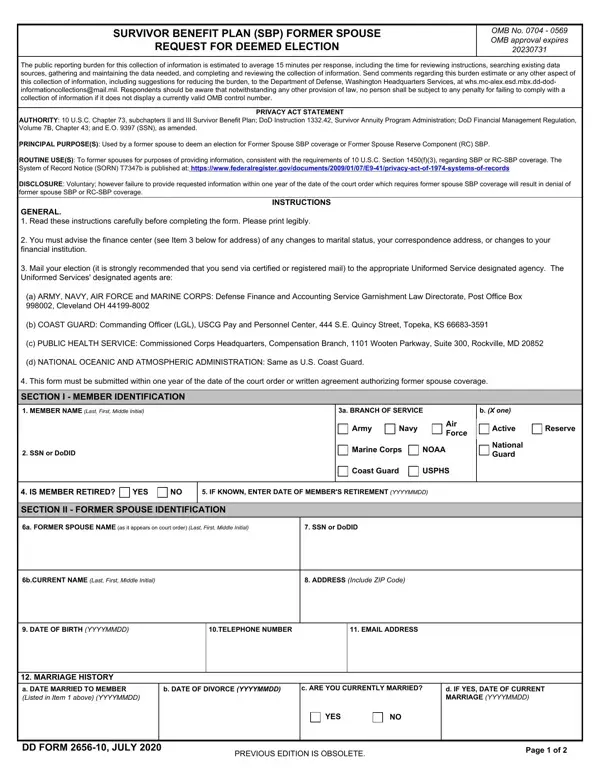
The DD Form 2656 10 is the official request form a former spouse uses to obtain Survivor Benefit Plan (SBP) coverage or Former Spouse Reserve Component (RC) SBP coverage after a military divorce. A qualifying court order or written agreement must specifically grant SBP entitlement before this form can be filed.
Section I collects identification data for both the former spouse and the service member. Section II records marriage history: the date of marriage, the date of divorce, and your current marital status. Section III establishes the legal basis for the request, whether it is a court order or a written agreement ratified by the court. Section IV covers dependent children when child SBP coverage was also included in the order.
You must submit the form within one year of the court order or written agreement that grants SBP. This deadline has no exceptions. Late submissions result in automatic denial. Mail the completed form to the DFAS Survivor Benefit Plan office, Retired and Annuitant Pay, 8899 E 56th Street, Indianapolis, IN 46249-1300.
Three conditions must be met to use this form. First, you must have been married to the service member at some point during their military service. Second, a valid court order or written agreement must grant you SBP coverage as part of the divorce settlement. Third, the service member must be eligible for or already receiving SBP. Former spouses who remarry before age 55 lose SBP eligibility, but eligibility may be restored if that marriage later ends.
You may also need: DD Form 2656 (the primary SBP Election Statement for retiring members), DD Form 2656-1 (SBP Election Statement for Reserve Component soldiers), and DD Form 2656-6 (SBP Election Change Certificate for coverage updates after retirement). Surviving spouses verifying annuity payments use DD Form 2656-7. To request a stop to SBP coverage, see DD Form 2656-8.
| Question | Answer |
|---|---|
| Form Name | Dd Form 2656 10 |
| Form Length | 2 pages |
| Fillable? | Yes |
| Fillable fields | 93 |
| Avg. time to fill out | 30 sec |
| Other names | 2656 10 sbp, how to form sbp, dd form 2656 10 survivor benefit plan, form deemed dfas |
| Submission deadline | Within one year of the court order or written agreement |
| Submitting agency | Defense Finance and Accounting Service (DFAS) |
| Mailing address | DFAS Retired and Annuitant Pay, 8899 E 56th Street, Indianapolis, IN 46249-1300 |
Dd Form 2656 10 isn’t the one you’re looking for?