
Dd Form 2789 PDF Details

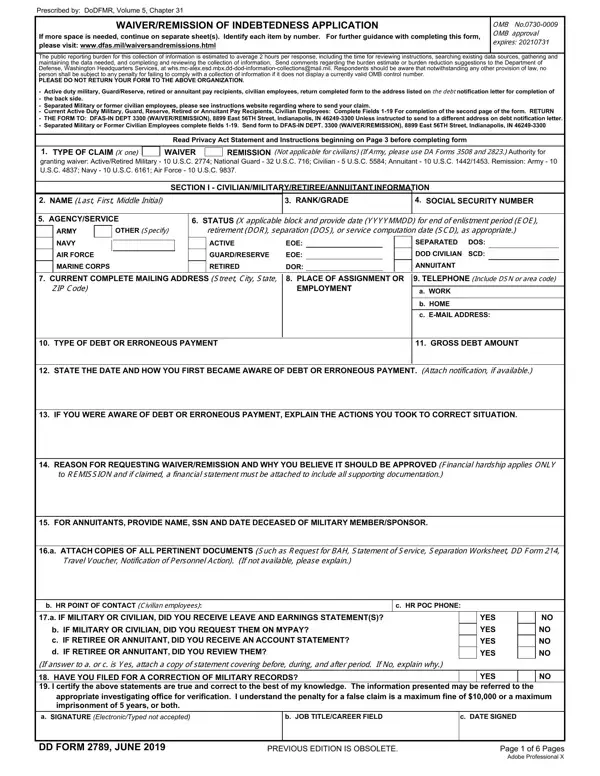
The DD Form 2789, officially titled the Waiver/Remission of Indebtedness Application, is used to request financial relief from debts owed to the Department of Defense. These debts typically arise from overpayments or erroneous payments in military or civilian pay systems.

Who Can Use DD Form 2789?

The form is available to these groups:

The form is authorized under the DoDFMR (Department of Defense Financial Management Regulation), Volume 5, Chapter 31. It is subject to OMB approval requirements.

What Information Does DD Form 2789 Require?

You must provide detailed information to complete the 6-page form. Required sections include the type of claim (waiver or remission), your personal and contact details, a written explanation of how the debt occurred, and a formal justification for your request.

You must also attach all supporting documents. These may include travel vouchers, HR contact records, notification letters, pay statements, and any military investigation reports related to the debt.

It is important to acknowledge the debt in writing before submitting the form. Providing false or misleading information carries serious legal consequences under federal law.

What Happens After You Submit DD Form 2789?

Filing the form may suspend active debt collection while your request is under review. Your commanding officer or civilian supervisor must review and sign the form before it reaches the appropriate financial authority.

Approval is not guaranteed. The reviewing authority weighs factors like the nature of the debt, your service record, and the specific financial circumstances. The process is voluntary but can protect you from active collection actions during review.

Related DoD Forms

If you are working through military financial paperwork, you may also need the Petition for Remission Form for additional debt relief options, the Military Power of Attorney Form to authorize a representative, the DD Form 149 for a military record correction request, or the DD Form 214 for discharge and separation documentation.

QuestionAnswer
Form NameDd Form 2789
Form Length6 pages
Fillable?No
Fillable fields0
Avg. time to fill out1 min 30 sec
Other namesva form 2789, dd 2789 pdf, dd 2789 waiver, how to form indebtedness

How to Edit Dd Form 2789 Online for Free

You can prepare dd form 2789 effectively using our PDFinity® PDF editor. Our expert team is always working to expand the editor and enable it to be even better for clients with its extensive functions. Make the most of the current innovative opportunities, and discover a trove of emerging experiences! By taking several easy steps, you'll be able to begin your PDF editing:

Step 1: First, access the pdf tool by clicking the "Get Form Button" above on this webpage.

Step 2: With this handy PDF editor, you may do more than merely fill in blanks. Edit away and make your docs look professional with customized text added, or optimize the original input to excellence - all that comes with the capability to add any graphics and sign the PDF off.

It is an easy task to finish the pdf with this detailed tutorial! This is what you must do:

1. Whenever submitting the dd form 2789, ensure to include all of the essential fields in the associated area. It will help to expedite the process, which allows your details to be handled fast and accurately.

Filling in part 1 in form 2789

2. When this section is done, proceed to type in the applicable information in all these - IF YOU WERE AWARE OF DEBT OR, REASON FOR REQUESTING, to REMISSION and if claimed a, FOR ANNUITANTS PROVIDE NAME SSN, a ATTACH COPIES OF ALL PERTINENT, Travel Voucher Notification of, b HR POINT OF CONTACT Civilian, c HR POC PHONE, a IF MILITARY OR CIVILIAN DID YOU, b c d, IF MILITARY OR CIVILIAN DID YOU, YES YES YES YES, and NO NO NO NO.

Writing section 2 in form 2789

Always be extremely mindful when filling in IF YOU WERE AWARE OF DEBT OR and b c d, since this is the part in which a lot of people make a few mistakes.

3. Completing b c d, IF MILITARY OR CIVILIAN DID YOU, YES YES YES YES, If answer to a or c is Yes attach, MILITARY RECORDS, YES, appropriate investigating office, a SIGNATURE ElectronicTyped not, b JOB TITLECAREER FIELD, c DATE SIGNED, DD FORM JUNE, PREVIOUS EDITION IS OBSOLETE, Page of Pages Adobe Professional, and NO NO NO NO is essential for the next step, make sure to fill them out in their entirety. Don't miss any details!

Completing segment 3 of form 2789

4. Filling out COMMANDERS OR SUPERVISORS, paper if needed, RECOMMENDATION a COMMANDERS OR, APPROVE, Please print, PARTIAL b SIGNATURE, DENY, RECOMMEND COLLECTION RATE c DATE, To be completed and signed by, SECTION II REPORT OF INVESTIGATION, INFORMATION ON DEBT OR ERRONEOUS, b TYPES OF PAYMENTS, c DATES OF PAYMENTS, d X and complete as applicable, and DATE OF THE COMMANDERS SIGNATURE is key in this fourth section - ensure that you take your time and be attentive with each and every field!

form 2789 completion process explained (step 4)

5. The form needs to be wrapped up with this area. Below you will notice a full list of form fields that require specific information to allow your document submission to be complete: DETAILED STATEMENT OF HOW AND WHY, IS THERE ANY INDICATION OF FRAUD, STATEMENT AS TO WHETHER OR NOT, PAYMENT Furnish facts and, and REMARKS Attach a separate sheet.

How one can fill out form 2789 step 5

Step 3: Reread what you have inserted in the form fields and then click on the "Done" button. Obtain the dd form 2789 the instant you register at FormsPal for a free trial. Instantly gain access to the document in your personal account page, along with any edits and adjustments being all synced! If you use FormsPal, it is simple to complete documents without worrying about personal data leaks or entries being distributed. Our secure software makes sure that your personal information is maintained safely.

Tips for Completing DD Form 2789

Gather all required documents before you begin. You will need pay records showing the overpayment, written debt notifications, and any statements from your supervisor or commander. Having these ready speeds up the review process.

Check that all dates, dollar amounts, and personal information are accurate. Missing or incorrect entries may delay your request or lead to denial of the waiver.

Other DoD Forms Available at FormsPal

While handling Department of Defense paperwork, you may also need these related forms: DD Form 2656 for retirement benefit designations, DD Form 93 for emergency contact records, DD Form 2870, and the Fee Waiver Application Form for other waiver requests.