
Getting Started with the PDF Editor
Using the PDF editor online is straightforward. Anyone can fill in this transportation discrepancy form without difficulty. The tool is maintained by our team and receives regular updates. All you have to do is follow these simple steps below:
Step 1: First, open the pdf editor by pressing the "Get Form Button" above on this webpage.
Step 2: This tool offers the opportunity to customize your PDF in various ways. Change it by writing your own text, correct existing content, and place in a signature - all within a couple of mouse clicks!
Completing the Required Fields
With regards to the fields of this specific form, here is what you should do:
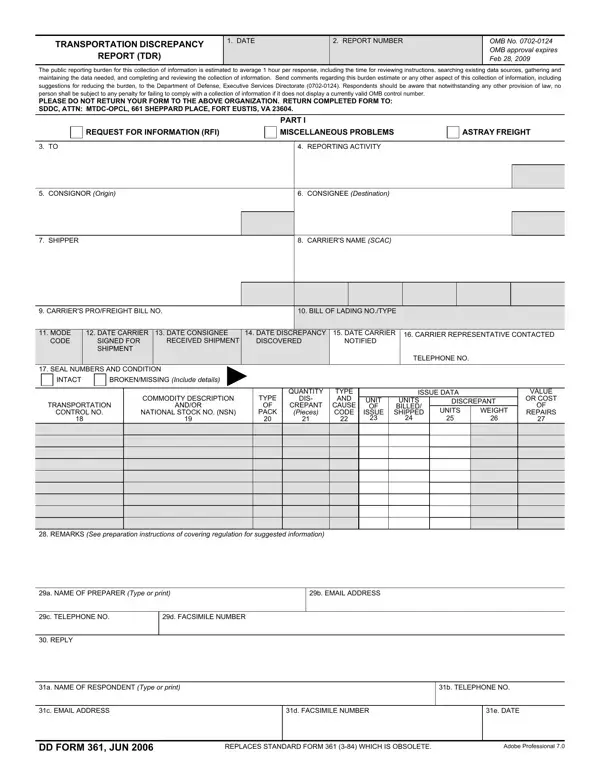
1. You need to complete the lading correctly, therefore pay close attention when filling out the sections comprising these blank fields:
2. The next step would be to fill in these fields: SEAL NUMBERS AND CONDITION, INTACT, BROKENMISSING Include details, TRANSPORTATION, CONTROL NO, COMMODITY DESCRIPTION, ANDOR, NATIONAL STOCK NO NSN, TYPE, PACK, QUANTITY, DIS, CREPANT, Pieces, and TYPE AND.
3. Completing a NAME OF RESPONDENT Type or print, b TELEPHONE NO, c EMAIL ADDRESS, d FACSIMILE NUMBER, e DATE, DD FORM JUN, REPLACES STANDARD FORM WHICH IS, and Adobe Professional is essential for the next step, make sure to fill them out in their entirety. Do not miss any details!
4. The following part requires your information in the following areas: EXCEPTION NOTED ON CARRIERS, YES, INSPECTION DATA, CARRIER INSPECTED Report attached, INSPECTION WAIVED Waiver attached, DISPOSITION DATA, REJECTED Receipt attached, REPAIRED AT GOVERNMENT EXPENSE, ORAL WAIVER Provide name title and, GOVERNMENT INSPECTED Report, OTHER Explain in Remarks, and REMARKS See preparation. Make sure you give all of the needed details to move onward.
5. To wrap up your form, this final subsection features a number of extra blanks. Completing ATTACHMENTS, CY BOL, DD FORM, CY CARRIERS TENDER, CY DD FORM, CY CARRIERS DELIVERY RECEIPT, ACTUAL REPAIR COST COMMODITY, PHOTOGRAPH, CARRIERS INSPECTION REPORT, OTHER, OTHER, ACCOUNTING CLASSIFICATION, and DD FORM BACK JUN will certainly conclude the process and you will be done quickly!
As for DD FORM and OTHER, be sure you get them right here. Both of these could be the most important ones in the page.
Common Mistakes to Avoid
When completing this form, watch for these frequent errors. First, ensure all discrepancy data matches the original shipping documentation exactly. Second, do not leave the National Stock Number (NSN) blank if the discrepancy involves a cataloged item. Third, attach all required supporting documents before submission, including the carrier inspection report and delivery receipt.
Related Military Transportation Forms
The Transportation Discrepancy Report is used with other Department of Defense documents. A Bill of Lading accompanies most shipments and serves as the primary transport contract. Military personnel may also need the DD Form 93 to maintain current emergency data records.
Finalizing and Downloading
Step 3: Prior to finalizing the file, make certain that all form fields are filled out correctly. As soon as you believe it is all fine, click on "Done." Get hold of your form once you subscribe to a 7-day free trial. Readily access the pdf document from your FormsPal cabinet, together with any modifications and adjustments being automatically preserved! FormsPal ensures your information privacy via a secure method that never saves or distributes any type of private information used in the PDF. Rest assured knowing your docs are kept confidential whenever you use our services!
