
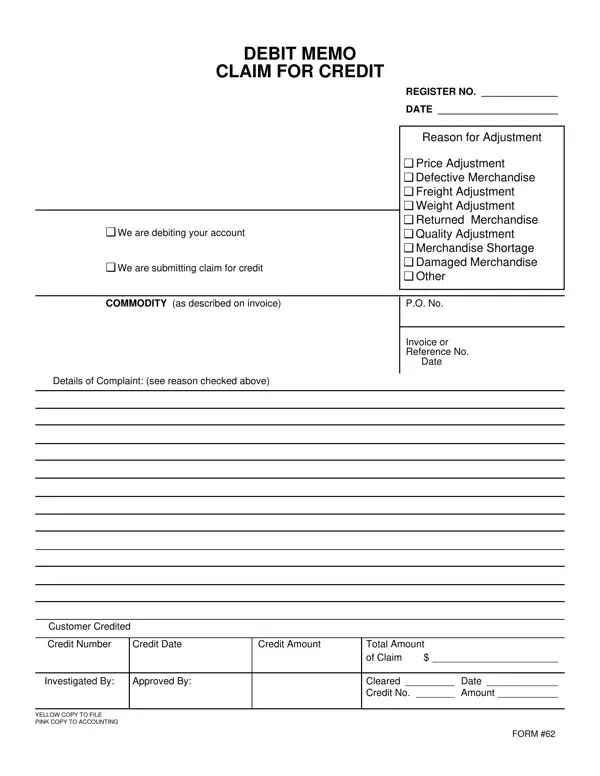
A debit note is a formal business document issued by a buyer to notify a seller that the buyer is debiting the seller's account for a specific reason. Unlike a standard invoice, which requests payment for completed work or delivered goods, this document adjusts a prior transaction by establishing that the buyer is owed a credit or that the seller owes an amount reduction. Companies across many industries rely on this document to maintain accurate records when financial discrepancies arise after goods are delivered or services are performed.
A properly completed debit note form includes several essential elements that ensure clarity and accuracy in financial recordkeeping:
A common source of confusion in business accounting is the relationship between debit notes and credit notes. A debit note is issued by the buyer to the seller when the buyer wants to notify the seller that it is returning goods or claims that an overcharge occurred. A credit note is then issued by the seller back to the buyer to acknowledge that adjustment and confirm a credit has been applied to the buyer's account.
Think of it this way: the buyer initiates the adjustment with a debit note, and the seller responds with a credit note. Both documents together complete the financial correction cycle. This is different from a standard commercial invoice, which simply requests payment for goods or services without implying a prior discrepancy.
Businesses issue this type of adjustment document in a range of situations:
This form uses a color-coded copy system to streamline internal distribution. The yellow copy is sent to the filing department for long-term record storage, while the pink copy goes to the accounting team for reconciliation. This system ensures both departments work from the same source document and reduces the risk of data discrepancies during audits.
For businesses that regularly process financial adjustments, having the right supporting documents on hand simplifies accounting. You may also find it helpful to use the blank invoice template when creating original billing records, so that any subsequent adjustments can clearly reference a traceable invoice number.
| Question | Answer |
|---|---|
| Form Name | Debit Note Letter Form |
| Form Length | 1 pages |
| Fillable? | No |
| Fillable fields | 0 |
| Avg. time to fill out | 15 sec |
| Other names | debit note letter format in word, debit note format in word, debit note word format, safety debit note format |
Debit Note Letter Form isn’t the one you’re looking for?