
DeCa Form 70-4 PDF Details

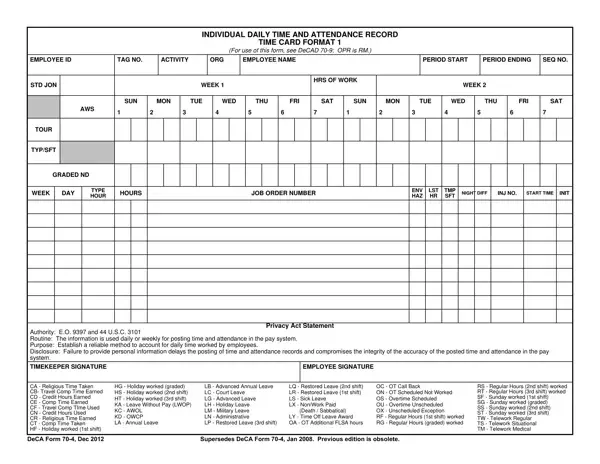
This Individual Daily Time and Attendance Record is used by Defense Commissary Agency (DeCA) employees and their timekeepers to track work hours, leave usage, and overtime across a bi-weekly pay period. It supports accurate payroll processing and compliance with federal labor standards, particularly for non-exempt Fair Labor Standards Act (FLSA) employees.

Who Uses This Attendance Record?

Timekeepers within DeCA complete this record on behalf of eligible employees each pay period. Supervisors review and certify the data before it goes to payroll. Human resources teams rely on the completed records to verify wage calculations and document all leave and overtime claims.

Key Sections of This Time and Attendance Record

The form is organized into clear sections. The header collects the employee name, ID number, organizational activity code, and the dates of the pay period. The daily time grid tracks regular hours, evening and night shift differentials, overtime, and call-back overtime for each day. A leave section uses two-letter codes to record annual leave, sick leave, advanced leave, leave without pay, military leave, credit hours, and compensatory time. A certification block at the bottom requires signatures from the employee and an authorized official before submission.

Related Time Tracking Resources

HR professionals and managers who work with attendance records may also find a time card template useful for non-government settings, or a daily attendance record for team-wide tracking. To complete the payroll process, a payroll check template can help maintain consistent documentation.

QuestionAnswer
Form Name DeCa Form 70-4
Form Length 2 pages
Fillable? No
Fillable fields 0
Avg. time to fill out 30 sec
Other names deca form 70 4 attendance, deca 70 4 form, deca 70 4 time form, deca 70 form, individual daily time and attendance record time card format 1

How to Edit DeCa Form 70-4 Online for Free

Handling PDF files online is actually very easy with this PDF tool. Anyone can fill in deca 70 form here effortlessly. FormsPal team is ceaselessly endeavoring to expand the tool and enable it to be even easier for users with its handy functions. Enjoy an ever-improving experience today! With a few easy steps, you are able to start your PDF journey:

Step 1: Just click on the "Get Form Button" in the top section of this webpage to see our pdf form editing tool. Here you will find everything that is required to fill out your document.

Step 2: The editor grants the capability to work with most PDF documents in various ways. Modify it with personalized text, adjust what is already in the document, and add a signature - all at your fingertips!

This PDF requires specific details to be filled in, so you need to take your time to fill in exactly what is expected:

1. It is important to fill out the deca 70 form properly, thus be careful when filling in the parts including these specific blanks:

Writing section 1 in deca form 70 4 time attendance

2. Just after completing the last step, head on to the next part and fill in the essential particulars in these fields - Authority EO and USC Routine, TIMEKEEPER SIGNATURE, EMPLOYEE SIGNATURE, Privacy Act Statement, CA Religious Time Taken CB Travel, DeCA Form Dec, HG Holiday worked graded HS, LB Advanced Annual Leave LC, LQ Restored Leave nd shift LR, OC OT Call Back ON OT Scheduled, RS Regular Hours nd shift worked, and Supersedes DeCA Form Jan.

EMPLOYEE SIGNATURE, CA  Religious Time Taken CB Travel, and TIMEKEEPER SIGNATURE in deca form 70 4 time attendance

3. This next segment focuses on SUN, MON, TUE, WED, THU, FRI, SAT, SUN, MON, TUE, and WED - fill out all these blank fields.

Stage no. 3 of filling in deca form 70 4 time attendance

It is possible to get it wrong when completing your SUN, for that reason you'll want to look again before you decide to submit it.

4. Now complete the next section! In this case you'll get these THU, FRI, SAT, CERTIFICATION Attendances and, DeCA Form Dec, and AUTHORIZED SIGNATURE blank fields to fill out.

Part no. 4 in filling out deca form 70 4 time attendance

Step 3: You should make sure the details are accurate and then simply click "Done" to finish the process. Join FormsPal today and easily get access to deca 70 form, available for download. All changes made by you are preserved , letting you customize the document at a later time if required. Here at FormsPal, we do everything we can to ensure that all of your information is kept private.

Frequently Asked Questions

What information does this attendance record capture?

It tracks each employee's daily hours, shift type, leave category, and overtime during a bi-weekly pay period. Each day is recorded using standardized two-letter codes that identify regular time, various leave types, and overtime categories.

Who is required to complete this form?

Non-exempt FLSA employees within the Defense Commissary Agency must have this record completed by their designated timekeeper. The supervisor or certifying official then signs it before it goes to payroll.

Can I fill out this attendance record online?

Yes. FormsPal's PDF editor lets you open the document directly in your browser, type information into the fields, add a digital signature, and save or print the completed record.

What leave codes appear on this form?

The form uses two-letter abbreviations for each leave type. Examples include LA for annual leave, LC for advanced annual leave, LS for sick leave, LQ for restored leave, and LN for leave without pay. A full legend appears on the back of the printed version.