Form 48 PDF Details

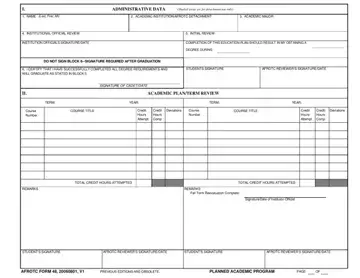
In the realm of academic and career planning within the Air Force Reserve Officer Training Corps (AFROTC), the AFOATS Form 48 plays a pivotal role. Designed to meticulously chart the academic journey of cadets, this form bridges the gap between aspirations and achievements. At its core, the form captures essential administrative data including the cadet's name, academic institution, major, and the pivotal institutional official review, ensuring that every aspect of the cadet's academic venture is aligned with both the educational institution's requirements and the AFROTC's expectations. What stands out about the Form 48 is its dual focus on both current academic status and forward-looking academic planning, requiring updates with each term and signatures from pertinent authorities to validate the cadet's path toward degree completion. Furthermore, its structured layout not only facilitates a clear record of courses taken, credit hours attempted and completed, and any deviations from the planned course but also serves as a tool for periodic reevaluation, ensuring both the cadet and institution remain on the same page throughout the academic journey. This comprehensive approach underscores the AFROTC's commitment to developing well-rounded officers equipped with both the leadership qualities and academic grounding necessary for success.

QuestionAnswer
Form NameForm 48
Form Length4 pages
Fillable?No
Fillable fields0
Avg. time to fill out1 min
Other namesafrotc form 48 blank, afrotc form 48 fill online, hfd form 48, houston fire department form 48

How to Edit Form 48 Online for Free

Our PDF editor was made with the aim of allowing it to be as effortless and easy-to-use as possible. These particular actions are going to make filling out the form 48 afrotc no No Download Needed needed fast and simple.

Step 1: Hit the "Get Form Now" button to get started on.

Step 2: You can now update your form 48 afrotc no No Download Needed needed. Our multifunctional toolbar can help you include, erase, improve, and highlight content as well as carry out other sorts of commands.

For you to obtain the template, enter the content the application will require you to for each of the next sections:

entering details in hfd form 48 step 1

Provide the expected data in the REMARKS, TOTAL CREDIT HOURS ATTEMPTED, TOTAL CREDIT HOURS ATTEMPTED, REMARKS, Fall Term Reevaluation Complete, SignatureDate of Institution, STUDENTS SIGNATURE, AFROTC REVIEWERS SIGNATUREDATE, STUDENTS SIGNATURE, AFROTC REVIEWERS SIGNATUREDATE, AFOATS FORM EFV PREVIOUS EDITION, PLANNED ACADEMIC PROGRAM, and PAGE segment.

hfd form 48 REMARKS, TOTAL CREDIT HOURS ATTEMPTED, TOTAL CREDIT HOURS ATTEMPTED, REMARKS, Fall Term Reevaluation Complete, SignatureDate of Institution, STUDENTS SIGNATURE, AFROTC REVIEWERS SIGNATUREDATE, STUDENTS SIGNATURE, AFROTC REVIEWERS SIGNATUREDATE, AFOATS FORM   EFV PREVIOUS EDITION, PLANNED ACADEMIC PROGRAM, and PAGE blanks to fill out

The program will require details to effortlessly submit the box NAME Last First MI, TERM, Course Number, COURSE TITLE, YEAR, TERM, YEAR, Credit Hours Attempt, Credit Hours Comp, Devia tions, Course Number, COURSE TITLE, Credit Hours Attempt, Credit Hours Comp, and Devia tions.

Completing hfd form 48 step 3

Indicate the rights and obligations of the parties in the section Course Number, COURSE TITLE, Credit Hours Attempt, Credit Hours Comp, Devia tions, Course Number, COURSE TITLE, Credit Hours Attempt, Credit Hours Comp, Devia tions, TOTAL CREDIT HOURS ATTEMPTED, TOTAL CREDIT HOURS ATTEMPTED, REMARKS Fall Term Reevaluation, REMARKS Fall Term Reevaluation, and SignatureDate of Institution.

Finishing hfd form 48 stage 4

End up by reading the following fields and preparing them as required: NAME Last First MI, TERM, Course Number, COURSE TITLE, YEAR, TERM, YEAR, Credit Hours Attempt, Credit Hours Comp, Devia tions, Course Number, COURSE TITLE, Credit Hours Attempt, Credit Hours Comp, and Devia tions.

part 5 to finishing hfd form 48

Step 3: Choose the Done button to save the file. Then it is ready for transfer to your device.

Step 4: Generate duplicates of your template. This should protect you from future troubles. We do not read or disclose your information, thus be sure it's going to be secure.

Watch Form 48 Video Instruction

Please rate Form 48

1 Votes
If you believe this page is infringing on your copyright, please familiarize yourself with and follow our DMCA notice and takedown process - click here to proceed .