
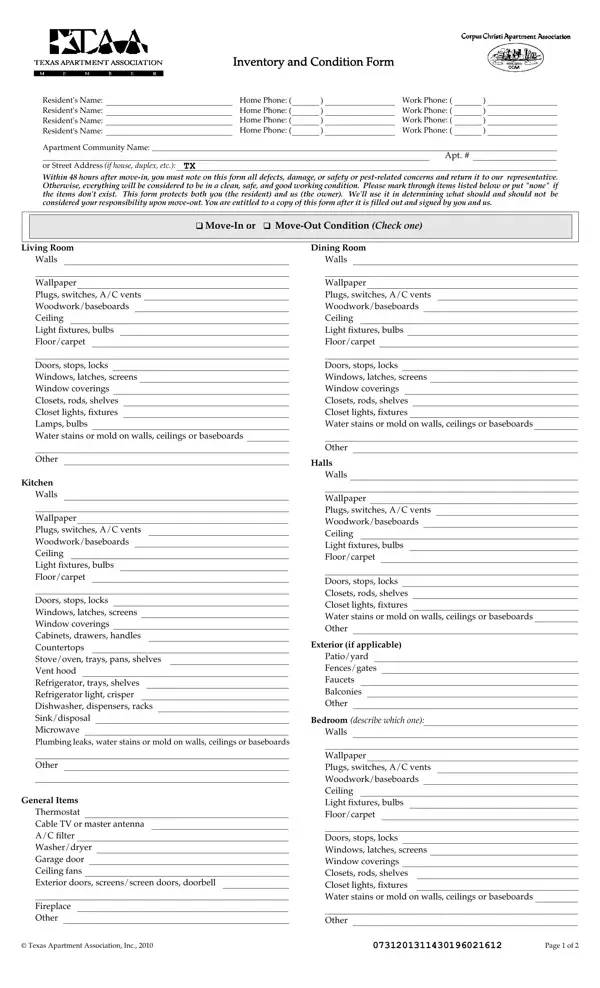
Inventory Condition Form PDF Details

The Inventory Condition form serves as a critical document that delineates the state of a rental property at the time of a tenant's move-in and move-out. It meticulously lists the condition of various parts of the rental unit, including living areas, kitchen, bedrooms, baths, and exterior aspects if applicable, emphasizing walls, floors, appliances, and other specifics, ensuring every detail is accounted for. Residents are required to note any defects, damages, or safety and pest-related concerns within 48 hours after moving in, as failing to do so implies an acceptance of the property in its current condition, clean, safe, and in good working order. This thorough process not only protects the interests of the residents by accurately documenting the property's condition prior to occupancy but also serves the owners by establishing a clear record, assisting in determining the liability for any damages that occur during tenancy. For both parties, this form is indispensable for resolving potential disputes over damages and for clarifying responsibilities, thereby ensuring a fair process for assessing conditions and charges at the end of the lease term. It underscores the importance of transparency and collaboration between tenants and property owners from the outset of a leasing agreement.

QuestionAnswer
Form NameInventory Condition Form
Form Length2 pages
Fillable?No
Fillable fields0
Avg. time to fill out30 sec
Other namesDoorviewers, inventory and condition form filled out, apartment inventory and condition form, taa move in inventory condition form apartment

How to Edit Inventory Condition Form Online for Free

You can work with Doorviewers without difficulty by using our online editor for PDFs. To keep our tool on the cutting edge of convenience, we strive to adopt user-oriented capabilities and improvements regularly. We are at all times looking for suggestions - help us with revolutionizing the way you work with PDF documents. To begin your journey, consider these simple steps:

Step 1: Just click the "Get Form Button" in the top section of this webpage to start up our pdf form editor. There you will find everything that is needed to work with your document.

Step 2: As you start the tool, there'll be the document prepared to be filled in. Aside from filling in various fields, it's also possible to perform several other actions with the file, particularly writing any textual content, changing the original text, adding graphics, signing the form, and more.

With regards to the blank fields of this particular document, here's what you should do:

1. The Doorviewers needs particular details to be inserted. Make sure the subsequent blanks are complete:

The way to fill out move in condition form portion 1

2. Given that this section is complete, you should put in the required particulars in Doors stops locks Windows latches, Doors stops locks Windows latches, Other, Kitchen Walls, Wallpaper Plugs switches AC vents, Doors stops locks Windows latches, Other, Halls, Walls, Wallpaper Plugs switches AC vents, Doors stops locks Closets rods, Exterior if applicable, and Patioyard Fencesgates Faucets in order to move forward further.

Filling in section 2 of move in condition form

3. This next segment is mostly about Doors stops locks Windows latches, Other, General Items Thermostat Cable TV, Fireplace Other, Patioyard Fencesgates Faucets, Bedroom Walls, describe which one, Wallpaper Plugs switches AC vents, Doors stops locks Windows latches, Other, Texas Apartment Association Inc, and Page of - fill in all of these blank fields.

Page  of, Texas Apartment Association Inc, and Bedroom Walls of move in condition form

4. The next section will require your information in the subsequent areas: Bedroom Walls, describe which one, Wallpaper Plugs switches AC vents, Bedroom Walls, describe which one, Wallpaper Plugs switches AC vents, Doors stops locks Windows latches, Doors stops locks Windows latches, Other, Bath, describe which one Walls Wallpaper, Other, Bath, and describe which one Walls Wallpaper. Just be sure you fill out all of the required information to go onward.

Filling in segment 4 of move in condition form

5. Finally, the following final subsection is precisely what you will need to wrap up before finalizing the form. The blank fields in question are the next: describe which one Walls Wallpaper, describe which one Walls Wallpaper, Doors stops locks Windows latches, Doors stops locks Windows latches, Other, Half Bath Walls, Wallpaper Plugs switches AC vents, Other, Safety or PestRelated Items, Put none if item does not exist, and Door knob locks Keyed deadbolt.

Part # 5 in completing move in condition form

Regarding Half Bath Walls and Door knob locks Keyed deadbolt, be certain you don't make any mistakes in this section. These two are definitely the most important fields in the file.

Step 3: Right after you've looked once more at the information in the blanks, click on "Done" to complete your form at FormsPal. After setting up a7-day free trial account here, it will be possible to download Doorviewers or email it immediately. The form will also be at your disposal via your personal account page with all your adjustments. FormsPal ensures your information privacy with a protected system that never saves or shares any personal information involved. Be confident knowing your docs are kept protected any time you work with our tools!