

Form NAVPERS 1306/7 at a glance
What it is: Electronic Personnel Action Request NAVPERS 1306/7 (Rev. 08-2025), with Supporting Directive MILPERSMAN 1306-112.
Who signs: Enter the MEMBER NAME and sign at MEMBER SIGNATURE. For the COMMAND/NRA ENDORSEMENT, enter the COMMANDING OFFICER NAME, sign at COMMANDING OFFICER SIGNATURE and enter the DATE. For the SELRES UNIT ENDORSEMENT, write the COMMENTS (Address acceptable gap, relief requirement, waivers, etc.), enter the COMMANDING OFFICER NAME, sign at COMMANDING OFFICER SIGNATURE and enter the DATE. Under DETAILER/ECM ACTION, enter the NAME and CODE, sign at SIGNATURE (By Direction) and enter the DATE.
The authority to request this information is contained in 5 USC 301 Departmental Regulations and from E.O. 9391. The principal purpose of this information is to enable you to make known your desires for the various types of duty listed, or some other special assignment consideration. The information will be used to assist officials and employees of the Department of the Navy in determining your future assignment. Completion of the form is mandatory except for duty and home phone numbers; failure to provide information may result in delay in response to or disapproval of your request.
A filled-in Form NAVPERS 1306/7 example: a member fills in page 1
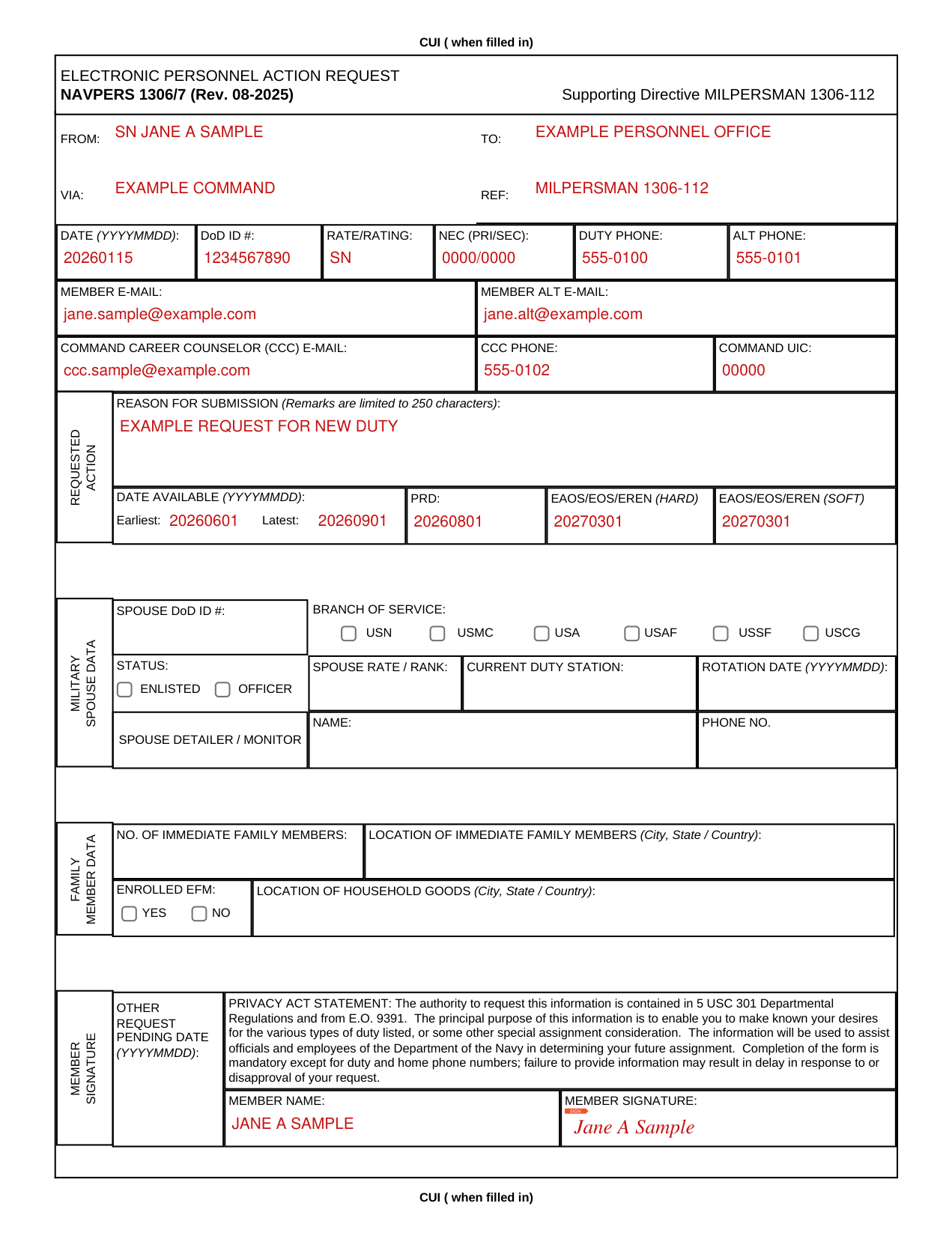
How to fill out Form NAVPERS 1306/7, box by box
From, to, via and ref

Fill in FROM, TO, VIA and REF.
Date, DoD ID, phone and e-mail

Enter the DATE (YYYYMMDD), DoD ID #, RATE/RATING, NEC (PRI/SEC), DUTY PHONE and ALT PHONE.
Enter the MEMBER E-MAIL and the MEMBER ALT E-MAIL.
Enter the COMMAND CAREER COUNSELOR (CCC) E-MAIL, the CCC PHONE and the COMMAND UIC.
Reason for submission

Write the REASON FOR SUBMISSION; remarks are limited to 250 characters.
Date available

Enter the DATE AVAILABLE (YYYYMMDD) as Earliest and Latest.
Enter the PRD, the EAOS/EOS/EREN (HARD) and the EAOS/EOS/EREN (SOFT).
Spouse data

Enter the SPOUSE DoD ID # and mark the BRANCH OF SERVICE: USSF, USN, USMC, USA, USAF or USCG.
Mark ENLISTED or OFFICER for the STATUS.
Enter the SPOUSE RATE / RANK, the CURRENT DUTY STATION and the ROTATION DATE (YYYYMMDD).
Under SPOUSE DATA, enter the SPOUSE DETAILER / MONITOR NAME and the PHONE NO.
Family member data
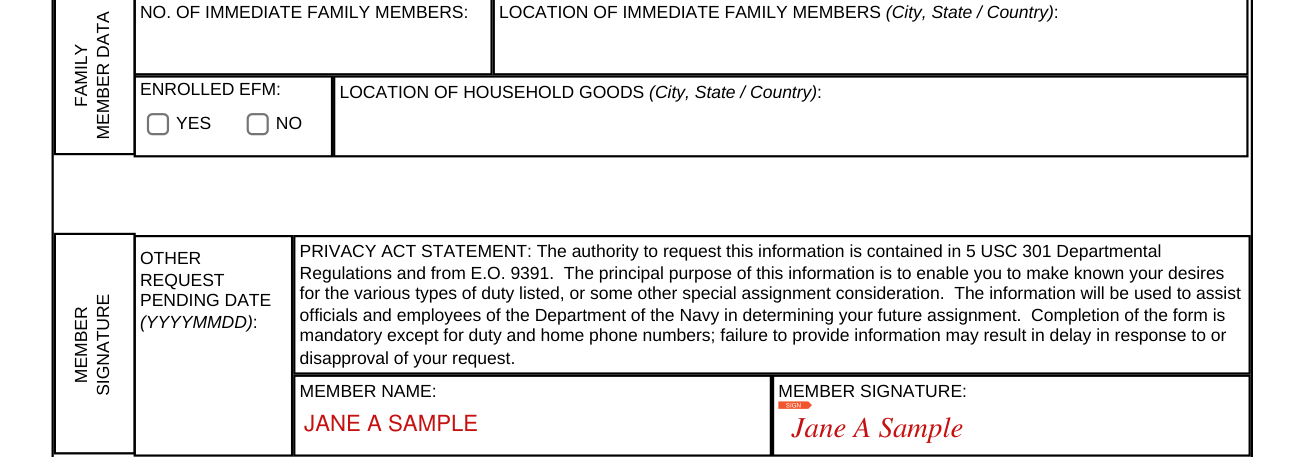
Enter the NO. OF IMMEDIATE FAMILY MEMBERS and the LOCATION OF IMMEDIATE FAMILY MEMBERS (City, State / Country).
Mark YES or NO for ENROLLED EFM.
Enter the LOCATION OF HOUSEHOLD GOODS (City, State / Country).
Enter the OTHER REQUEST PENDING DATE (YYYYMMDD).
Member name and signature

Enter the MEMBER NAME and sign at MEMBER SIGNATURE.
More rules for Form NAVPERS 1306/7
For each EVAL / FITREP PERIOD (YYYYMMDD - YYYYMMDD), enter the PHYSICAL READINESS, 33, 34, 35, 36, 37, 38, 39 and the PROMOTION RECOMMENDATION.
Enter the RETENTION RECOMMENDATION.
Mark YES or NO for HAS CLEAR RECORD (NO NJP) FOR PAST YEARS AS REQUIRED.
Mark YES, NO or N/A for MEETS SECURITY CLEARANCE REQUIREMENTS.
For the COMMAND/NRA ENDORSEMENT, mark YES or NO for RECOMMENDED and YES or NO for COMMAND TEAMING INFO UPDATED.
For the COMMAND/NRA ENDORSEMENT, under COMMENTS (Address acceptable gap, relief requirement, waivers, etc.), write the comments.
For the SELRES UNIT ENDORSEMENT, mark YES or NO for RECOMMENDED and YES or NO for COMMAND TEAMING INFO UPDATED.
Under DETAILER/ECM ACTION, under APPROVED, mark ORDERS WILL BE ISSUED TO TRANSFER IN TO COMMAND / UIC and enter the command or UIC.
Under DETAILER/ECM ACTION, mark PRD ADJUSTED TO and fill it in BY SEPAC (ENSURE MEMBER HAS OBLISERV).
Under DETAILER/ECM ACTION, mark AUTHORIZED TO EXTEND ENLISTMENT TO, or AUTHORIZED TO REENLIST FOR with the YEAR(S).
Under DETAILER/ECM ACTION, mark CONVERSION AS and fill in CONVERSION AS, or mark HYT TO and fill in HYT TO.
Under DETAILER/ECM ACTION, under DISAPROVED (LETTER OF EXPLANATION FORWARDED), enter the DATE.
Under DETAILER/ECM ACTION, under Returned without action, mark Not eligible for duty requested, Request not in compliance with or Other (see additional info).
Under DETAILER/ECM ACTION, write the ADDITIONAL INFORMATION.
Sources
[1] Form NAVPERS 1306/7 (Rev. 08-2025), Electronic Personnel Action Request (the Official source link on this page).
