
PMRF Guest Card Application Form PDF Details

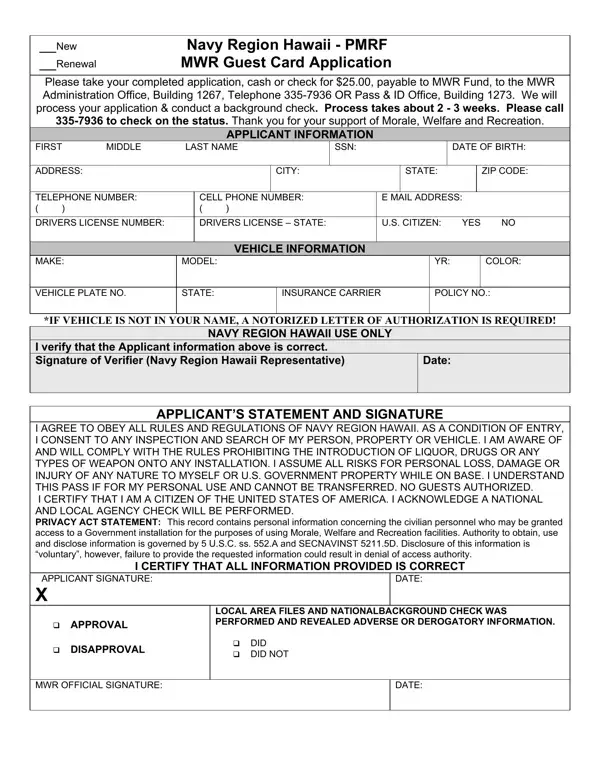
Navigating the procedural landscape of obtaining a Guest Card for access to Navy Region Hawaii's Morale, Welfare and Recreation (MWR) facilities requires a deep dive into the specifics of the PMRF Guest Card Application form. Designed as both a new request and a renewal mechanism, this form is a gateway for civilians to partake in the wide array of services and activities offered by MWR, marking an intersection of service provision and security protocols. Every applicant must furnish comprehensive personal information, including but not limited to their social security number, date of birth, and driver's license details, alongside vehicle information if applicable. A nominal fee of $25, payable to the MWR Fund, initiates a thorough background check—a critical step affirming the applicant's eligibility and ensuring the safety and security of the military installation. Furthermore, the application embodies a pledge by the applicant to adhere to Navy Region Hawaii's regulations, including consent to personal and property searches and prohibition against bringing prohibited items onto the premises. The detailed Privacy Act Statement elucidates the intended use of the provided information, underscoring the delicate balance between personal privacy and the imperatives of national security. Through this form, applicants are not only seeking entertainment and leisure opportunities but are also entering into a commitment to uphold the standards and security of the Navy Region Hawaii.

QuestionAnswer
Form Name PMRF Guest Card Application Form
Form Length 2 pages
Fillable? No
Fillable fields 0
Avg. time to fill out 30 sec
Other names pmrf mwr guest card application, pmrf mwr, pmrf guest, mwr pmrf

How to Edit PMRF Guest Card Application Form Online for Free

pmrf pass can be filled out online without any problem. Simply try FormsPal PDF editor to get it done quickly. The editor is consistently improved by our staff, getting cool features and turning out to be greater. For anyone who is seeking to get started, here's what you will need to do:

Step 1: Press the "Get Form" button above on this webpage to get into our PDF tool.

Step 2: The tool will allow you to work with the majority of PDF files in a range of ways. Enhance it by writing your own text, adjust what is originally in the file, and add a signature - all at your fingertips!

It will be straightforward to complete the pdf using out helpful guide! Here is what you must do:

1. When completing the pmrf pass, make certain to incorporate all essential fields within the relevant form section. It will help to facilitate the process, allowing for your information to be handled quickly and correctly.

pmrf kauai guest pass conclusion process described (part 1)

2. Once your current task is complete, take the next step – fill out all of these fields - VEHICLE PLATE NO, STATE, INSURANCE CARRIER, POLICY NO, IF VEHICLE IS NOT IN YOUR NAME A, NAVY REGION HAWAII USE ONLY, I verify that the Applicant, Date, APPLICANTS STATEMENT AND SIGNATURE, I AGREE TO OBEY ALL RULES AND, I CERTIFY THAT ALL INFORMATION, APPLICANT SIGNATURE X, and DATE with their corresponding information. Make sure to double check that everything has been entered correctly before continuing!

How to fill in pmrf kauai guest pass part 2

Be really attentive while filling out APPLICANTS STATEMENT AND SIGNATURE and I AGREE TO OBEY ALL RULES AND, as this is the section where a lot of people make a few mistakes.

3. Within this step, take a look at APPLICANT SIGNATURE X, cid APPROVAL cid DISAPPROVAL, LOCAL AREA FILES AND, cid DID cid DID NOT, MWR OFFICIAL SIGNATURE, and DATE. Each of these must be filled in with greatest attention to detail.

Guidelines on how to fill out pmrf kauai guest pass step 3

4. You're ready to fill in this fourth form section! Here you will have these First Name, Middle Name Last Name, In accordance with the Privacy Act, State County, State County, and State Zip Code empty form fields to do.

Part # 4 of completing pmrf kauai guest pass

5. As a final point, this final section is precisely what you'll want to finish before closing the form. The blanks in question are the next: In accordance with the Privacy Act.

Completing section 5 in pmrf kauai guest pass

Step 3: Right after going through your fields and details, hit "Done" and you're all set! Try a free trial option with us and get instant access to pmrf pass - download or modify in your personal account. FormsPal is dedicated to the privacy of all our users; we ensure that all information coming through our system remains protected.