
Updated:
Get Form Now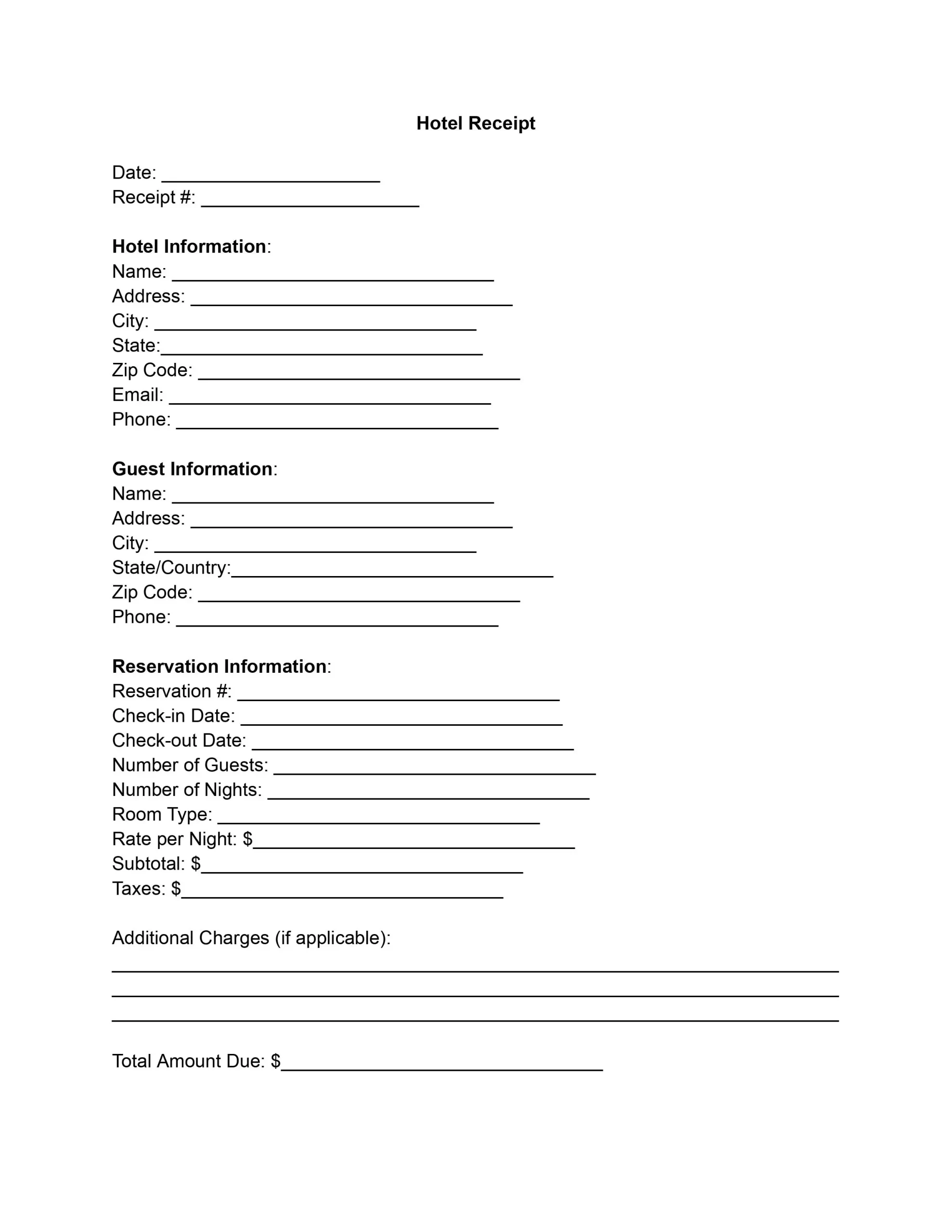
A hotel receipt template is a fillable form for one hotel stay. It lists the room rate, nights, taxes, extra charges, the total, and how the guest paid. Fill in this free template online, then save a PDF or print it.
Hotels, motels, inns, and short-stay hosts use it to hand each guest a clear receipt at check-out, and guests use the finished receipt as proof of payment.
A hotel receipt is the document a hotel gives a guest to confirm payment for a stay, listing the nights, the extra charges, the taxes, and the amount paid.
The guest uses it as proof of payment. A business traveler attaches it to an expense report to get reimbursed. The hotel keeps a copy to answer billing questions later.
It usually covers these charges:
The same document goes by several names: hotel bill receipt, hotel stay receipt, accommodation receipt, or check-out receipt. Some hotels add the loyalty points earned or a short thank-you note at the bottom, and guests who understand every line of the bill have fewer questions at the desk.
A hotel receipt includes the hotel's name and address, the guest's name, the stay dates, each charge on its own line, the taxes, the total, and how the guest paid.
IRS Publication 463 says a hotel receipt is enough to support expenses for business travel if it shows all three of these: the name and location of the hotel, the dates of the stay, and separate amounts for charges such as lodging, meals, and telephone calls.
The free template has a field for each detail in the table below, so you can check them off as you fill it in.
| Field | What to enter | Why it helps |
|---|---|---|
| Receipt ID and date | A unique ID and the date the receipt is issued | Both sides can find the receipt later |
| Hotel details | Name, address, and phone | Shows where the stay took place |
| Guest details | Name, address, and phone | Matches the receipt to the person who stayed |
| Reservation | Reservation ID, check-in and check-out dates, party size, and nights booked | Shows how long the stay lasted |
| Lodging | Type of room and rate per night | Explains the room charge |
| Charges | Subtotal, taxes, and extras such as dining, mini-bar items, or parking | Lets the guest check each amount |
| How paid | Method, status, and the transaction ID if there is one | Confirms the bill is settled |
| Authorization | Name, title, signature, and date of the hotel representative | Shows who issued the receipt |
Treat the charges section like an itemized receipt, with one line for each charge. Readers can then check every amount against the final total.
To create a hotel receipt, open this free template in the PDF editor, fill in each section from top to bottom, check the total, and then save or print the finished PDF.
Enter the date you issue the receipt at the top of the template. Below it, give the receipt a unique number so you and the guest can find it later.
Enter the hotel's full name and street address with the city and ZIP code. Add the hotel's main email and phone number so the guest can reach the billing desk with questions.
Enter the guest's name, street address, city, country, and ZIP code. Add the guest's phone number in case the hotel needs to follow up.
Enter the reservation number from the booking. Then fill in these details:
Multiply the rate per night by the number of nights to get the lodging subtotal, then add the taxes charged on the room.
List each extra charge beyond the room rate and taxes on its own line, with a short description and the amount. Typical extras are room service purchases, mini-bar items, and parking fees.
Add the lodging subtotal, the taxes, and the extra charges to get the total amount due. If the guest paid a deposit at booking, subtract it to find the balance.
Enter how the guest paid, such as credit card or cash. Mark the payment as completed, pending, or partially paid, and add the transaction ID if there is one.
A hotel representative signs the receipt to confirm the charges and the payment. The representative then prints their name and title and dates the signature, so the record is complete.
When every field is filled in, save the receipt as a PDF or print it. Give the guest one copy and keep a signed copy for your files.
This example shows a finished stay from the template, with lodging, dining, and parking on separate lines, then the taxes and the total paid. The names, address, and amounts are made up for illustration, so replace each one with your own details.
| Item | Details | Amount |
|---|---|---|
| Lodging | Deluxe queen, 3 nights at $120.00 | $360.00 |
| Dining | Dinner on 10/08 | $42.00 |
| Parking | 3 nights at $10.00 | $30.00 |
| Subtotal | $432.00 | |
| Taxes | $51.84 | |
| Total Paid | $483.84 | |
Hold the sample up against IRS Publication 463: it names the hotel and its location, gives the dates of the stay, and shows lodging and dining as separate amounts.
This template is a fillable PDF that opens in your browser, so you can type into each field without Word or other billing software.
Use the finished receipt in whichever way suits the guest:
A blank hotel receipt suits a small inn, a motel, a bed and breakfast, or a vacation rental host that has no billing system of its own.
A hotel receipt confirms that a stay was paid for, while a hotel bill, an invoice, a folio, and a booking receipt each show a different stage of the same charges.
| Document | What it shows | When the guest gets it |
|---|---|---|
| Booking receipt | The reservation and any deposit paid | When the room is booked |
| Invoice | An amount owed, with a request to pay | Before payment, such as for a group booking |
| Folio | The running list of charges on the guest's account | During the stay |
| Hotel bill | The charges at check-out | At check-out, before or with payment |
| Hotel receipt | The final charges and proof they were paid | After payment |
You can copy the folio's charges onto the receipt line by line. For a stay that is booked but not yet paid, send an invoice instead and give the receipt once the guest pays.
The most common receipt mistakes are a total that does not match the line items, missing dates, and extra charges lumped together on one vague line.
| Mistake | How to avoid it |
|---|---|
| A total that does not match the line items | Add up the lines again before you print |
| Taxes left off or added twice | Enter the taxes once, on their own line |
| A missing receipt ID or missing dates | Fill in the top section first |
| Extra charges lumped together on one vague line | Give each extra its own line with the date |
| No note of how the guest paid | Enter the method and the payment status |
| A guest name that differs from the booking | Copy the name from the reservation |
A few habits make every receipt clearer:
A fake hotel receipt shows a stay, a charge, or an amount that did not happen, and this template is meant only for real stays and the charges a guest actually paid.
IRS Publication 463 says you generally need documentary evidence, such as receipts, canceled checks, or bills, to support your travel expenses, with exceptions such as a per diem allowance under an employer's accountable plan. If your return is examined, IRS Publication 463 says the IRS may ask for more information to establish the accuracy of your records or documentary evidence.
A receipt with made-up figures defeats its own purpose: the hotel keeps its own copy of each guest's charges, so the numbers have nothing real behind them.
A few simple habits keep your own receipts accurate:
This template is a PDF, not a Word document, and it opens in the online editor so you can fill it in without Word. Download the finished PDF and print it or send it like any other attachment.
Yes. Open this template in the PDF editor, type the hotel, guest, stay, and charge details into each field, then download the finished receipt as a PDF.
Yes. This free template lets you fill in the fields online, save a PDF, and print it. The sample above shows how the totals work out.
A template gives every receipt the same layout, so guests find the dates, charges, and total in the same place each time.
Under the FTC's Rule on Unfair or Deceptive Fees, 16 CFR Part 464, a business that offers, displays, or advertises a price for short-term lodging, such as a hotel, motel, or inn, has to disclose the total price clearly and conspicuously. Under 16 CFR 464.2, the total price may leave out government charges and fees for optional extras, but the business must disclose each excluded charge and the final amount clearly and conspicuously before the guest agrees to pay. The rule covers the price a business offers, displays, or advertises, not how a receipt is laid out.
Yes. Save the finished receipt as a PDF and send it as an attachment, or print it at the desk. Keep a copy of every receipt you send.
Contact the hotel’s front desk or billing team and give them these details:
Many hotels can send a copy right away. For a stay at a chain hotel, start with the property where you stayed. Many chains also show past folios in the guest's online account.
General information, not legal or tax advice.
