
Updated:
Get Form Now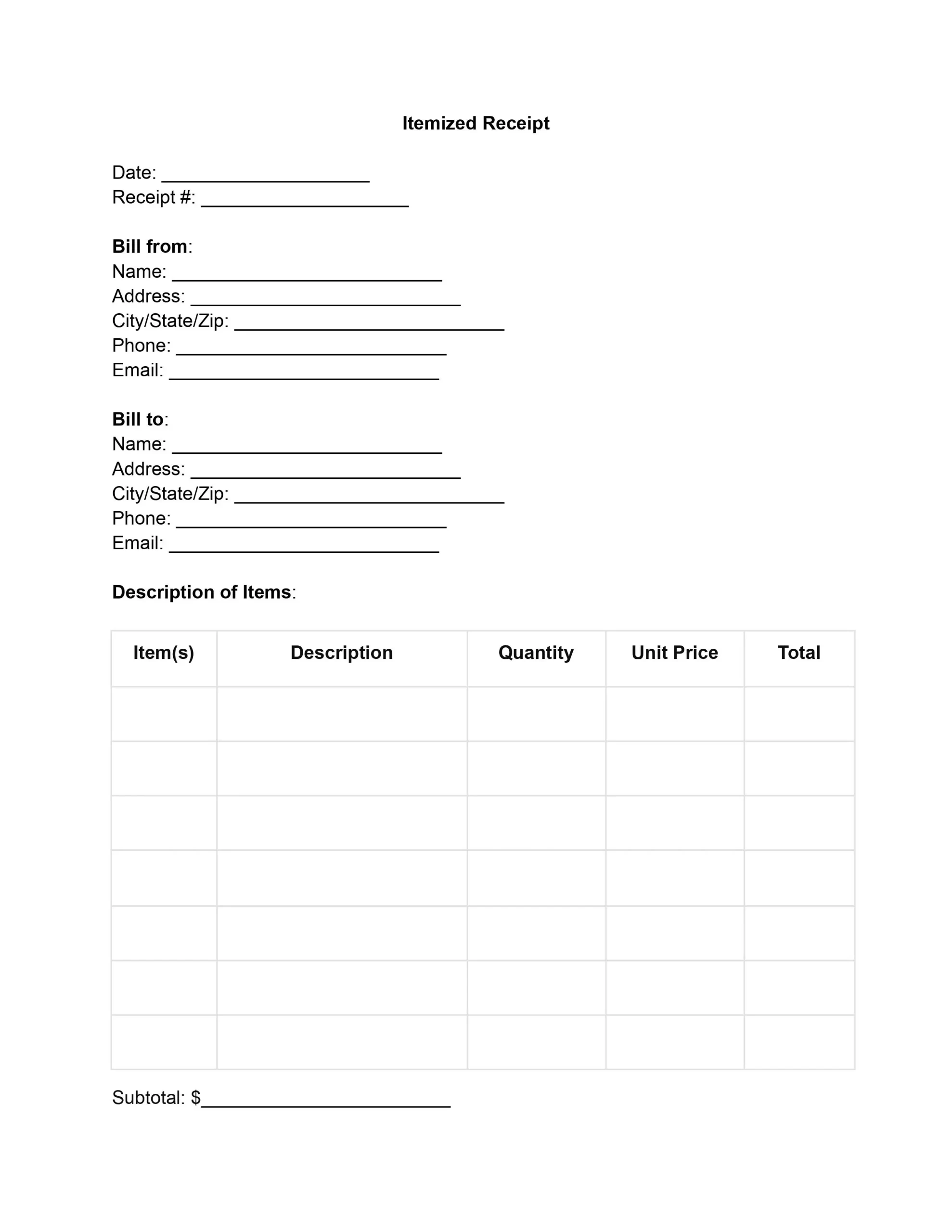
An itemized receipt template is a ready-made form that lists every item or service a customer paid for. Each line shows the quantity, price, and tax, and the total sits at the bottom. This free itemized receipt template lets you fill in each field online, save a PDF, and keep a copy for your records.
An itemized receipt is a detailed bill of all goods or services purchased. It gives a breakdown of each item’s cost, including taxes, discounts, and additional charges, and this detail helps both businesses and consumers track their expenses accurately.
A standard receipt gives a general overview of the transaction. It usually shows the total paid, the date, and sometimes a short description of the purchase or the store’s information. It works as proof of payment, but it lacks the specifics needed for detailed financial tracking. An itemized receipt lists each purchased item or provided service on its own line, along with its individual cost.
An itemized receipt can include:
For businesses, itemized receipts help manage inventory, understand sales trends, and prepare accurate financial statements. For customers, they show exactly what they are paying for, which makes budgeting and checking charges easier.
This level of detail also makes returns, exchanges, and warranty claims simpler for customers, and businesses can study the itemized list to spot buying trends, learn customer preferences, and find areas to reduce costs.
Whether you fill in this free receipt template online or print it first, the same set of fields applies. The table below shows each field and what goes in it, so you can tick them off as you work through the receipt.
| Field | What to enter |
|---|---|
| Date and receipt number | The date of the sale and a unique number for this receipt |
| Bill from | The seller’s name, address, phone number, and email |
| Bill to | The customer’s name, address, phone number, and email |
| Items | The name and a short description of each item or service |
| Quantity and unit price | How many units were sold and the price of one unit |
| Line cost | Quantity multiplied by unit price for each line |
| Subtotal and tax | The sum of all lines and the tax charged |
| Discounts | Any discount or promotion, shown on its own line |
| Payment method and final charge | How the buyer paid and what the receipt comes to |
| Signature | The signature and printed name of the person who issued the receipt |
Using a template for itemized receipts speeds up the creation of accurate financial documentation, and a standardized format lets you enter the details of each sale quickly while leaving fewer gaps or errors. That saves time for every business, and a clean layout gives your receipts a professional look.
A good itemized receipt template helps you:
Moreover, staying compliant and preparing for tax season is critical to running a successful business. Itemized receipts are used to prove income and expenses, support claims on tax returns, and ensure compliance with tax laws. These detailed receipts can also be crucial in the event of an audit, providing clear evidence of transactions.
Follow these steps to complete the template from top to bottom. Open this free itemized receipt template in the PDF editor and type straight into each field, or print it and write by hand. Each step matches one part of the receipt, so nothing gets skipped.
Enter the transaction’s date and the unique number that tells this receipt apart from others, since these details make the receipt easy to find and track later.
Enter the details of the business or person issuing the receipt:
This information shows where the receipt came from and gives the customer a way to reach you.
You’ll enter the recipient’s information here, similar to the “Bill from” section. Include the customer’s name, address, city, state, zip code, phone number, and email address.
Fill in a few key details for each item or service provided:
Finally, calculate the total cost for each line by multiplying the quantity by the unit price.
Sum up all the totals from the “Description of Items” section to determine the subtotal. This figure represents the comprehensive cost before any taxes, discounts, or additional fees are applied.
Then, compute the taxes due by applying the appropriate tax rate to the subtotal. This calculation must conform to the local tax regulations applicable to the products or services sold. Record the tax amount in the designated area.
If a discount applies to the transaction, list it on its own line and subtract its value from the subtotal. Note the discount clearly, since it lowers the final price and gives both parties a record of the change.
Add the tax to the subtotal and subtract any discount to find what the buyer owes. This final figure is the total charge for the goods or services provided.
Next, mark the payment method used, such as cash, credit card, check, or another form. If the payment was made by credit card or check, add the check number or the last four digits of the card for reference.
The person responsible for the transaction must authorize the receipt with a signature. After signing, print the name of the signatory below the signature.
The sample below uses made-up details to show how the fields fit together. It follows the same order as the template, from the receipt number at the top down to the total at the bottom.
| Item | Quantity | Unit price | Cost |
|---|---|---|---|
| Spiral notebook | 3 | $4.00 | $12.00 |
| Desk lamp | 1 | $24.50 | $24.50 |
| Gel pens, pack of 4 | 2 | $3.25 | $6.50 |
| Subtotal | $43.00 | ||
| Sales tax (8%) | $3.44 | ||
| Final charge | $46.44 | ||
Each line cost is the quantity times the unit price, the subtotal adds the three lines, and the sales tax goes on top to reach the final charge. The 8% rate is only an example.
A few small habits make an itemized receipt easier to read and easier to check later. Try these when you fill in a free receipt template, whether you issue a handful of receipts a week or a few hundred.
An itemized receipt shows every charge on its own line, so both sides can check the total at a glance. Most questions come down to what goes on each line, how to save the finished file, and which copies to keep.
An invoice asks for payment that is still owed, while a receipt confirms that payment was made. If you need to bill a buyer first, use a blank invoice template, then issue the itemized receipt once the payment arrives.
Yes. List each job on its own line in the “Item(s)” column, enter the hours or number of visits as the quantity, and enter the rate as the unit price.
A sales receipt confirms a sale and often shows a single total. An itemized receipt lists each product or service with its own price. Use the itemized version when a buyer wants to see every charge, or try the sales receipt template for a simpler record.
Fill in the fields in the PDF editor, then save the file as a PDF or print it. Name the file with the receipt number so it is easy to find later.
Name the product or service, then add the detail that sets it apart, such as the size, the color, or the hours worked. A buyer should be able to match each line to what they received.
Yes. Keep a blank copy of the template, then open that copy each time you make a new receipt and change the date, the receipt number, and the items.
Yes. You can fill in this free receipt template online, save a PDF, and print it at no cost.
Take a quick look at these points:
A short review like this catches most typing slips.
Yes. A copy of every receipt you issue makes it easier to look up a sale later. Store the copies in order by receipt number.
General information, not legal or tax advice.
