
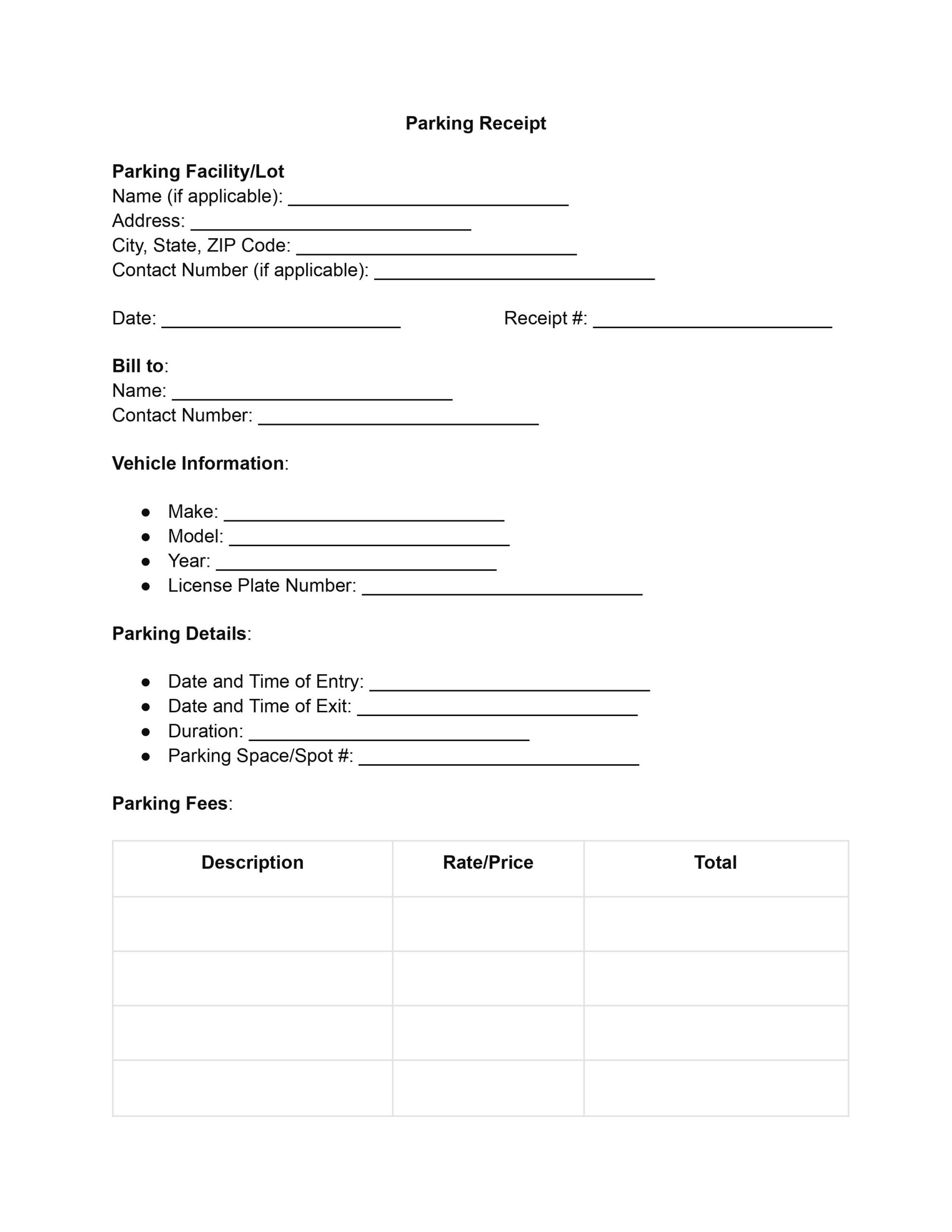
A parking receipt template is a ready-made form that records a parking payment, including the lot, the vehicle, the time parked and the amount paid. Use our free printable PDF to give each customer a clear record of the visit and to keep your own parking records in order. You can fill it in online, then print it or save a copy.
Last Updated: October 2026. This guide is reviewed and updated regularly to reflect current law. If you notice an error or outdated information, please contact us.
A parking receipt is a document issued to a customer by a parking facility to confirm a transaction has taken place. It shows what was paid, for which vehicle and for how long. This receipt typically includes these essential details:
Parking garage receipts serve multiple purposes, including confirmation of payment. They also aid with dispute settlement, financial record-keeping for the parking lot, and compliance with local laws.
Customers keep the receipt as proof of payment for an expense report, a reimbursement request or a question about a charge.
One of the most obvious advantages of employing a parking receipt form is a significant increase in operational efficiency. Templates streamline the process of issuing receipts, reducing the time required for parking attendants to generate and provide receipts to customers.
A well-designed parking receipt template ensures the precise recording and uniform presentation of all required information. It cuts down on mistakes made while typing in receipt details, which can lead to misunderstandings or disagreements. A uniform parking garage receipt template also helps businesses to manage their records.
For customers, a clear receipt makes it easy to check the lot, the hours and the amount before leaving. A copy filed with your trip records also helps when you add up your expenses later.
Anyone who takes payment for parking can use a simple receipt form, from a small private lot to a large garage. Drivers also use the receipts they get to keep track of what they spent on parking. Common users include:
Parking is sold in several ways, and the receipt can be adjusted to match each one. The same template works for all of them if you fill in the parts that apply and leave the rest blank. The most common kinds are:
Choose the version that matches how your lot sells parking, and keep the layout the same from one receipt to the next.
You can hand over a printed receipt or send a digital copy, and the details stay the same either way. A printed copy is handy at the gate or the pay station. A PDF is easy to email, store and search later, so it suits customers who track their parking costs on a computer or phone.
Open the template, fill in each part in order, and check the totals before you print or save the receipt. These steps help you complete the parking receipt comprehensively and accurately, so it gives a clear record of the parking transaction.
Start with the parking facility or lot, then add the receipt details:
Write the name of the individual or entity being billed and their contact number. Check the spelling so the receipt goes to the right party.
Enter the make, model and year of the parked vehicle, then add its license plate number. These details help identify the vehicle and avoid mix-ups.
Enter the date and time the vehicle came in and the date and time it left. Then enter the total time parked. If the vehicle used a specific space, add the space or spot number.
Identify each charge, such as the parking fee and any additional charges, then work through the amounts in this order:
Indicate the payment method used, such as cash or credit card. If there is a transaction ID or receipt number from the payment process, add it here. This section keeps the payment method and the transaction on record.
Finally, ask the customer to sign and date the receipt. The signature and date act as the customer’s confirmation of the transaction and the receipt details.
Here is how a finished parking receipt can look. The names, numbers and amounts below are made up for illustration, so replace each one with the details of your own transaction.
| Part of the receipt | Sample entry |
|---|---|
| Parking facility | Main Street Parking Garage, 123 Main Street, Springfield |
| Receipt number and date | 1001, May 14 |
| Billed to | Anna Baker, 555-0100 |
| Vehicle | Honda Civic, plate ABC-1234 |
| Time in and time out | 8:30 AM to 11:00 AM, 2 hours 30 minutes, space B-12 |
| Charges | 2.5 hours at $4.00 per hour, subtotal $10.00, tax $0.80, total $10.80 |
| Payment | Credit card, transaction ID 48213 |
| Customer signature and date | Anna Baker, May 14 |
If you are the customer, the receipt is most useful when you can find it again later. Store it with your other expense records as soon as you receive it, and check the details while the visit is still fresh in your memory. Helpful habits include:
A few habits keep your parking receipts easy to read and easy to find later. Number them in order, write the times clearly and hand every customer a copy before they leave the lot.
Most problems with a parking receipt come from small gaps in the details. Look over the receipt once before you hand it over, and avoid these common errors, all of which a quick check will catch:
Yes. Download the PDF and fill it in with the PDF editor, then print it or save a copy. You can type straight into each field instead of writing by hand, and you can reuse the same file for the next customer.
A complete parking receipt covers the following details, and our template has a place for each of them:
No. A receipt confirms that you paid for parking. A ticket from the gate usually shows only when the car came in, so it does not show what was paid.
Yes. A Parking Lease Agreement sets out the terms for renting a space over time. Use a receipt for each payment you collect.
Yes. The Business Receipt template works for other sales and services.
Fill in a new copy with the same details and the same receipt number, and mark it as a duplicate.
Ask the parking facility to issue a corrected receipt, and keep the first one until you have the new copy in hand. Both receipts then show what changed and why.
An invoice asks for a payment that is still due. A receipt confirms that the payment has already been made.
Yes. After you fill in the PDF, print it for the customer or save it as a file to send by email.
General information, not legal or tax advice.
