
Updated:
Get Form Now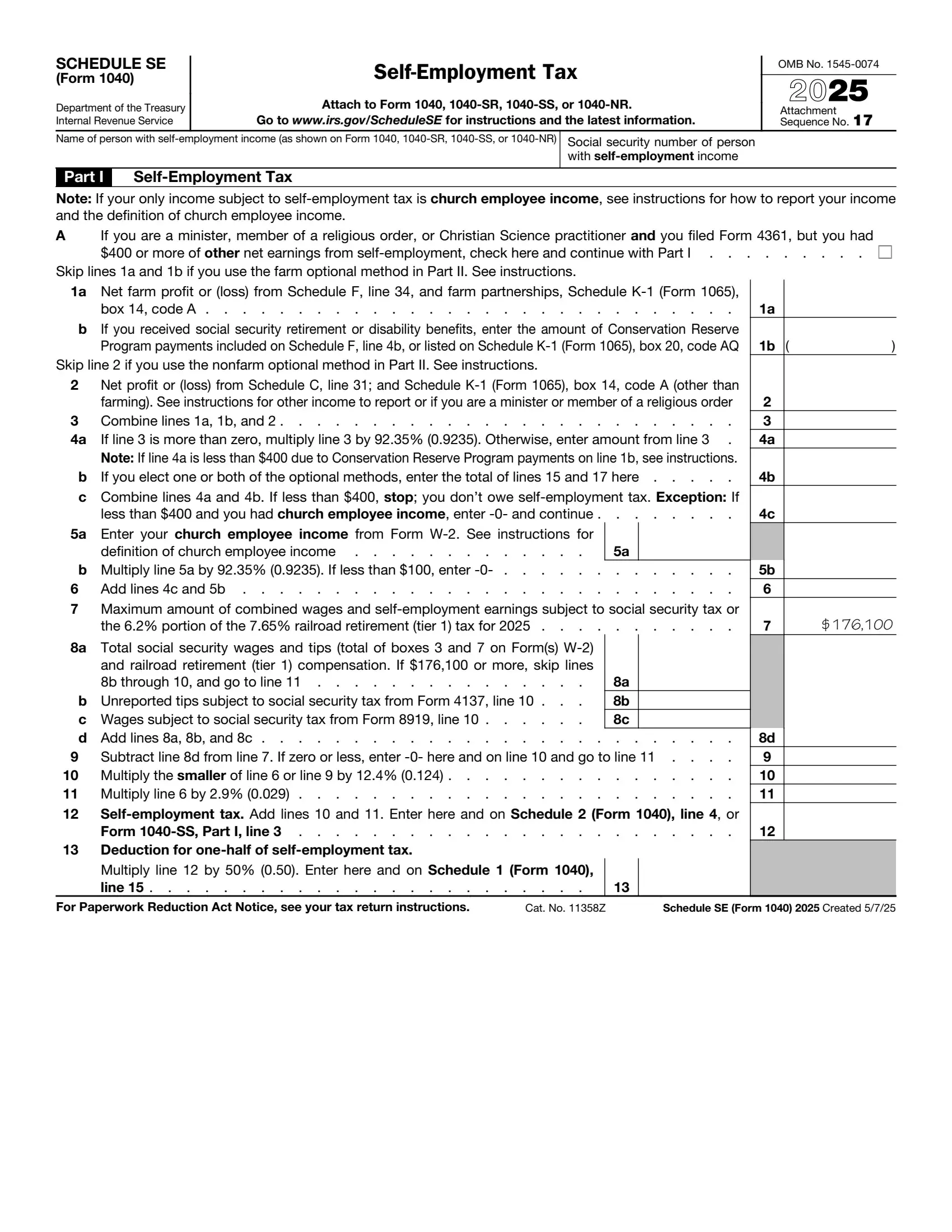
IRS Schedule SE (Form 1040), titled “Self-Employment Tax,” is used by individuals to calculate the tax due on net earnings from self-employment. This form is essential for anyone who works as a sole proprietor, partner in a partnership, or other self-employed individual, including those who earn income as independent contractors. Self-employment tax consists of Social Security and Medicare taxes, primarily for individuals who work for themselves. Schedule SE for Form 1040 includes:
Filing Schedule SE allows self-employed individuals to contribute to their Social Security and Medicare benefits, similar to how these contributions are automatically withheld from the paychecks of traditional employees.
Other IRS Forms for Partnerships
Before filing an individual’s tax return, you need to carefully read about schedules to IRS forms and choose the one based on your specific financial situation.
What it is: Schedule SE (Form 1040), Self-Employment Tax: Use Schedule SE (Form 1040) to figure the tax due on net earnings from self-employment.[2]
Where and when to file: Attach to Form 1040, 1040-SR, 1040-SS, or 1040-NR.
You must file Schedule SE if the amount on line 4c of Schedule SE is $400 or more, or you had church employee income of $108.28 or more. (checked November 17, 2026)[2]
Exception to filing Schedule SE: If you filed Form 4029 or Form 4361 and received IRS approval, you may not need to file Schedule SE.[2]
If you are in business (farm or nonfarm) for yourself, you are self-employed. You must also pay SE tax on your share of certain partnership income and your guaranteed payments.[2]
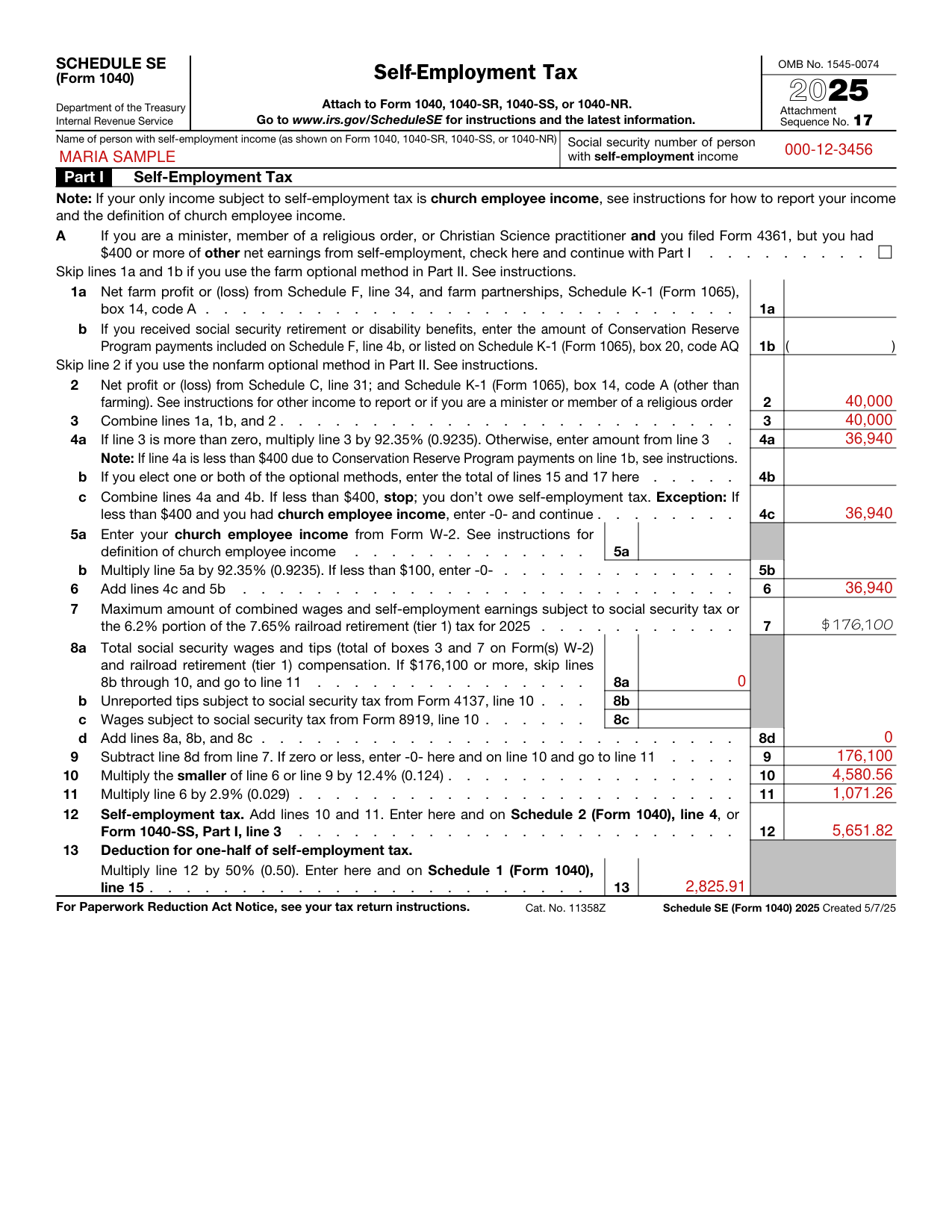

Enter the Name of person with self-employment income (as shown on Form 1040, 1040-SR, 1040-SS, or 1040-NR) and the Social security number of person with self-employment income.
Show the name of the spouse with self-employment income on Schedule SE. If both spouses have self-employment income, each must file a separate Schedule SE.[2]

A: If you are a minister, member of a religious order, or Christian Science practitioner and you filed Form 4361, but you had $400 or more of other net earnings from self-employment, check here and continue with Part I. (checked November 17, 2026)

Line 1a: Net farm profit or (loss) from Schedule F, line 34, and farm partnerships, Schedule K-1 (Form 1065), box 14, code A.
Line 1b: If you received social security retirement or disability benefits, enter the amount of Conservation Reserve Program payments included on Schedule F, line 4b, or listed on Schedule K-1 (Form 1065), box 20, code AQ.
Skip lines 1a and 1b if you use the farm optional method in Part II. See instructions.

Line 2: Net profit or (loss) from Schedule C, line 31; and Schedule K-1 (Form 1065), box 14, code A (other than farming). See instructions for other income to report or if you are a minister or member of a religious order.
Skip line 2 if you use the nonfarm optional method in Part II. See instructions.
Line 3: Combine lines 1a, 1b, and 2.
Enter all negative amounts in (parentheses).[2]

Line 4a: If line 3 is more than zero, multiply line 3 by 92.35% (0.9235). Otherwise, enter amount from line 3.
Line 4b: If you elect one or both of the optional methods, enter the total of lines 15 and 17 here.
Line 4c: Combine lines 4a and 4b. If less than $400, stop; you don't owe self-employment tax. Exception: If less than $400 and you had church employee income, enter -0- and continue. (checked November 17, 2026)
Note: If line 4a is less than $400 due to Conservation Reserve Program payments on line 1b, see instructions. (checked November 17, 2026)

Note: If your only income subject to self-employment tax is church employee income, see instructions for how to report your income and the definition of church employee income.
If your only income subject to SE tax is church employee income (described earlier under Employees of Churches and Church Organizations), skip lines 1 through 4b. Enter -0- on line 4c, and go to line 5a.
Line 5a: Enter your church employee income from Form W-2. See instructions for definition of church employee income.
Line 5b: Multiply line 5a by 92.35% (0.9235). If less than $100, enter -0-. (checked November 17, 2026)[2]

Line 6: Add lines 4c and 5b.
Line 7: Maximum amount of combined wages and self-employment earnings subject to social security tax or the 6.2% portion of the 7.65% railroad retirement (tier 1) tax for 2025, $176,100. (checked November 17, 2026)

Line 8a: Total social security wages and tips (total of boxes 3 and 7 on Form(s) W-2) and railroad retirement (tier 1) compensation. If $176,100 or more, skip lines 8b through 10, and go to line 11. (checked November 17, 2026)
Line 8b: Unreported tips subject to social security tax from Form 4137, line 10.
Line 8c: Wages subject to social security tax from Form 8919, line 10.
Line 8d: Add lines 8a, 8b, and 8c.

Line 9: Subtract line 8d from line 7. If zero or less, enter -0- here and on line 10 and go to line 11.
Line 10: Multiply the smaller of line 6 or line 9 by 12.4% (0.124).

Line 11: Multiply line 6 by 2.9% (0.029).
Line 12: Self-employment tax. Add lines 10 and 11. Enter here and on Schedule 2 (Form 1040), line 4, or Form 1040-SS, Part I, line 3.
Line 13: Deduction for one-half of self-employment tax. Multiply line 12 by 50% (0.50). Enter here and on Schedule 1 (Form 1040), line 15.
If you are filing Form 1040-SS, skip line 13.[2]
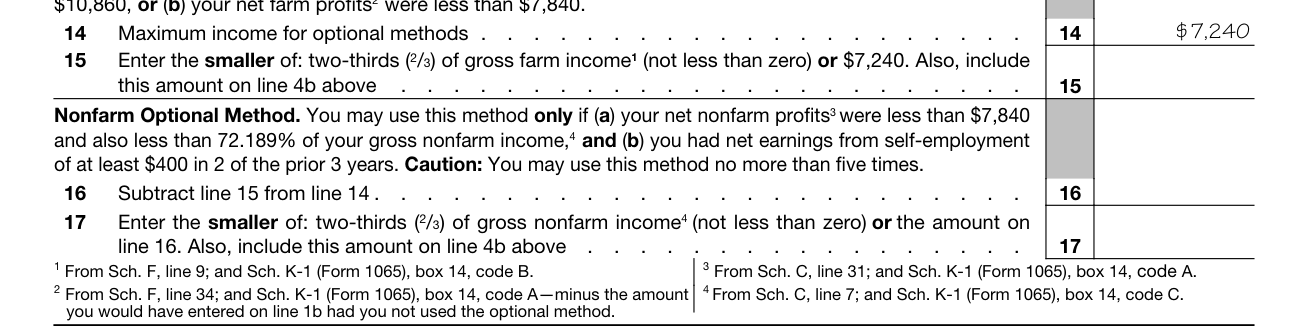
Farm method: You may use this method only if (a) your gross farm income wasn't more than $10,860, or (b) your net farm profits were less than $7,840. (checked November 17, 2026)
Line 14: Maximum income for optional methods, $7,240. Line 15: Enter the smaller of: two-thirds (2/3) of gross farm income (not less than zero) or $7,240. Also, include this amount on line 4b above. (checked November 17, 2026)
Nonfarm method: You may use this method only if (a) your net nonfarm profits were less than $7,840 and also less than 72.189% of your gross nonfarm income, and (b) you had net earnings from self-employment of at least $400 in 2 of the prior 3 years. Caution: You may use this method no more than five times. (checked November 17, 2026)
Line 16: Subtract line 15 from line 14.
Line 17: Enter the smaller of: two-thirds (2/3) of gross nonfarm income (not less than zero) or the amount on line 16.
Fees received for services performed as a notary public. If you had no other income subject to SE tax, check box number 3 and enter “EN” on Schedule 2 (Form 1040), line 4. Don't file Schedule SE. However, if you had other earnings of $400 or more subject to SE tax, enter “Exempt-Notary” and the amount of your net profit as a notary public from Schedule C (Form 1040) on the dotted line to the left of Schedule SE, line 3. Subtract that amount from the total of lines 1a, 1b, and 2, and enter the result on line 3. (checked November 17, 2026)[2]
[1] Schedule SE (Form 1040) (2025), Department of the Treasury Internal Revenue Service (the Official source link on this page).
[2] Instructions for Schedule SE (Form 1040), 2026, Department of the Treasury Internal Revenue Service.