
Aetna Cover Sheet Form PDF Details

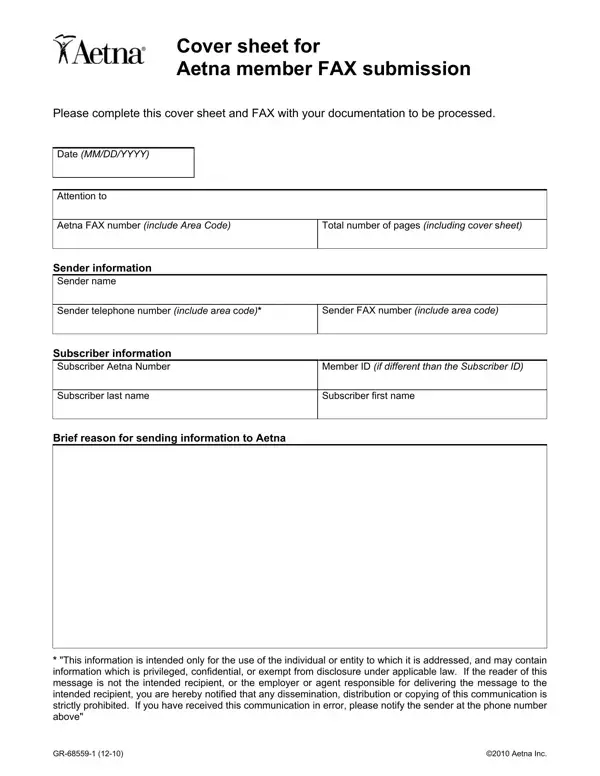
The Aetna Cover Sheet form is a one-page document that Aetna members use to fax medical records, appeals, and other health-related documents. Every field on the form plays a specific role in routing your submission to the right department.

The top section captures the submission date, the name of the person or department receiving the fax, the Aetna fax number, and the total number of pages including the cover sheet itself. Accurate page counts help Aetna confirm nothing was lost during transmission.

The sender section collects your name, phone number, and fax number. The subscriber section asks for the Aetna Number, Member ID, and the subscriber's last and first name. Including the Aetna Number alongside the Member ID helps match the fax to the correct account.

At the bottom, a short reason field lets you describe why you are sending the documents. This context speeds up processing and helps Aetna staff direct the fax to the right team. A confidentiality notice reminds both sender and recipient that the contents are intended only for the named party.

QuestionAnswer
Form NameAetna Cover Sheet Form
Form Length1 pages
Fillable?No
Fillable fields0
Avg. time to fill out15 sec
Other namesaetna fax cover sheet, gr 68559 1, aetna fax number, claim appeal coversheet payflex

Form Preview Example

Cover sheet for

Aetna member FAX submission

Please complete this cover sheet and FAX with your documentation to be processed.

Date (MM/DD/YYYY)

Attention to

Aetna FAX number (include Area Code)

Total number of pages (including cover sheet)

Sender information

Sender name

Sender telephone number (include area code)*

Sender FAX number (include area code)

Subscriber information

Subscriber Aetna Number

Member ID (if different than the Subscriber ID)

Subscriber last name

Subscriber first name

Brief reason for sending information to Aetna

*"This information is intended only for the use of the individual or entity to which it is addressed, and may contain information which is privileged, confidential, or exempt from disclosure under applicable law. If the reader of this message is not the intended recipient, or the employer or agent responsible for delivering the message to the intended recipient, you are hereby notified that any dissemination, distribution or copying of this communication is strictly prohibited. If you have received this communication in error, please notify the sender at the phone number above"

GR-68559-1 (12-10)

©2010 Aetna Inc.

How to Edit Aetna Cover Sheet Form Online for Free

Step-by-Step Guide to Filling Out the Aetna Cover Sheet

Follow these steps to complete the Aetna fax cover sheet accurately before sending any documentation to Aetna.

  1. Date: Enter today's date at the top of the form. Use MM/DD/YYYY format for clarity.
  2. Attention: Write the name of the department or person at Aetna who should receive the fax. For claims appeals, this is typically the Appeals Department.
  3. Fax Number: Enter the correct Aetna fax number for the relevant department. Verify the number on your Aetna member card or through the Aetna member portal before sending.
  4. Total Pages: Count all pages you are sending, including the cover sheet. Entering an accurate total helps Aetna confirm your fax was received in full.
  5. Sender Information: Fill in your name, telephone number, and fax number in the From section.
  6. Subscriber Information: Enter the Aetna Number, Member ID, and the subscriber's last and first name. These must match the information on file with Aetna.
  7. Reason: Write a brief, clear explanation of why you are sending the documents. For example: "Appeal for claim #12345 dated 04/15/2026" or "Authorization request for specialist visit."

Common Mistakes to Avoid

  • Incorrect page count: Always count every page before entering the total. An inaccurate count can cause Aetna to request a resend of your documentation.
  • Missing Member ID: The Member ID and Aetna Number are both required. Leaving either blank delays processing and may result in the fax being returned.
  • Wrong fax number: Double-check the Aetna fax number for your specific request type. The number for claims differs from the number used for appeals or prior authorization requests.
  • Vague reason field: Be specific about what you are sending and why. A clear reason gets your documents routed to the right department faster.

When to Use the Aetna Fax Cover Sheet

The Aetna fax cover sheet should accompany any documents you send to Aetna by fax. Common situations include prior authorization requests, claim appeals, medical records submitted for review, and enrollment verification documents. Always attach the cover sheet as the first page of your fax so Aetna staff can identify and route your submission immediately.

Frequently Asked Questions

Where do I find the correct Aetna fax number?
The correct fax number appears on your Explanation of Benefits (EOB), your Aetna member card, or in the Aetna member portal. Different departments use different fax numbers, so confirm the right number for your specific type of request before sending.

Do I need to fill in both the Aetna Number and the Member ID?
Yes. Both fields are required on the Aetna cover sheet. The Aetna Number is a plan-level identifier, while the Member ID is specific to you as an individual subscriber. Entering both ensures your documents are matched to the right account without delay.

How many pages should I include in the total count?
Include the cover sheet plus all other pages you are faxing. If you are sending a five-page document with the cover sheet as the first page, enter 6 as the total number of pages.

Is the Aetna Cover Sheet different from a standard fax cover sheet?
Yes. The Aetna fax cover sheet includes fields specific to Aetna membership, such as the Aetna Number and Member ID. A generic fax cover sheet does not capture this information and may slow down processing at Aetna. Always use the Aetna-specific form when faxing to any Aetna department.

Related Aetna Forms

Depending on the reason for your submission, you may also need one of these forms when faxing to Aetna: