
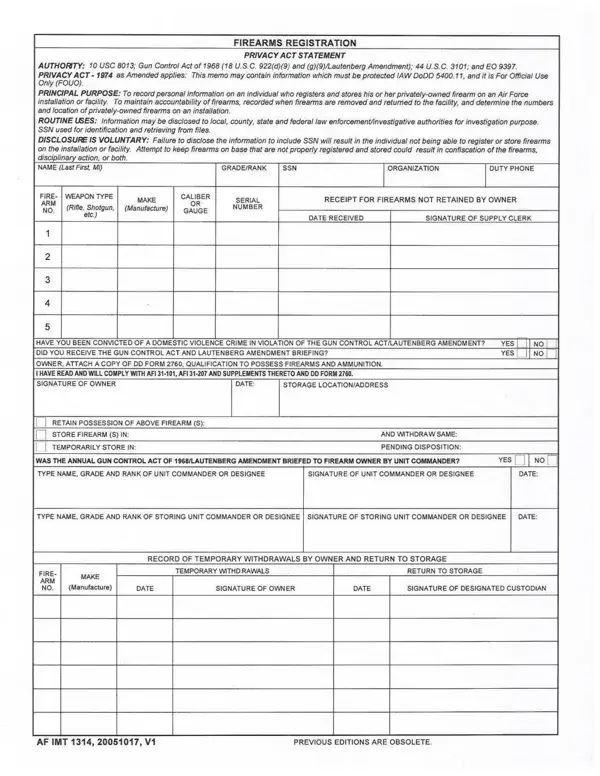
AF IMT 1314 Firearms Registration Form Details

The AF IMT 1314 is an official U.S. Air Force form used to document the registration of privately owned firearms by military personnel and civilians residing on Air Force installations. Submitting this form is required before bringing any personally owned weapon onto a base, ensuring compliance with Department of Defense security policy and local installation regulations.

The following groups are typically required to complete the AF IMT 1314:

Key details captured on the form include the registrant's name and unit, the weapon's make, model, caliber, and serial number, and the approving security officer's signature. Registration must be updated whenever a service member transfers to a new duty station or acquires an additional firearm. For related Air Force administrative documents, see Air Force Form 1168 and AF IMT 3902.

QuestionAnswer
Form NameAf Imt 1314 Form
Form Length1 pages
Fillable?No
Fillable fields0
Avg. time to fill out15 sec
Other namesaf imt 1314, af 1314 form, af 1314, af 1314 pdf

Form Preview Example

How to Edit Af Imt 1314 Form Online for Free

Complete the AF IMT 1314 form online in minutes using FormsPal's free PDF editor. Follow the steps below to ensure all fields are filled out correctly before printing or downloading.

How to Complete the AF IMT 1314

Step 1: Open the form by clicking "Get Form" at the top of this page. The document opens directly in your browser with no software needed.

Step 2: Complete Part I, the registrant information section. Enter your full name, rank, unit designation, and the name of your installation.

Completing the registrant information section on the AF IMT 1314 form

Step 3: Fill in the firearm details. Provide the manufacturer name, model, caliber, and serial number of each weapon being registered. Verify the serial number directly on the firearm before entering it.

Step 4: Review all entries for accuracy. Any incorrect serial number or mismatched caliber can result in the form being rejected by security forces.

Reviewing firearm details on the AF IMT 1314 form before signing

Step 5: Sign the form in the designated signature block and submit it to your installation's Security Forces Squadron. The security officer will countersign and retain a copy for official records.

Step 6: After completing the form, click "Done" in FormsPal to download or print a clean copy. You can also save it to your account for future access.

Frequently Asked Questions

Who is required to file the AF IMT 1314?

Any active duty member, reservist, dependent, or DoD civilian on an Air Force installation who possesses a privately owned firearm must register it using this form. Requirements may vary by installation, so confirm with your local Security Forces Squadron.

What information is needed to complete the form?

You will need your full name, rank, unit, and duty location, plus the make, model, caliber, and serial number of each firearm. Having these details ready before opening the form saves time.

Is there a fee for registering a firearm on base?

No. Firearm registration using the AF IMT 1314 is a free administrative requirement. There is no fee to submit the form to Security Forces.

What other Air Force forms might I need?

Depending on your situation, you may also need to complete the AF IMT 1048 or reference the Air Force Form 102 for related administrative procedures.