

Member Data Form 30-001 at a glance
What it is: The American Legion Member Data Form reports name or address changes, date of birth, email additions or changes, continuous years changes, post transfers and deceased members.
Where and when to file: Email the form to IT / Member Support Services: MSSforms@legion.org.
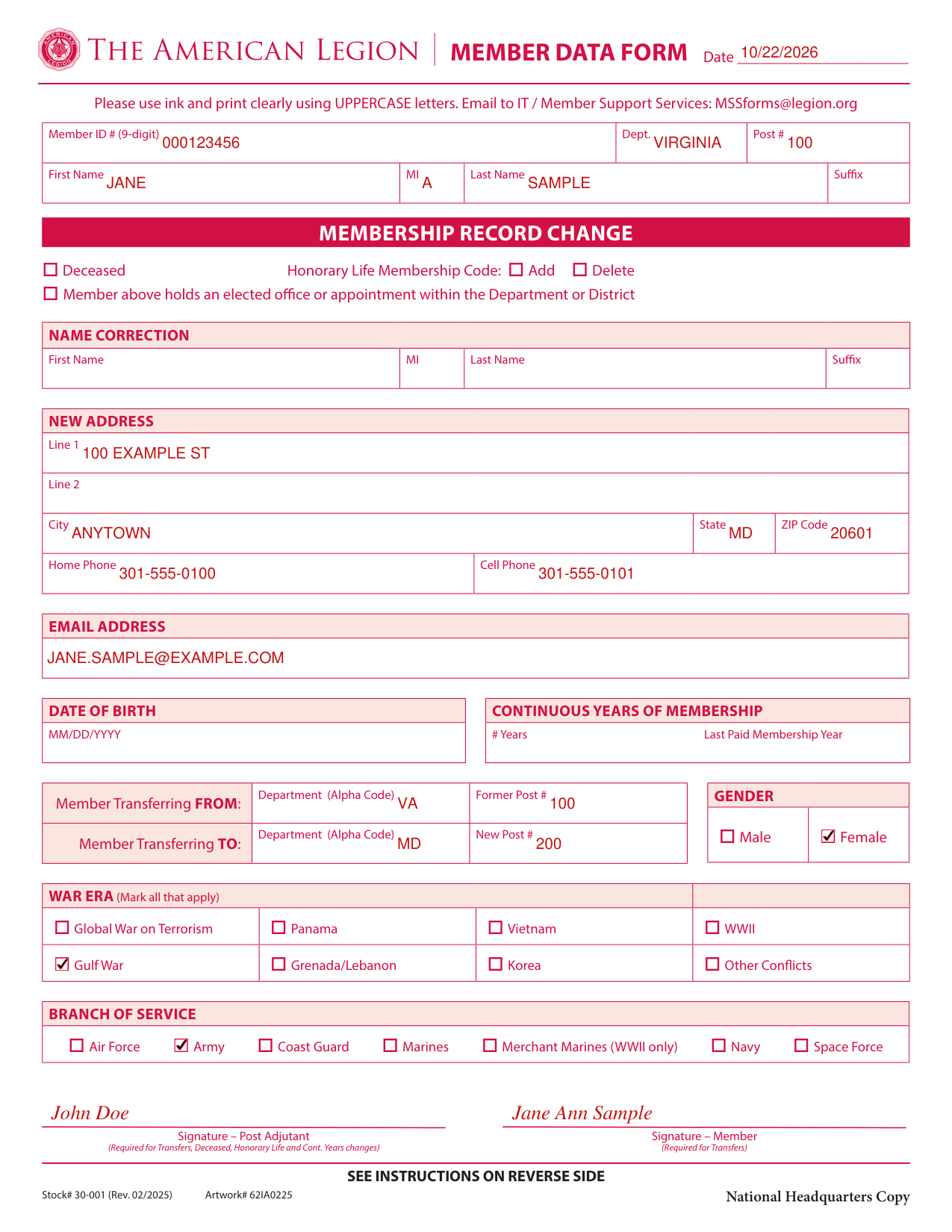
A filled-in Member Data Form 30-001 example: a Legionnaire transfers to a new post
How to fill out Member Data Form 30-001, box by box
Date, Member ID #, Dept., Post # and name
The Member ID Number, Post Number and the name of the Department are required for National Headquarters to process a Member Data Form.
Enter the Date, Member ID # (9-digit), Dept., Post #, First Name, MI, Last Name and Suffix.
Membership record change
Under MEMBERSHIP RECORD CHANGE, mark Deceased, Honorary Life Membership Code Add or Delete, or the member holds an elected office or appointment within the Department or District.
Name correction
Under NAME CORRECTION, enter First Name, MI, Last Name and Suffix.
New address
Under NEW ADDRESS, enter Line 1, Line 2, City, State, ZIP Code, Home Phone, Cell Phone and EMAIL ADDRESS.
Date of birth and continuous years of membership
Enter the DATE OF BIRTH as MM/DD/YYYY.
Under CONTINUOUS YEARS OF MEMBERSHIP, enter the # Years and the Last Paid Membership Year.
Member Transferring FROM and TO
To transfer a member, enter the Department (Alpha Code) and Former Post # under Member Transferring FROM:, and the Department (Alpha Code) and New Post # under Member Transferring TO.
The following pertains to transfers only: the transfer from one post to another is a privilege with the approval of the post to which the member desires to transfer.
No transfer shall be made unless the member requesting transfer has a current or expired membership number at the time the transfer is requested.
A Legionnaire desiring transfer of membership must first secure approval from the post to which transfer is desired, orally or in writing.
The Adjutant of the new post will complete and route the parts of the form as instructed.
No member may transfer to another post if the member has disciplinary actions and their post has notified National Headquarters of the situation.
No charge shall be made to the member for the privilege of transfer and no dues shall be transferred from one post to another.
Department or National Headquarters will transfer the member's record to the new post, provided that member's current record is on file and provided the information on the transfer is complete.
In an in state transfer, email a copy to the department headquarters, send a copy to the transferring post, and the post keeps a copy for their files.
Gender
Under GENDER, mark Male or Female.
War era
Under WAR ERA, mark all that apply: Global War on Terrorism, Panama, Vietnam, WWII, Gulf War, Grenada/Lebanon, Korea or Other Conflicts.
Branch of service
Under BRANCH OF SERVICE, mark Air Force, Army, Coast Guard, Marines, Merchant Marines (WWII only), Navy or Space Force.
More rules for Member Data Form 30-001
Print clearly in ink using UPPERCASE letters.
Print or type the information clearly when filling out the form.
Information that is illegible or incomplete is subject to error.
The copies are: National Headquarters Copy, Department Headquarters Copy, Department Headquarters Copy (to be sent to post losing member) and Post Files (for post gaining member).
Common questions about Member Data Form 30-001
Who signs it?
Signature - Post Adjutant is required for Transfers, Deceased, Honorary Life and Cont. Years changes. Signature - Member is required for Transfers.
Where do I file it?
Email the form to IT / Member Support Services: MSSforms@legion.org. In an interstate transfer, the department headquarters sends the form to IT/Member Support Services MSSforms@legion.org.
Sources
[1] The American Legion Member Data Form, Stock# 30-001 (Rev. 02/2025) (the Official source link on this page).
