
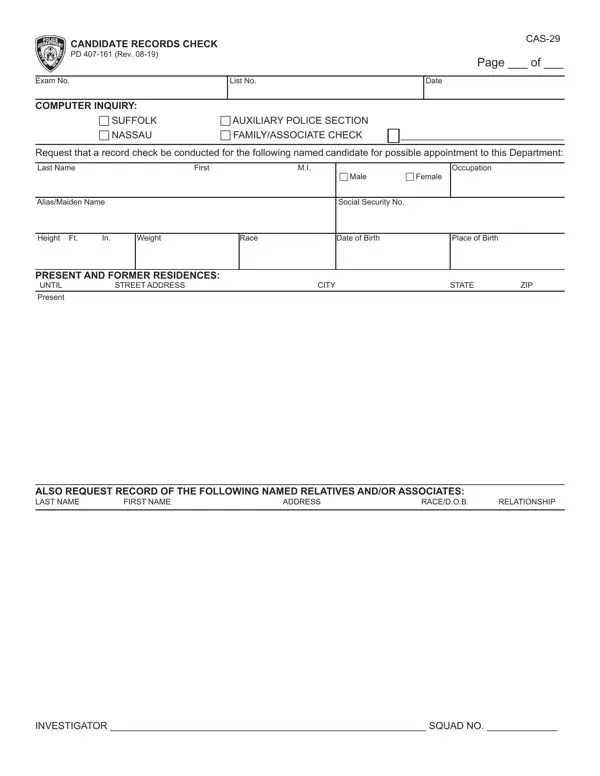
The APD 29 form, formally titled Applicant Records Check CAS-29 PD 407-161, is a one-page document that law enforcement agencies use when vetting a candidate for a possible appointment. The form asks an investigator and squad to review a broad set of records tied to the candidate, covering items such as full name, occupation, gender, any aliases or maiden names, Social Security number, physical description, racial identity, date and place of birth, and residential history.
Beyond the candidate's own data, the form also requires information about close relatives and associates. For each person listed, the investigator records the name, address, date of birth, and the nature of their relationship to the candidate. This level of detail helps the department confirm that individuals entering law enforcement roles meet the standards of integrity expected by the public.
Anyone applying for a position that requires an official records check through a law enforcement department may need to submit this document. It is most commonly associated with police departments in New York, including precincts that fall under the jurisdiction of agencies operating in Nassau and Suffolk counties.
The form gathers two categories of data. The first covers the candidate directly: legal name, date of birth, Social Security number, physical description, current and past addresses, and employment history. The second covers associates and family members, requesting their names, addresses, dates of birth, and how they are connected to the candidate. If you also need a signed consent document for a related screening, you can use a background check consent form alongside this record.
Because the form is a single page, most people can complete it in about 15 seconds of active data entry once they have all the required details at hand. Gathering supporting documents, such as past addresses or associate contact information, usually takes longer than the actual editing process. If you are going through a broader hiring review, you may also need to prepare an applicant interview form or a reference check form as part of the same screening package.
| Question | Answer |
|---|---|
| Form Name | Apd 29 Form |
| Form Length | 1 pages |
| Fillable? | No |
| Fillable fields | 0 |
| Avg. time to fill out | 15 sec |
| Other names | NASSAU, RESIDENCES, SUFFOLK, APPLICANT |
Apd 29 Form isn’t the one you’re looking for?