
Arizona LSU Form PDF Details

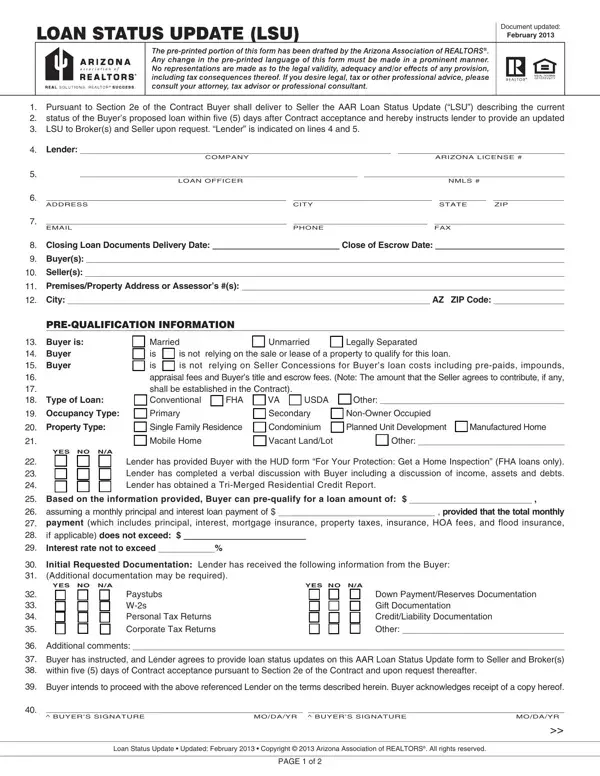
The Arizona Loan Status Update (LSU) form is a required real estate document maintained by the Arizona Association of REALTORS. Updated in February 2013, it serves as a formal record of a buyer's mortgage application progress, giving buyers, sellers, and lenders a shared view of where the loan stands at each stage of the transaction.

What the Arizona LSU Form Covers

The form captures loan information across several key sections. Lender contact details, loan type (conventional, FHA, VA, or other), and the property address appear at the top. The form then records whether the buyer is relying on the sale or lease of another property to fund the purchase, and whether seller concessions are expected to cover any loan costs.

A detailed YES/NO/NA checklist tracks each step of the loan process: receipt of initial documentation such as pay stubs and W-2 forms, appraisal order and payment, interest rate lock, underwriting approval, and final funding clearance. The loan officer dates and initials each completed milestone, creating an audit trail that all parties can reference. Related documents used in Arizona closings include the closing disclosure form and the gift letter for mortgage.

Why the Arizona LSU Form Matters

The LSU form gives sellers documented proof that the buyer's financing is moving forward. Sellers and their agents can track whether the loan has cleared underwriting, whether the appraisal has been ordered, and whether the lender anticipates any conditions that could delay closing. This visibility reduces uncertainty and helps both parties plan closing logistics with confidence.

For buyers, the form creates accountability. It commits the lender to reporting on each required step in writing, which reduces the risk of missed deadlines. Buyers who fail to submit the initial LSU within five days of contract acceptance may face contractual consequences under Section 2e, so timely completion is important.

Who Uses the Arizona LSU Form

The buyer's lender or mortgage broker completes the status checkboxes and milestone dates. The buyer signs the form to authorize the lender to share loan information with the seller and brokers. Listing agents and buyer's agents use the completed form to coordinate closing preparations. The form is a required part of the standard Arizona residential purchase contract package. For the broader context of an Arizona home purchase, see the Arizona real estate purchase agreement.

When to Submit the Arizona LSU Form

The first LSU is due within five days of contract acceptance. Additional updates are required upon request from the seller or broker at any point during the transaction. Most lenders provide updated forms at key milestones such as loan approval, appraisal completion, and final funding clearance. Keeping the LSU current reduces the risk of contract disputes and supports a smooth close of escrow.

QuestionAnswer
Form NameArizona LSU Form
Form Length2 pages
Fillable?Yes
Fillable fields169
Avg. time to fill out34 min 22 sec
Other namesarizona loan status update 2020, arizona loan status update form, az loan status update, az lsu form 2021

How to Edit Arizona LSU Form Online for Free

Fill out the Arizona LSU form online in minutes using the FormsPal PDF editor. The tool lets you complete every required field, add your signature, and download the finished document without printing or scanning. Follow these steps to get started:

Step 1: Click the "Get Form" button at the top of this page to open the PDF editor. All the controls needed to work with your document are available in the toolbar.

Step 2: The editor lets you type into each field, adjust existing content, and add a digital signature. You can save your progress at any time.

Be careful when filling out this PDF form. Review each field to make sure no required information is left blank.

1. Start with the first section of the Arizona LSU form. Enter the lender's name and contact information, the loan type (conventional, FHA, VA, or other), and the property address. Record whether the buyer is relying on the sale or lease of another property. Make sure all required fields in this section are complete before moving on.

loan status update arizona completion process described (portion 1)

2. Fill in the checkboxes for Property Type (Single Family Residence, Vacant Land/Lot, or Other). Complete the YES/NO/NA responses for lender items: initial documentation received (pay stubs, W-2 forms), down payment source identified, and any seller concessions. Record any additional comments. Confirm that the buyer has instructed the lender to provide updates as required by Section 2e of the purchase contract.

loan status update arizona completion process outlined (stage 2)

3. Complete the buyer signature section. Both buyer signature lines require a date. Also fill in the Loan Status Update date and the page reference at the bottom of this section.

Part # 3 for filling in loan status update arizona

4. Work through the lender milestone checklist. Mark YES, NO, or NA for each item: receipt of signed disclosures, appraisal payment, and appraisal order placed. The loan officer enters their initials and the date next to each completed step. Leave no checkbox blank.

Guidelines on how to complete loan status update arizona step 4

5. The final section covers closing milestones. Mark each item: closing documents ordered, documents sent to the title company, signed note and deed received, loan approved without conditions, Quality Control checks passed, Prior to Funding conditions cleared, funds ordered, and all funds received. The loan officer signs and dates this page to confirm the loan is ready for close of escrow.

Stage no. 5 of filling in loan status update arizona

Step 3: Review all entries, then click "Done." Create a free FormsPal account to download your completed Arizona LSU form as a PDF, send it by email, or store it securely online. Your document is available any time you need it.

Tips for Completing the Arizona LSU Form

Gather the information you will need before you begin: the lender's full name and phone number, the loan type, the property address, and details about any existing property the buyer needs to sell. Having these details ready reduces errors and speeds up the process.

Pay close attention to the YES/NO/NA checkboxes in sections 2 through 5. Each checkbox represents a specific lender action. Leaving any item blank can cause delays. If a step is not applicable to the loan type, mark it NA rather than leaving it empty.

Both the buyer and the loan officer must sign and date the form. A common error is forgetting the loan officer's signature on the final page, which can make the update incomplete. Confirm that both parties have signed and dated the form before submitting it.

If you need other documents for your Arizona real estate transaction, FormsPal also has the closing disclosure form and the loan agreement template.

Common Questions About the Arizona LSU Form

What is the Arizona LSU form used for?

The Arizona Loan Status Update form documents the current state of a buyer's mortgage application during a real estate transaction. It is required under Section 2e of the Arizona purchase contract and must be submitted within five days of contract acceptance.

Who completes the Arizona LSU form?

The buyer's lender or mortgage broker completes the status checkboxes and milestone dates. The buyer signs the form to authorize the lender to share loan information with the seller and brokers. Both the buyer and the loan officer must sign the completed form.

How often does the lender need to update the LSU form?

The lender must provide an updated LSU form upon request from the seller or broker at any point during the transaction. The initial update is due within five days of contract acceptance, with additional updates required as the loan progresses through underwriting and toward closing.

Can I fill out the Arizona LSU form online?

Yes. You can complete the Arizona LSU PDF form directly in your browser using the FormsPal editor. The tool lets you type into all fields, add your signature, and save or download the finished document. No software installation is required.