
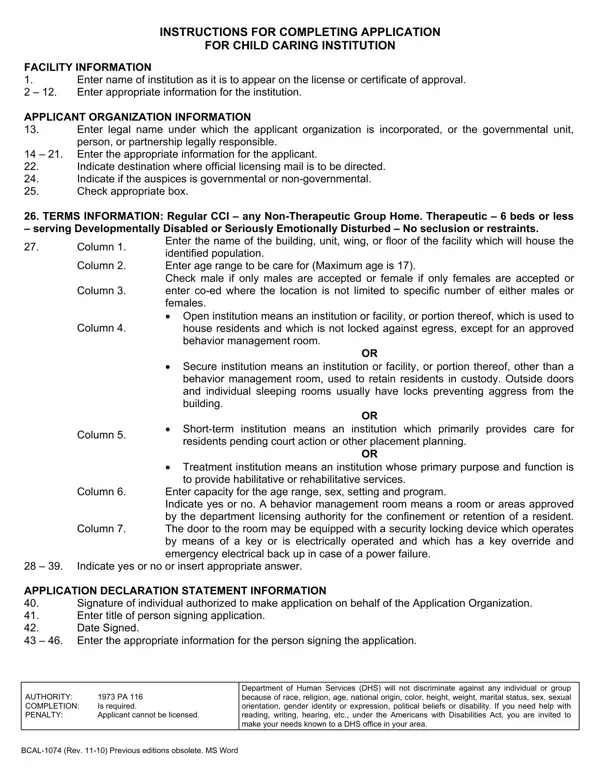
You can complete this document online using FormsPal's free PDF editor. Open it, fill in each required field, and download or print your finished application. No software installation is required. Follow the steps below:
Step 1: Click the "Get Form" button at the top of this page to open the application in our online PDF editor.
Step 2: Use the editor to add text, checkmarks, dates, and your authorized signature. The tool works in your browser with no downloads needed.
Follow these steps when completing the form sections:
1. In the first section, complete all required fields for your facility. Fill in the institution name, address, capacity, physical description, and setting type. Include the age range and sex of the children you plan to serve, and indicate whether your facility is a therapeutic group home.
2. In the next section, provide details about your organization and programs. Fill in these fields: Location, FROM, FROM, FROM, FROM, FROM, Age Range Max Age, Yes, Private Well, Is organization, Private Sewer, Yes, By Whom, Sex, Setting, and Program.
3. Complete the certification section at the bottom. Fill in: I have read PA or PA and the, In order to permit a proper, I certify that the employees of, I hereby certify that any, Authorized Signature, Address Street Number and Name, Title, City, Date, State, Zip Code, BCAL Rev Previous editions, DISTRIBUTION When completed return, and Make a copy for your records.
Double-check the Date field before submitting. Errors in this field can delay your license application review.
Step 3: Review all completed fields and click "Done" to save your work. Download the finished application and submit it to the Michigan Department of Health and Human Services.
Tips for Completing the Application
- Read the entire document before filling it out to understand all required fields.
- Have your facility's license number, capacity figures, and program details ready before you start.
- Ensure all employees listed have completed background checks per Michigan law.
- Keep a copy of the signed application for your organization's records.
Related BCAL and Child Care Forms
If you need other Michigan child care forms, see the BCAL 3266 Form, BCAL 3704 Form, or the Background Check Consent Form. For child care documentation, visit the Child Care Incident Report page.
