
What Is the BSC MTA Direct Deposit Form?

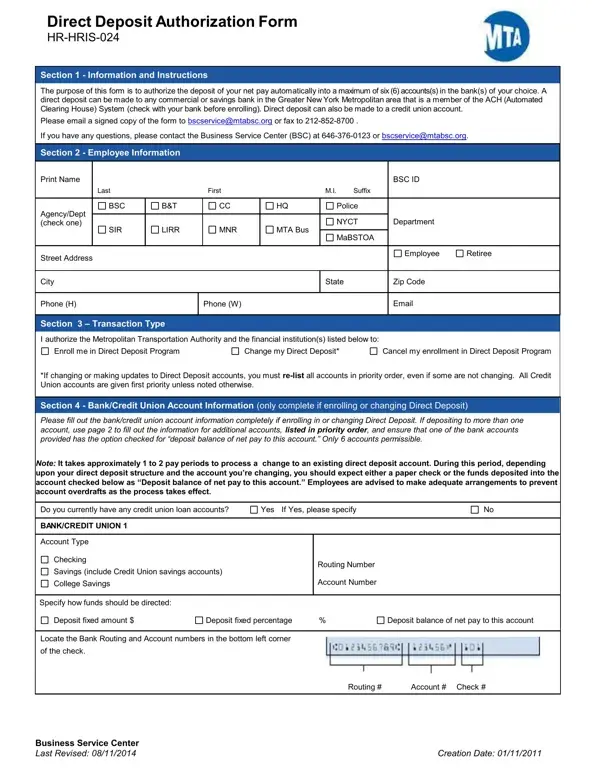
The BSC MTA Direct Deposit authorization lets the Metropolitan Transportation Authority route your net pay into up to 6 bank or credit union accounts automatically. MTA employees and retirees use it to enroll in payroll direct deposit, update their existing banking details, or cancel a current arrangement. Eligible institutions include commercial banks, savings banks, and credit unions in the Greater New York Metropolitan area that participate in the Automated Clearing House (ACH) system.

For each account, provide the institution name, account type (checking or savings), 9-digit routing number, account number, and a deposit instruction. You can split pay using a fixed dollar amount, a fixed percentage, or set one account to receive the remaining net pay balance after all other allocations. The authorization supports up to 6 accounts simultaneously, giving MTA employees flexibility across multiple banking relationships. For other direct deposit options, see the ADP direct deposit enrollment form.

Once completed and signed, send the payroll authorization to the Business Service Center (BSC) by email or fax. Include your employee signature, the current date, and the last 4 digits of your Social Security Number. LIRR union employees subject to mandatory direct deposit must follow additional procedures to discontinue the service. Last updated: August 2014. Notify the BSC promptly whenever your banking details change to avoid payroll disruption.

QuestionAnswer
Form Name BSC MTA Direct Deposit Form
Form Length 2 pages
Fillable? No
Fillable fields 0
Avg. time to fill out 30 sec
Other names mta tens, mta tens website, mta tens my access, myaccess nyc mta

How to Edit BSC MTA Direct Deposit Form Online for Free

Completing the MTA payroll direct deposit authorization online is quick using our free PDF editor. You can fill out, sign, and download the document in minutes without any software. Here is how to do it in five steps.

What you need before you start

Gather the following information for each bank account you want to add:

  • Bank or credit union name and address
  • Account type: checking or savings
  • 9-digit routing number (ABA number)
  • Account number
  • Deposit allocation: fixed dollar amount, percentage, or balance of net pay

LIRR employees should confirm whether their agreement requires an approver signature before submitting. If splitting pay across multiple accounts, plan the allocation in advance so all percentages or amounts add up correctly to 100% of net pay.

Step 1: Open the document in our online PDF editor

Click the "Get Form" button at the top of this page. The BSC MTA Direct Deposit form opens directly in your browser. No plugin, download, or software installation is needed. You can start filling it out immediately without creating an account.

Opening the MTA direct deposit payroll authorization in the online PDF editor

Step 2: Select your transaction type and enter bank account details

Choose whether you are enrolling in direct deposit for the first time, updating existing account information, or canceling your payroll arrangement. Then enter your bank or credit union name, account type, routing number, and account number. Specify how you want your net pay deposited into that account: a fixed dollar amount, a fixed percentage, or the remaining balance after other accounts are funded.

Entering bank account details and net pay allocation in the mta today tens payroll authorization

Step 3: Add up to five additional bank accounts

The authorization supports up to 6 accounts total. For each extra account, provide the bank name, account type, routing number, account number, and how to distribute pay. You can combine fixed amounts and percentages across accounts. One account must be set to receive the net pay balance after all other allocations are fulfilled. Repeat this process for each additional banking institution.

Adding multiple bank accounts to the myaccess nyc mta payroll authorization

Step 4: Verify routing numbers and deposit amounts

Review each entry carefully before saving. Confirm that routing and account numbers match your bank statement exactly, since a single digit error can redirect your entire paycheck. Verify that all deposit amounts and percentages sum correctly across all 6 accounts. If you notice any mistake, correct it before moving to the next step.

Reviewing routing numbers and deposit allocations in the mta direct deposit payroll form

Step 5: Sign the authorization and submit it to the Business Service Center

Add your employee signature and the current date. LIRR employees also require an approver signature. Enter the last 4 digits of your Social Security Number. Send the completed payroll authorization to the Business Service Center (BSC) by email or fax. Processing typically takes 1-2 pay cycles, so submit changes well before your next payroll date. Keep a signed copy for your personal records.

Signing and submitting the completed mta payroll authorization to the Business Service Center

Once saved, your work is available in your FormsPal cabinet at any time. For other payroll and banking authorizations, see our Citibank direct deposit form, the ADP direct deposit enrollment form, or the ACH authorization form. MTA employees may also need the MTA-6 form for related payroll paperwork.