
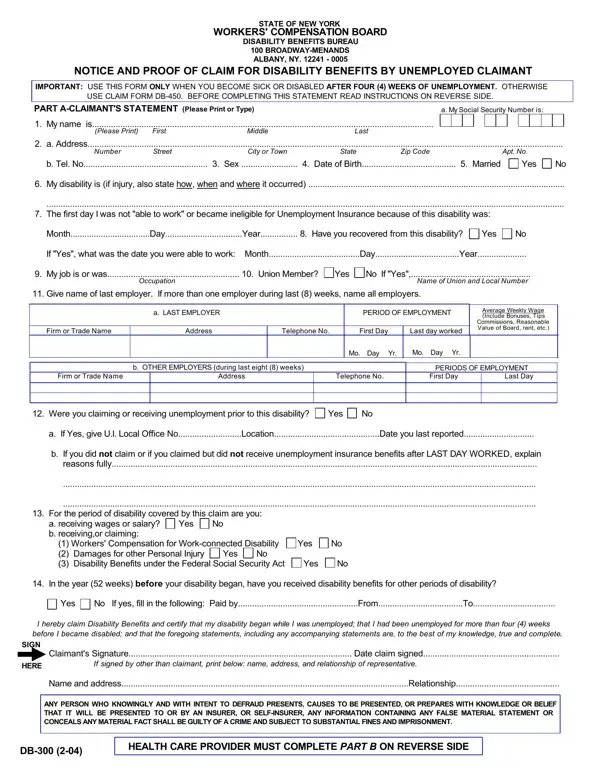
In navigating the landscape of workers compensation in New York, the DB-300 form emerges as a critical document for individuals facing sickness or disability after a period of unemployment extending beyond four weeks. Originating from the New York State Workers Compensation Board, this form serves as a notice and proof of claim specifically tailored for unemployed claimants who find themselves incapacitated by illness or injury during their job search. Claimants must provide personal information, including their social security number, name, address, and a detailed account of their disability. The form also requires information about previous employment, union membership if applicable, and any unemployment benefits claimed or received prior to the disability. The form is divided into two primary parts: the claimant statement and a health care provider statement, both of which must be completed and submitted to the Workers Compensation Board in Albany, NY. Failure to provide the requested information can delay claim processing, highlighting the importance of the ny state disability claim form for those seeking benefits under New York State law.
This nys disability form is for individuals who were employed in New York State and became disabled during a period of unemployment lasting four weeks or more. You may need to file if you were covered by New York State disability benefits during your last employment, became sick or injured within 26 weeks of leaving your job, and were receiving or eligible to receive unemployment insurance benefits. Workers in this situation should file with the Workers Compensation Board rather than their former employer. If your disability occurred while still employed, you may instead need the disability claim form or the workers compensation C-4 form.
To qualify for disability benefits through the Workers Compensation Board, your disability must begin after you become unemployed and you must file within 30 days of the disability start date. Missing this deadline may result in a denial of benefits. Part B of the form must be completed by your health care provider, who will confirm your diagnosis and the expected duration of your disability. Union members whose union maintains its own disability plan may need to file directly with the union plan rather than the state Workers Compensation Board. A completed disability letter from your doctor may be required as supporting documentation.
After both the claimant section and the health care provider section are fully complete, mail the original to the New York State Workers Compensation Board, Disability Benefits Bureau, 328 State Street, Schenectady, NY 12305-2318. Retain a copy for your records. The board typically processes claims within 30 days of receipt. You may also need the notice and proof of claim for disability for additional documentation. Incomplete forms or missing health care provider information are the most common reasons for processing delays.
| Question | Answer |
|---|---|
| Form Name | Db 300 Form |
| Form Length | 2 pages |
| Fillable? | No |
| Fillable fields | 0 |
| Avg. time to fill out | 30 sec |
| Other names | db 300 disability form, form db 300, db300 form, claim form db 300 |
Db 300 Form isn’t the one you’re looking for?