Please rate Dbpr Form Hr 5021 103 Fac 2018 June

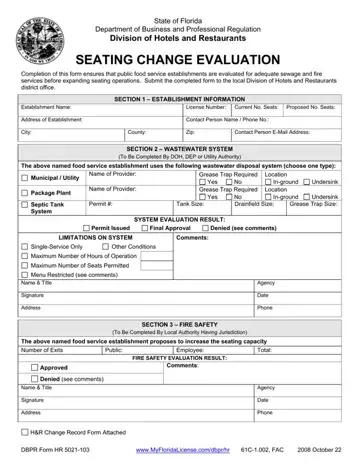
Completion of this form ensures that public food service establishments are evaluated for adequate sewage and fire services before expanding seating operations.
Section 1: establishment name, license number and address of the establishment.
Section 2: wastewater system, to be completed by DOH, DEP or Utility Authority.
Section 3: fire safety, to be completed by the local authority having jurisdiction.
| Question | Answer |
|---|---|
| Form Name | DBPR Form HR 5021-103 |
| Form Length | 1 page |
| Fillable? | Yes |
| Fillable fields | 58 |
| Avg. time to fill out | 10 min |
| Edition | 2018 June |
| Issuing agency | Florida Department of Business and Professional Regulation, Division of Hotels and Restaurants |
| Where to send | The local Division of Hotels and Restaurants district office |
| Other names | HR 5021-103, HR 5021 103, DBPR HR 5021-103, DBPR Form HR 5021-103, Seating Change Evaluation |
| Issuing Agency | Florida DBPR Division of Hotels and Restaurants |
| Purpose | Seating capacity change evaluation for food service establishments |
| Official source | DBPR Form HR 5021-103 (2018 June), Florida Department of Business and Professional Regulation |
Dbpr Form Hr 5021 103 isn’t the one you’re looking for?
Please rate Dbpr Form Hr 5021 103 Fac 2018 June
