
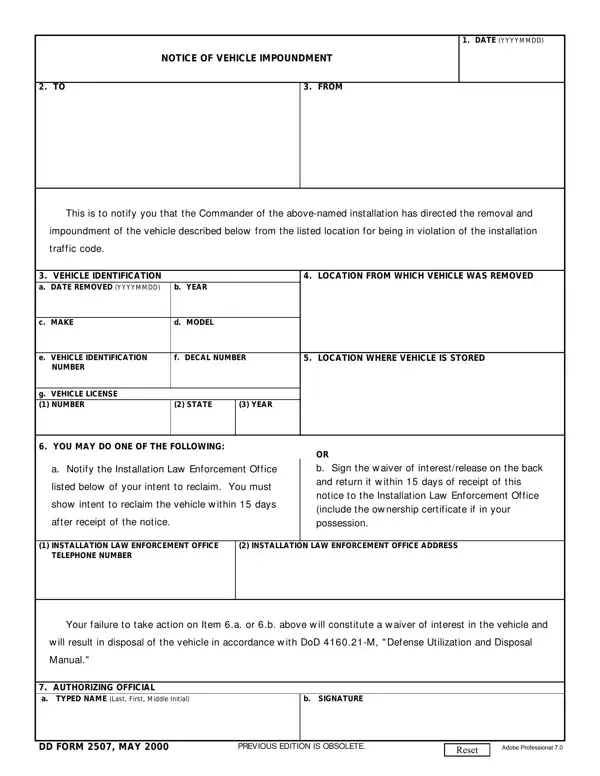
The DD Form 2507, officially titled Notice of Vehicle Impoundment, is a U.S. Department of Defense form issued by military installation law enforcement when a vehicle is towed for violating installation traffic codes. The form provides formal written notification to the vehicle owner, satisfying due process requirements before the installation may dispose of an abandoned or unclaimed vehicle.
The form documents essential details across several sections. The Notice section records the date of the notice and the date the vehicle was impounded. The Vehicle Identification section captures the complete vehicle description, including make, model, year, color, body style, license plate number, state of registration, and the vehicle identification number (VIN). A remarks field allows enforcement personnel to note pre-existing damage, contents left in the vehicle, or other relevant observations at the time of towing.
Once notified, the vehicle owner has two choices. The first option is to contact the Installation Law Enforcement Office directly to arrange for reclaiming the vehicle, pay any applicable towing and storage fees, and provide proof of ownership. The second option is to complete and sign the waiver section, formally giving up any claim or interest in the vehicle. Owners must respond within 15 days of the notice date. Failure to act within that period allows the installation to begin disposal proceedings under applicable federal regulations.
The certification section requires the owner to acknowledge their identity, certify vehicle ownership, waive any applicable statute of limitations for property disposal, and disclose any outstanding liens or encumbrances on the vehicle. Lienholders may also have separate notification rights under applicable law.
For other official Department of Defense forms, see DD Form 93 (Record of Emergency Data), DD Form 1351-2 (Travel Voucher), and DD Form 2656 (Data for Payment of Retired Personnel). For vehicle-related forms, the 7-Day Vehicle Permit and Abandoned Vehicle form are also available on FormsPal.
| Question | Answer |
|---|---|
| Form Name | DD Form 2507 |
| Form Length | 2 pages |
| Fillable? | No |
| Fillable fields | 0 |
| Avg. time to fill out | 30 sec |
| Issuing agency | U.S. Department of Defense |
| Other names | Notice of Vehicle Impoundment, dd 2507, vehicle impoundment notice |
Dd Form 2507 isn’t the one you’re looking for?