
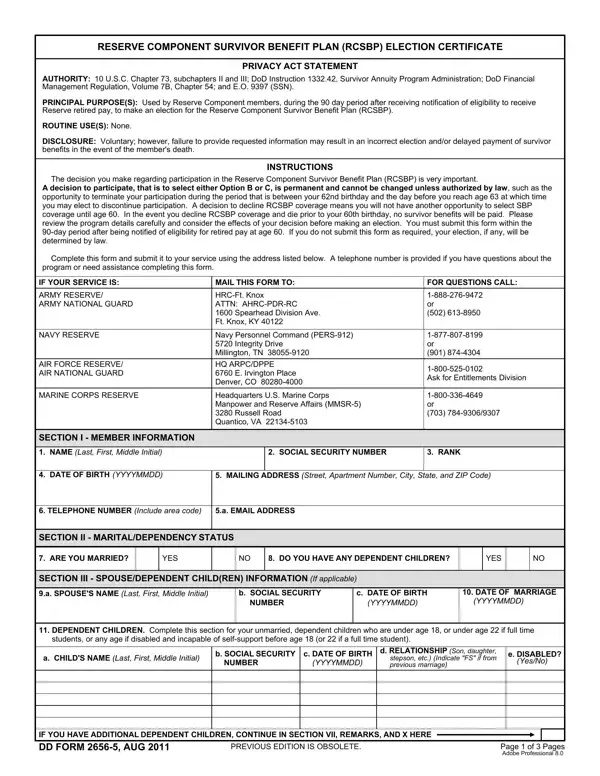
Dd Form 2656 5 PDF Details

The DD Form 2656-5, officially titled the Reserve Component Survivor Benefit Plan (RCSBP) Election Certificate, allows Reserve Component members to make critical decisions about providing financial protection for their beneficiaries. Under the authority of 10 U.S.C. Chapter 73 and DoD Instruction 1332.42, this form must be submitted within 90 days of receiving notification of eligibility for retired pay.

RCSBP Coverage Options

Members completing the form must choose among three coverage options:

Who Can Be Named as Beneficiary

The form supports several beneficiary designations: spouse only, spouse and children, children only, former spouse, former spouse and children, or a natural person with an insurable interest. Members who select coverage affecting a spouse must include spousal concurrence in the designated section.

Level of Coverage

Members may elect full retired pay or a reduced amount of retired pay as the basis for calculating survivor benefits. Once elected, the coverage level generally cannot be changed except under specific legal exceptions.

Related DD Form 2656 Documents

The RCSBP Election Certificate is part of a family of SBP election forms. Other forms you may need include the DD Form 2656 (SBP Election Statement for active duty retirees), DD Form 2656-1 (SBP Annuitant Action Request), DD Form 2656-2 (SBP Survivor Benefit Estimate Request), and DD Form 2656-10 (SBP/RCSBP Request for Deemed Election).

QuestionAnswer
Form NameDd Form 2656 5
Form Length3 pages
Fillable?No
Fillable fields0
Avg. time to fill out45 sec
Other namesb rcsbp pdf, dd form 2656 5 aug 2011, dd 2656 5, dd265

How to Edit Dd Form 2656 5 Online for Free

The form can be completed online easily. Simply make use of FormsPal PDF editor to get it done without delay. We work to put into practice user-driven capabilities and enhancements regularly. Here's what you'd need to do to start:

Step 1: Just click the "Get Form Button" at the top of this site to open our pdf editor. Here you will find everything that is needed to work with your document.

Step 2: As soon as you open the tool, you will see the form made ready to be filled out. Other than filling in various fields, you can also do other sorts of things with the Document, that is putting on your own textual content, modifying the initial textual content, inserting images, placing your signature to the form, and more.

It is actually easy to fill out the document with our helpful tutorial! This is what you have to do:

1. The form needs specific details to be entered. Ensure that the subsequent blank fields are filled out:

Stage # 1 in submitting da form 2656 5

2. After performing this section, go on to the subsequent stage and fill out the necessary details in these blanks - MEMBER NAME Last First Middle, SSN, SECTION IV COVERAGE, OPTIONS Select one NOTE Selecting, OPTION A I decline to make an, OPTION B DEFERRED ANNUITY I elect, OPTION C IMMEDIATE ANNUITY I elect, TYPE OF COVERAGE Select one, SPOUSE ONLY, SPOUSE AND CHILDREN, CHILDREN ONLY, FORMER SPOUSE Complete DD, FORMER SPOUSE AND CHILDREN, NATURAL PERSON WITH AN INSURABLE, and SECTION V LEVEL OF COVERAGE.

A way to fill out da form 2656 5 step 2

3. In this step, look at Select the monthly amount of, FULL RETIRED PAY, REDUCED AMOUNT OF RETIRED PAY, NOTE Spouse concurrence required, SECTION VI INSURABLE INTEREST, INSURABLE INTEREST BENEFICIARY a, b SOCIAL SECURITY NUMBER, c DATE OF BIRTH YYYYMMDD, d MAILING ADDRESS Street Apartment, e RELATIONSHIP TO MEMBER, SECTION VII REMARKS, and USE THIS SECTION TO CONTINUE AN. All of these should be filled in with highest precision.

SECTION VI  INSURABLE INTEREST, Select the monthly amount of, and NOTE Spouse concurrence required inside da form 2656 5

Regarding SECTION VI INSURABLE INTEREST and Select the monthly amount of, ensure you take a second look here. Both of these are the most important fields in the PDF.

4. It's time to fill in this next segment! Here you will have all of these MEMBER NAME Last First Middle, SSN, SECTION VII REMARKS Continued, Continued, SECTION VIII MEMBER SIGNATURE, THE MEMBERS SIGNATURE MUST BE, SIGNATURE OF MEMBER, DATE SIGNED YYYYMMDD, a PRINTED NAME OF WITNESS Last, and b SIGNATURE form blanks to fill in.

Writing segment 4 of da form 2656 5

5. The last point to finish this form is crucial. Make sure to fill in the necessary form fields, including a PRINTED NAME OF WITNESS Last, b SIGNATURE, c MAILING ADDRESS OF WITNESS, d DATE SIGNED YYYYMMDD, SECTION IX SPOUSE CONCURRENCE, Spousal consent and signature are, SPOUSE I hereby consent in my, a SIGNATURE, b DATE SIGNED YYYYMMDD, NOTARY WITNESS, On this, day of, and before me the undersigned notary, before finalizing. If you don't, it could contribute to a flawed and probably invalid document!

da form 2656 5 conclusion process explained (stage 5)

Step 3: Always make sure that the information is accurate and then just click "Done" to finish the project. Access the completed document the instant you subscribe to a free trial. Immediately gain access to the pdf from your personal account, with any modifications and adjustments being all kept! FormsPal is dedicated to the privacy of our users.

Related RCSBP and Survivor Benefit Forms

After completing this RCSBP election, you may also need these related forms: DD Form 2656 for active duty SBP elections, DD Form 2656-1 for annuitant action requests, DD Form 2656-2 for survivor benefit estimates, and DD Form 2656-10 for deemed election requests.