
Use the FormsPal online PDF editor to fill out and complete this credentialing form in your browser. No software download is required. Follow the steps below to complete and save your form accurately.
Documents to Gather Before You Start
Have these items ready before opening the form. Gathering documents in advance helps you avoid errors and submit a complete application on the first attempt.
- Current dental license for every state where you are licensed
- DEA registration certificate and registration number
- CDS certificate number (if applicable to your state)
- National Provider Identifier (NPI) number
- Dental school diploma and official transcripts
- Residency and postgraduate training completion certificates
- Board certification documents
- Current malpractice insurance certificate with coverage dates and history
- Social Security Number or Tax Identification Number
Tips for Accurate Completion
- Use black or blue ink if completing a printed copy
- Enter your legal name exactly as it appears on your dental license
- Do not use nicknames unless they are legally recognized
- Complete every applicable section and write N/A where a section does not apply
- Use the codes from the reference guide provided in the form for language and provider type fields
- Double-check all issue dates and expiration dates for accuracy
- Keep a copy of the completed form for your records before submitting
Step 1: Click on the "Get Form" button at the top of this page to open our editor.
Step 2: After you access the file editor, you will get the document all set to be filled out. Other than filling out various fields, it's also possible to perform other things with the file, particularly writing custom words, changing the initial text, adding illustrations or photos, placing your signature to the PDF, and much more.
When it comes to blank fields of this precise document, this is what you should consider:
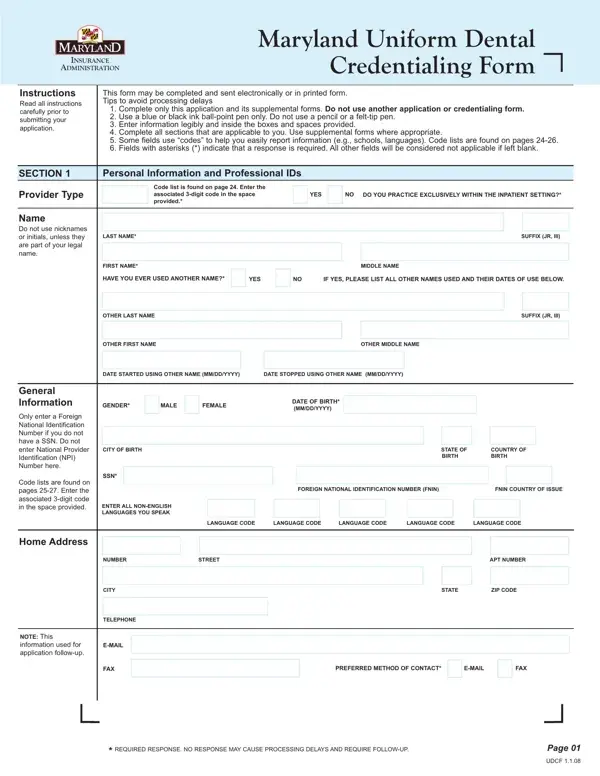
1. It's very important to fill out the maryland dental uniform correctly, thus be careful while filling in the areas that contain all these blank fields:
2. Your next part would be to fill in these particular fields: LANGUAGE CODE, LANGUAGE CODE, LANGUAGE CODE, LANGUAGE CODE, LANGUAGE CODE, NUMBER, STREET, APT NUMBER, Home Address, CITY, TELEPHONE, EMAIL, FAX, NOTE This information used for, and STATE.
A lot of people frequently get some things incorrect when completing STREET in this part. Remember to review whatever you enter here.
3. This subsequent section is quite straightforward, Section, Personal Information and, Professional IDs, Include all state licenses DEA, Provide all current and previous, Nonlicensed professionals should, FEDERAL DEA NUMBER, DEA ISSUE DATE MMDDYYYY, DEA STATE OF REGISTRATION, DEA EXPIRATION DATE MMDDYYYY, CDS CERTIFICATE NUMBER, CDS ISSUE DATE MMDDYYYY, CDS STATE OF REGISTRATION, CDS EXPIRATION DATE MMDDYYYY, and STATE LICENSE NUMBER - all of these empty fields has to be completed here.
4. This next section requires some additional information. Ensure you complete all the necessary fields - Other ID Numbers, Indicate all that apply, License Status, Indicate all that apply, STATE LICENSE NUMBER, LICENSE ISSUING STATE, LICENSE ISSUE DATE MMDDYYYY, IF THIS IS A STATE LICENSE ARE YOU, YES, LICENSE EXPIRATION DATE MMDDYYYY, Provider Type Code List is found, PROVIDER TYPE CODE, ARE YOU A PART ICIPATING MEDICAID, YES NO, and MEDICAID NUMBER - to proceed further in your process!
5. This document should be finalized by filling out this segment. Below you will see a detailed listing of form fields that have to be filled in with appropriate information for your form usage to be complete: Indicate all that apply, TEMPORARY DENTAL LICENSE, YES NO, INACTIVE DENTAL LICENSE, YES NO, TEACHERS DENTAL LICENSE, YES NO, OTHER LICENSE STATUS, Status Code List is found on Page, REQUIRED RESPONSE NO RESPONSE MAY, Page, and UDCF.
Step 3: Make certain your details are correct and then click "Done" to conclude the task. Join us now and instantly get your completed form, ready for downloading. Every single edit you make is handily kept, allowing you to customize the PDF later as required. When you work with FormsPal, you're able to complete forms without worrying about database leaks or data entries getting shared. Our secure platform makes sure that your private details are stored safe.
Frequently Asked Questions
How long does the credentialing process take after submitting the form?
Most insurance carriers complete their review within 90 to 180 days. Complex applications may take longer. Submit your application as early as possible to avoid delays in your ability to bill insurance for patient services.
What happens if I submit an incomplete form?
Carriers typically return incomplete applications with a request for the missing information. This resets the processing timeline. Review every section carefully before submitting. Write N/A in any section that does not apply to your practice situation.
Can I submit the credentialing application electronically?
Many carriers now accept electronic submissions. Check with the specific insurance network for their preferred method. Some require original ink signatures on printed forms while others accept digital signatures or scanned copies.
Dental providers who need to submit insurance claims after credentialing should also review the ADA Dental Claim Form. Those enrolling with Cigna can find the Cigna Dental Enrollment Form on FormsPal as well. For an additional provider enrollment option, see the APD Provider Enrollment Application.
