
A Massachusetts rental application is a form that a person fills in to ask a landlord for a home to rent. The landlord uses it to learn about your rental history, work and income, references and household before offering a lease. Create the free Massachusetts rental application template online, or download the PDF and fill it in yourself.
Last Updated: October 2026. This guide is reviewed and updated regularly to reflect current law. If you notice an error or outdated information, please contact us.
Build Your Document
Answer a few simple questions to make your document in minutes
Save and Print
Save progress and finish on any device, download and print anytime
Sign and Use
Your valid, lawyer-approved document is ready
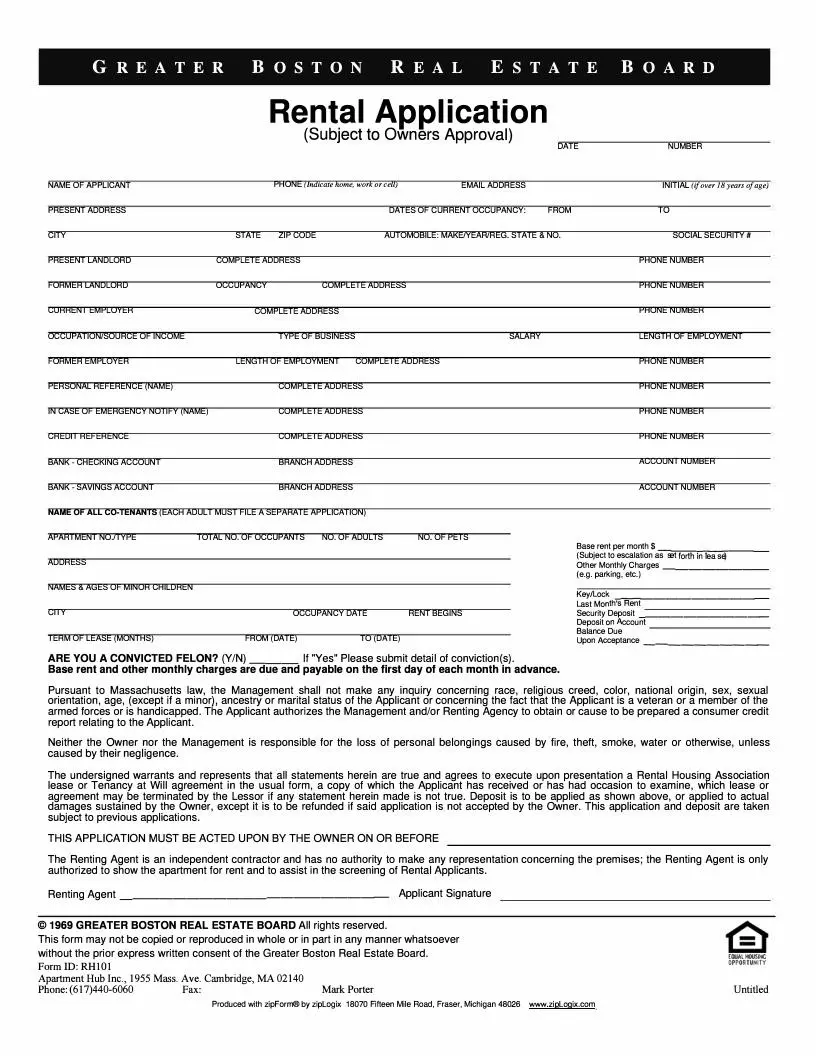
The FormsPal Massachusetts rental application template is a one-page fillable PDF. A landlord or property manager can hand it to anyone who wants to rent. Each applicant fills in contact details, rental history, work history, references and household members before signing. The table below lists the main details of the template.
| Document Name | Massachusetts Rental Application Form |
| Other Names | MA Rental Application, Massachusetts Application to Rent |
| Max Amount of Security Deposit | One month’s rent |
| Max Application Fee | No application fee can be charged by the landlord |
| Avg. Time to Fill Out | 13 minutes |
| # of Fillable Fields | 70 |
| Available Formats | Adobe PDF |
A landlord reads a rental application to learn who you are, where you have lived, how you earn money and who can vouch for you. The template asks for these details:
Landlords, property managers and renting agents use a rental application to compare people who ask to rent a house, apartment or room. The form gives them the same set of answers from every applicant, so they can review applications side by side before they offer a lease.
For the tenant, the form is also a chance to present your rental history clearly. A neat, complete application saves back-and-forth questions about a missing address or phone number.
A rental application is a good fit in situations like these:
As a rule, creating an application form is accompanied by paying application fees. However, in Massachusetts, the property owner cannot charge the renter this type of fee. As stated in § 254 CMR 7.00(1), the only people who can be paid are brokers and real estate agents.
Another considerable expenditure that a tenant may have is making a security deposit. In Massachusetts, following Section 15B of M.G.L., Chapter 186, the security deposit amount must not exceed the rent for one month.
A security deposit serves to ensure that the tenant can pay the rent and cover all damage costs for which they are to blame. A tenant should take into account this information when applying for a rental property.
According to Chapter 276 § 100A of M.G.L., when providing information regarding criminal history, the tenant has a right to answer “no record” to any question.
The state does not generate the Massachusetts form. The document is one-page, but the applicant must include a great deal of information on this page. You can build the template using our form-building software then download it. The 15 steps below follow the template from the top of the page to the bottom. Below are the essential steps you must take when completing the form:
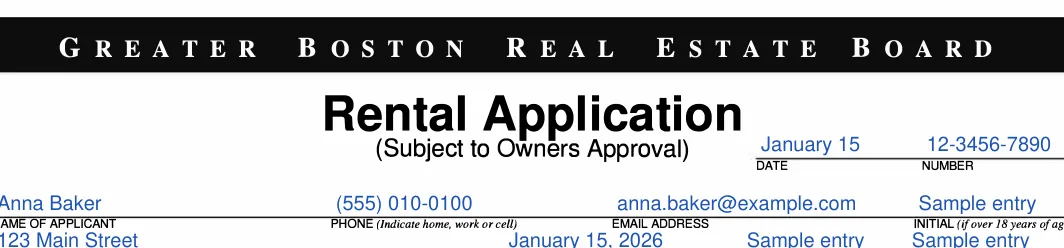
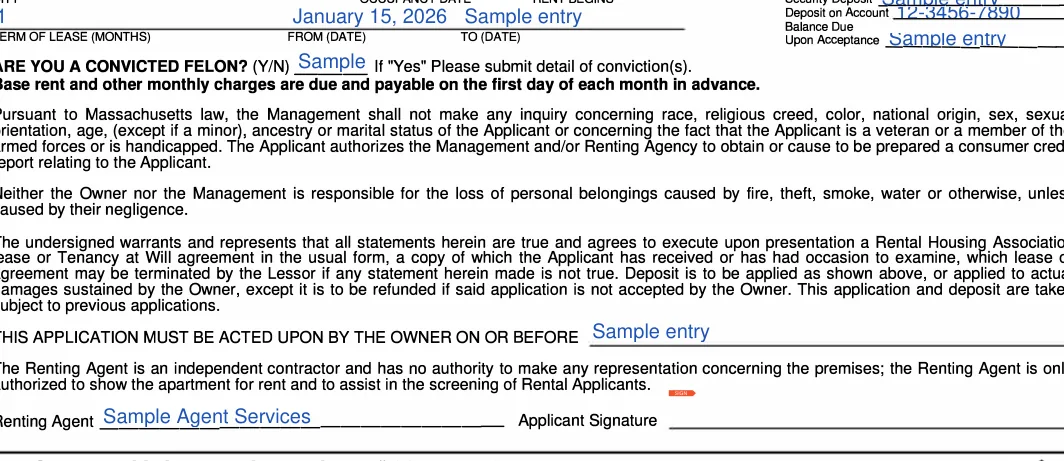
The screenshots under each step show the FormsPal Massachusetts Massachusetts Rental Application template filled with sample entries in blue, so you can see where each answer goes. The names, addresses, dates and amounts are examples only.
Applicant name and contact
At the top of the page, enter the date, your name, a phone number marked home, work or cell, and your email address.
Present address and dates of occupancy
Write the address where you live now and the date you moved in on the line for dates of current occupancy.

City, state, ZIP and automobile
Finish the address with city, state and ZIP code. Then move to the automobile line. If you own a vehicle, you must describe it in the document. The information must comprise its model, make, year of production, and registration number or state in which it was registered.

Present landlord
Enter your present landlord's name, complete address and phone number.

Former landlord
Enter your former landlord's name, complete address and phone number, along with the dates you lived there.

Current employer and income
Enter your current employer with address and phone number, your occupation or source of income, the type of business, your salary and the length of employment. Give accurate details, because the landlord uses them to see whether you can pay the rent. If you have another source of income, indicate it in the section.

Former employer
Enter your former employer with the length of employment, complete address and phone number.

Personal reference and emergency contact
Give the name, complete address and phone number of a personal reference. Then enter the same details for the person to notify in case of emergency.

Credit reference and checking account
Enter a credit reference with address and phone number. Then add your bank checking account with the branch address and account number.

Savings account
Enter the bank for your savings account, its branch address and the account number.

Co-tenants, occupants and pets
List the name of every co-tenant. Then enter the total number of occupants, the number of adults and the number of pets.

Apartment you are applying for
Enter the apartment number or type, the street address and the city of the home you want to rent.

Minor children, rent and occupancy date
Write the names and ages of any minor children. Then fill in the base rent per month, other monthly charges such as parking, key/lock, the occupancy date, the date rent begins and last month's rent.

Security deposit and term of lease
Enter the security deposit, the deposit on account, and the term of lease in months with its from and to dates. Here, you are also required to insert the lease period and the sum of all expenditures.

Balance due, felon question and signature
Enter the balance due. Answer the convicted felon question with Y or N, and add details if your answer is Yes. Initial the line if the form asks you to, then sign on the Applicant Signature line.
Once every part of the form is filled in, take a few minutes to review it before you hand it over. Work through the steps below to finish and send your application.
A few small habits make a rental application easier for a landlord to read and easier for you to finish. These tips apply whether you type into the PDF or print it and write by hand, and they take only a few extra minutes.
Common mistake: a missing phone number or a different spelling of your name on two lines. Read the whole page once more before you send it.

A rental application is usually the first step toward a lease, so a little preparation goes a long way. Landlords often review several applications at once, and a complete, legible form is easier to read than one with blanks.
The details table above lists an average of 13 minutes. Having your addresses, employer details and references on hand makes the form quicker to finish.
A rental application collects information about the person who wants to rent. A lease agreement form is the document that sets out the terms of the rental. Browse the Massachusetts rental lease agreement templates when you are ready for the lease.
Yes. Download the PDF and type into the fields, or open it in the FormsPal PDF editor to fill in, edit and sign it online before you print or send it.
A landlord reads the application to learn who you are, where you have lived, where you work and how you handle money. Complete answers in each part of the form give the landlord a clear picture of your rental background.
The template has a co-tenant section, so you can list everyone who will live in the home, along with the total number of occupants and adults.
Keep these details within reach so you can finish the form in one sitting:
General information, not legal or tax advice.
