
A New Jersey non-compete agreement template is a contract between a Company (the employer) and a Recipient (an employee or contractor) that protects the Company’s trade secrets and customer lists. Use this free non-compete agreement template to build the document online in minutes, or download the PDF and fill it in yourself. The template lists what the Recipient agrees not to do and which company details stay private.
Last Updated: October 2026. This guide is reviewed and updated regularly to reflect current law. If you notice an error or outdated information, please contact us.
Build Your Document
Answer a few simple questions to make your document in minutes
Save and Print
Save progress and finish on any device, download and print anytime
Sign and Use
Your valid, lawyer-approved document is ready
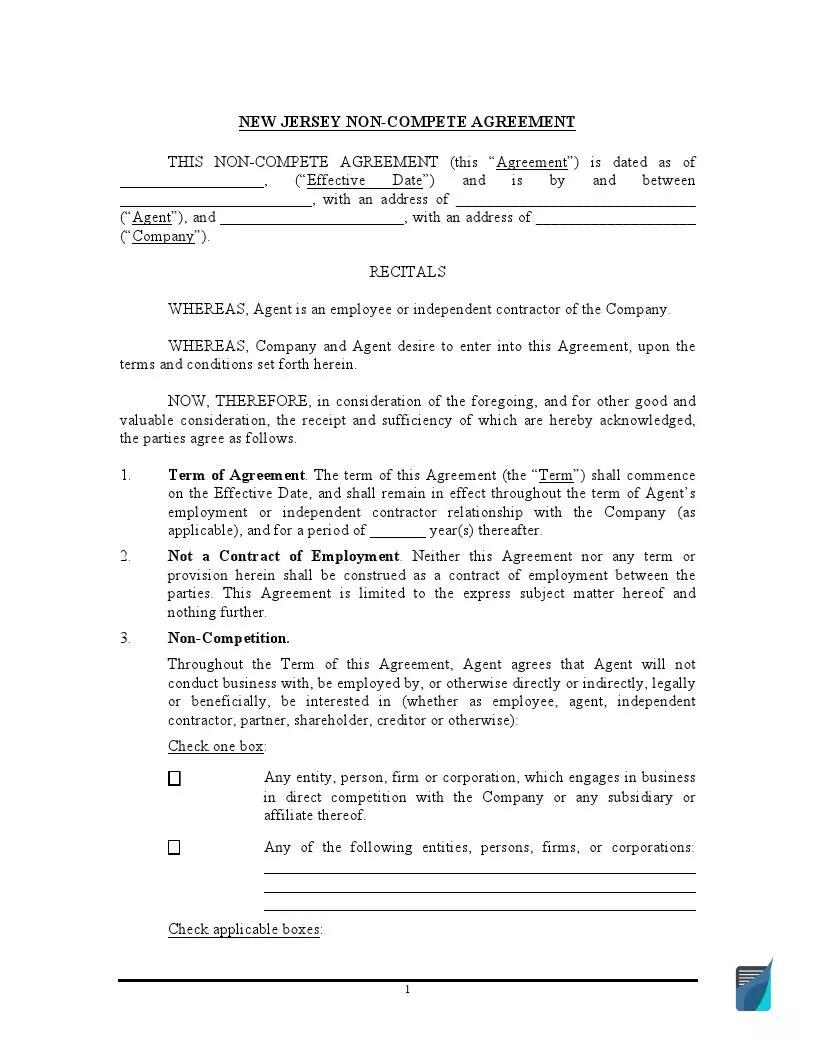
The template is a three-page PDF with fillable fields. It names the Company and the Recipient, sets the length of the agreement and lists the types of data the Company wants kept private. The PDF calls the Recipient the Agent. Fill in the blanks, then print the document and add both signatures.
This part of the template lists what the Recipient agrees not to do and the kinds of company details that stay private. Read both lists before you fill in the blanks, so the wording matches what the Company wants to protect. Inventions, customer lists and financial reports are common examples of protected details.
The Recipient is asked not to:
The contract also restrains the Recipient from revealing confidential information about the Company, usually implying keeping in secret:
Nevertheless, this info is allowed to be shared when needed with the organization’s staff members, including its agents, affiliates, directors, or other employees.
Both parties agree upon the time within which the paper remains effective. They also indicate the date when the Recipient becomes liable for the terms of this contract, which may be the date of appending signatures or the date when the partnership relations between the parties are terminated.
Popular Local NCA Forms
After the relationship between a worker and company concludes, the latter might want the former to sign a non-compete, known as “non-compete clause (NCC),” to keep their sensitive information from being being exposed to their rivals. The following are the state NCA forms our visitors read about most often.
The Company is responsible for informing the Recipient immediately they disclose any confidential data. The Recipient is obliged to reimburse all losses and damages caused to the Company in case the proprietary information is revealed to the third party without the Company’s written consent.
After the contract, the Recipient needs to return all the Company’s documents and materials, both original and duplicates.
The New Jersey Non-Compete Agreement is considered valid right after both parties print their names, sign, and date the paper.
Employers use a non-compete agreement template when they bring on a new employee or contractor who will see trade secrets, customer lists or product plans. The person signing reads the same document and keeps a copy. Owners, managers and HR teams can all complete the template, because it is short and has fillable fields.
Take a few minutes to read the whole document before anyone signs. Check that each blank is filled in, that each check box matches what the Company wants and that the names are spelled the same way on every page. Then print the agreement, add both signatures and give each side a copy.
You can complete the template online or by hand. The online builder asks a few simple questions and produces a finished document that you can save, print or download. The blank PDF has fillable fields, so you can type into it or print it and write in the blanks. Either way, both sides sign the same version.
No specific statute governs NCAs in New Jersey. However, according to N.J.A.C. 13:42-10.16, in-house counsels and psychologists are exempted from coming into such an agreement. The paper is considered legal if its purpose, provisions, geographical scope, and duration are established clearly.

It is a ready-made contract in which a Recipient agrees not to compete with a Company and to keep its private details secret. Lawyers also call this kind of clause a restrictive covenant. The FormsPal template is a PDF with fillable fields for the names, dates and terms.
Select Create My Document, answer a few questions, then save your progress and print or download the result. You can also download the blank PDF from the link near the top of this page and complete it yourself.
Yes. Open the downloaded file in the FormsPal PDF editor, type in the blanks and save a copy. You can print it afterward for signing.
The template uses two roles:
Keep a signed copy for each side. Store yours with the rest of the employment file so you can find it later.
It runs three pages. Page one has the parties, the term and the non-competition choices. Page two has the non-solicitation wording and the closing clauses. Page three has the signature lines for both sides.
Yes. After you download the PDF, print it on standard letter paper and sign it by hand, or complete it first in the online editor and print the finished copy.
FormsPal offers non-compete agreements for other states, including California, Texas, Florida and New York. Use the state links on this page to open them.
General information, not legal or tax advice.
