
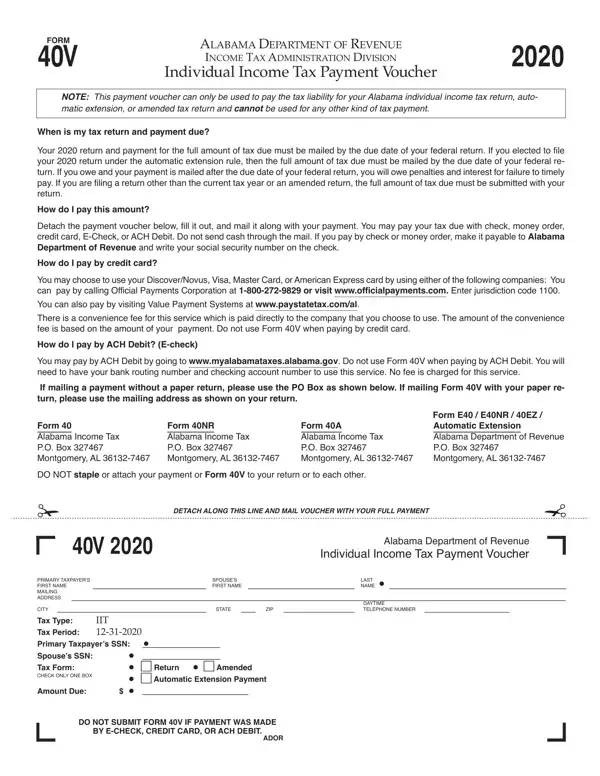
Form 40V is the official payment voucher for Alabama individual income tax. Alabama taxpayers use it when making payments for three purposes: a standard income tax return (Form 40 or Form 40A), an automatic filing extension, or an amended return (Form 40X). The voucher applies only to individual income tax. It cannot be used for other state tax types.
The Alabama Department of Revenue accepts these payment methods with Form 40V:
Tax payments are due on the same date as your federal return, typically April 15. Alabama grants an automatic six-month extension to file, but the extension does not extend the time to pay. Pay at least 90% of your total tax liability by the original due date. Failure to pay on time results in a penalty of 1% per month on the unpaid balance, plus interest charges. To avoid penalties, submit Form 40V with full payment by the original deadline.
Use Form 40V if you are mailing a check or money order with your Alabama income tax filing. If you pay online through the My Alabama Taxes portal, you do not need this voucher. Residents and part-year residents filing individual income taxes in Alabama may need it. For estimated tax payments, use Alabama Form 40ES instead.
| Question | Answer |
|---|---|
| Form Name | Alabama Form 40V |
| Form Length | 1 page |
| Fillable? | Yes |
| Fillable fields | 25 |
| Avg. time to fill out | 4 min 55 sec |
| Other names | PDF 40V TY 2020 Print Version.qxp - Alabama Department of Revenue |
Alabama Form 40V isn’t the one you’re looking for?