Please rate Coworx Staffing Timesheet

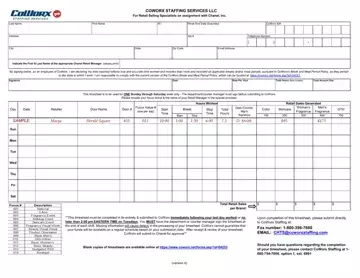
The Coworx Staffing Timesheet is the primary weekly record used by employees placed through CoWorx Staffing Services LLC. It provides a structured way to document key employment data, including daily hours worked, scheduled break and meal periods, and total retail sales figures for each brand during the assignment period.
Employees complete a coworx staffing timesheet for every work week, capturing their personal details, assignment start and end dates, and a complete breakdown of hours per shift. The form also requires employees to record total retail sales generated during the week by brand, giving CoWorx and its client companies a clear picture of both time management and sales performance. This dual tracking function makes the timesheet an essential tool for performance reviews and accurate payroll processing.
The staffing contract between CoWorx, the employee, and the client company defines specific obligations regarding timesheet submission. Employees must confirm that all reported hours are accurate and comply with CoWorx's Break and Meal Period Policy. This acknowledgment carries legal weight, reinforcing compliance with company and regulatory labor standards. Tax withholding for each pay period also depends on accurate hour reporting, making precise completion a financial priority for both the employee and the company.
Manager oversight is built into the process. After each shift, the Chanel Retail Manager or department counter manager must review and sign the coworx staffing timesheet to verify all reported information. This sign-off step ensures accountability at every level, from individual employee to client management. Unsigned or incomplete timesheets can delay payment and may require additional follow-up with the CoWorx staffing coordinator.
Understanding your roles and responsibilities when filling out the coworx staffing timesheet helps avoid common errors that lead to payment delays or compliance issues. Employees who submit accurate, timely records experience less friction in payroll processing and are better positioned to manage their benefits eligibility and assignment continuity with CoWorx Staffing Services.
| Question | Answer |
|---|---|
| Form Name | Coworx Staffing Timesheet |
| Form Length | 1 pages |
| Fillable? | No |
| Fillable fields | 0 |
| Avg. time to fill out | 15 sec |
| Other names | coworx timesheet, fill out timesheet for iplb coworx, coworx staffing timesheet, coworx timesheets |
Coworx Staffing Timesheet isn’t the one you’re looking for?
Please rate Coworx Staffing Timesheet
