
Updated:
Get Form Now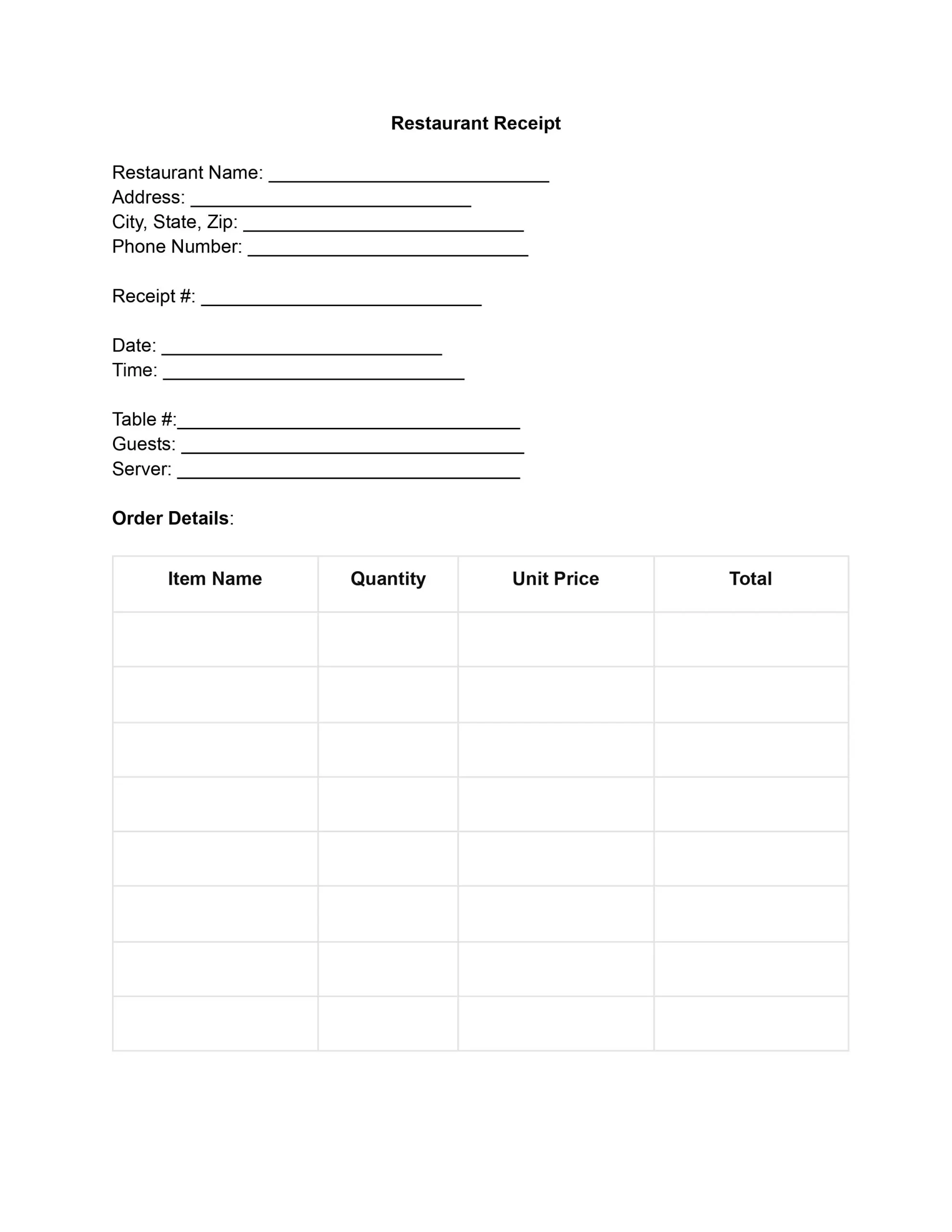
A restaurant receipt template is a ready-made form that records a food order, including the items ordered, the prices, the tax and the total paid. Use our free template to give each diner a clear record of the visit and to keep your own sales records in order. You can fill it in online, then print it or save a copy.
A restaurant receipt is a record of a meal purchase that the restaurant gives to the customer. It lists each dish ordered, the cost of each dish, the taxes and the total paid. Customers use it to check the bill, and the restaurant keeps a copy for its books.
A complete restaurant receipt usually shows the following:
For the business, receipts are useful sales records. Added up at the end of the day, they show how much the restaurant sold, which dishes sell best and how busy each shift was. Owners use these numbers to track sales, manage inventory and plan ahead.
An accountant can also use the receipts as a clear paper trail for each sale. They make it easier to work out sales, the cost of goods sold and gross profit, and they support budgeting and financial planning.
Legally, providing a receipt is not just a courtesy but a requirement. Many jurisdictions require businesses to issue transaction receipts as part of consumer protection laws. Filled restaurant receipt templates are essential for tax purposes, proving income and expenditures. They also ensure compliance with various tax laws, helping restaurants accurately report earnings and claim deductions.
A template saves time because the layout is already built. Staff fill in the blanks instead of designing a receipt each time, and every diner gets a receipt that looks the same. A steady layout also makes it easier to find a price when you review the day’s sales.
Using a restaurant receipt template helps you to:
Customers benefit too. A clear receipt lets them check the order, the tax and the total before they leave the table.
Anyone who sells prepared food can use a simple restaurant receipt template, from a small cafe to a large dining room. Customers also use the receipts they get to keep track of what they spend on meals. Common users include:
Meals are sold in several ways, and the receipt can be adjusted to match each one. The same template works for all of them if you fill in the parts that apply and leave the rest blank. The most common kinds are:
Choose the version that matches how the order was placed, and keep the layout the same from one receipt to the next.
You can hand over a printed receipt or send a digital copy, and the details stay the same either way. A printed copy is handy at the table or the counter. A file is easy to email, store and search later, so it suits customers who track their meal costs on a phone or computer.
Open the template with the Get Form Now button, fill in each part in order, and check the totals before you print or save the receipt. These seven steps help you complete the restaurant receipt accurately, so it gives clear and useful information for your records and for the customer.
Start by entering the restaurant’s name at the top of the receipt. Directly below, provide the restaurant’s physical address, including the city, state, and zip code. Next, include the restaurant’s phone number for any customer queries or feedback.
Enter a unique receipt or order number to tell this sale apart from the others. Then record the date and the time of the sale. Accurate times keep your sales records easy to follow.
Write the table number where the customers sat. It helps you see how busy each part of the dining room is and how service is going. Then fill in the number of guests served and the server’s name, so the receipt is easy to review later.
For each item ordered, fill in the item name, quantity, unit price and total price. Continue until every item from the order is listed. Read each line again so the entries are clear and the prices match your menu.
At the bottom of the order details, work through the amounts in this order:
Write the payment method the customer used, such as cash, credit card or debit card. If the customer paid by check or card, note the check number or the last four digits of the card so the payment is easy to match later.
Ask the customer or the person paying to sign the receipt to confirm the sale. Below the signature, write the date the payment was processed or confirmed.
The bottom of a restaurant receipt is where customers look first, so give every figure its own line. When each charge is labeled, the customer can follow how the total was built and spot a mistake right away.
Here is how a finished restaurant receipt can look. The names, numbers and amounts below are made up for illustration, so replace each one with the details of your own sale.
| Part of the receipt | Sample entry |
|---|---|
| Restaurant | Maple Street Diner, 123 Main Street, Springfield, 555-0100 |
| Receipt number, date and time | 1001, May 14, 7:15 PM |
| Table, guests and server | Table 12, 2 guests, served by Anna Baker |
| Items | 2 cheeseburgers at $9.50 each ($19.00), 1 soup at $5.00, 2 iced teas at $3.00 each ($6.00) |
| Totals | Subtotal $30.00, tax at 8% $2.40, total $32.40 |
| Payment | Credit card, last four digits 1234 |
| Signature and date | Anna Baker, May 14 |
A few habits keep your restaurant receipts easy to read and easy to find later. Number them in order, write the amounts clearly and hand every customer a copy at the end of the meal.
If you are the customer, the receipt is most useful when you can find it again later. Store it with your other expense records soon after the meal, and check the details while the visit is fresh in your memory. Helpful habits include:
Most problems with a restaurant receipt come from small gaps in the information. Look over the receipt once before you hand it over, and avoid these common errors, all of which a quick check will catch:
Yes. Use the Get Form Now button at the top of the page to open the template, type into each field, then print it or save a copy. You can reuse the same file for the next sale.
A clear restaurant receipt covers the following:
A check lists what the customers owe before they pay. A receipt confirms that the payment was made and shows how much was paid.
Yes. Fill in the same fields and leave the table number and server name blank, or write the order type there. For a delivery, add the address and any delivery charge.
Yes. The Business Receipt works for general sales, the Itemized Receipt suits orders with many lines, and the Cash Receipt fits a payment made in cash.
Add a separate line below the subtotal with the value taken off and a short label, such as coupon or loyalty reward. Then work out the tax and the final figure from the new subtotal.
Fill in a new copy with the same details and the same receipt number, and mark it as a duplicate.
Issue a corrected receipt, and keep the first one until you have the new copy in hand. Both receipts then show what changed and why.
Yes. After you fill it in, print it for the customer or save it as a file to send by email.
General information, not legal or tax advice.
