Please rate Application Vehicle Information

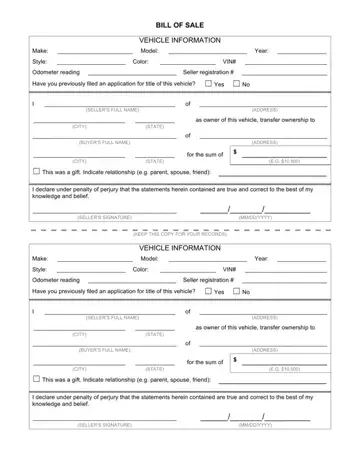
The Application Vehicle Information form is a key document in any car sale or ownership transfer. It serves as an official record that protects both the buyer and seller by documenting all relevant data and transaction details at the time of sale.
This form is required by state motor vehicle departments when initiating the official title transfer process during a private-party car sale. Both parties must retain a signed copy, as the document provides legal proof of the exact date and terms of the transaction.
This document collects the following information about the automobile and the transaction:
You need this document whenever you are:
The form carries legal weight because the seller signs under penalty of perjury. Providing false information about the automobile's condition, odometer reading, or ownership history can result in legal liability. Both buyer and seller should retain a copy for their records. For related registration documents, see the licensing and registration forms collection on FormsPal.
If the car's title was previously lost or duplicated, you may also need a duplicate certificate of title application before completing the sale.
Federal law requires sellers to disclose the odometer reading at the time of transfer for most automobiles under ten years old. An inaccurate disclosure can constitute odometer fraud, a federal offense. Many states also require a separate odometer disclosure statement or a notarized odometer statement to supplement the sale record.
This form is often used alongside other transfer documents, including:
What is the Application Vehicle Information form used for?
It is used to officially document automobile details and ownership information during a car sale or transfer. The completed form provides a legal record for both parties and may be required by state DMVs when applying for a new title.
Is this form the same as a bill of sale?
Not exactly. A bill of sale records the sale price and transaction terms, while this form focuses on the automobile's identifying details and the seller's declarations. Both documents are often completed together during a private-party car sale.
What happens if the odometer reading is incorrect?
An incorrect odometer reading on a legal document may constitute fraud under federal and state law. The seller should record the actual mileage displayed on the odometer at the time of sale and note any known inaccuracies in the disclosure section.
Do I need to notarize this form?
Notarization requirements vary by state. Many states do not require notarization for a car information form, but some require it for title transfer applications. Check your state's DMV requirements before completing the sale.
Who should keep a copy of the completed form?
Both the seller and the buyer should retain a copy. The seller's copy provides proof that the automobile was legally transferred on a specific date, protecting them from future liability. The buyer's copy supports the new title application and registration process.
| Question | Answer |
|---|---|
| Form Name | Application Vehicle Information |
| Form Length | 1 pages |
| Fillable? | No |
| Fillable fields | 0 |
| Avg. time to fill out | 15 sec |
| Other names | vehicle bill of sale template word, a car bill of sale, vehicle bill of sale, blank bill of sale print |
| Used for | Car sale, ownership transfer, title application |
| Required information | VIN, odometer reading, make, model, year, seller and buyer details |
Application Vehicle Information isn’t the one you’re looking for?
Please rate Application Vehicle Information
