Broadridge Legal Transfer Form PDF Details

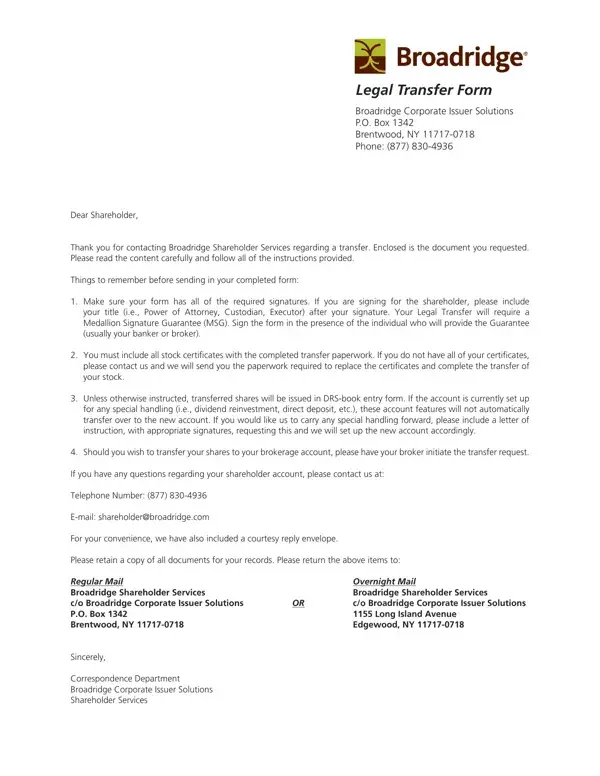
Managing the transfer of shares can often be a complex process, but with the Broadridge Legal Transfer Form, shareholders are provided a structured way to handle various situations requiring the transfer of stock. Broadridge Corporate Issuer Solutions, located in Brentwood, NY, offers a comprehensive solution for shareholders looking to transfer shares due to various circumstances such as changes in ownership, death of a shareholder, or corrections in account information.

Types of Transfers Covered

The Broadridge Legal Transfer Form handles several common transfer scenarios. Please review the list below to confirm which type of transfer applies to your account:

Required Documents and Information

Before completing your transfer request, please gather all necessary supporting documents. Missing items will delay processing. The following are typically required for a successful transfer of shares:

Understanding the Medallion Signature Guarantee

The Medallion Signature Guarantee is a certification that verifies the signature of the transferring shareholder. It is different from a standard notarization and must be obtained from a financial institution that participates in an approved Medallion Signature Program. The guarantee must cover the total market value of the shares being transferred. Please confirm the guarantee amount with your financial institution before having the form stamped.

Special Instructions for Certain Accounts

If your account includes dividend reinvestment or direct deposit options, please attach a separate letter of instruction to your transfer form. The letter should be signed by all registered account holders and should specify the new account information or updated direct deposit details. For accounts that hold fractional shares, please contact Broadridge Corporate Issuer Solutions directly to discuss how fractional shares will be handled during the transfer process.

Processing Time and Mailing Instructions

Once you have completed the Broadridge Legal Transfer Form and assembled all required documents, mail your complete package to Broadridge Corporate Issuer Solutions in Brentwood, NY. Processing typically takes 5 to 10 business days after Broadridge receives all required documents. Please send your package via a traceable mail service to ensure safe delivery. Do not fold or damage the stock certificates.

For additional stock transfer resources, see our related forms: the MetLife Stock Transfer Form, the Stock Transfer Ledger Template, and the Transfer of Ownership Form.

QuestionAnswer
Form NameBroadridge Legal Transfer Form
Form Length8 pages
Fillable?Yes
Fillable fields149
Avg. time to fill out1 min 30 sec
Other namesbroadridge shareholder services forms, legal transfer, broadridge shareholder services legal transfer from, legal transfer form template

How to Fill Out Legal Transfer Form

Legal Transfer Form at a glance

What it is: Legal Transfer Form Domestic Shareholders: use this form to transfer shares to another person or trust, change your registration, or transfer shares after the death of an owner.

Where and when to file: Step 4 - Mail your complete package to Broadridge Corporate Issuer Solutions at the Regular Mail or Overnight Mail address. Most transfers are completed within 5-10 business days after all documents are received in good order. Please keep copies of all documents for your records. Documents submitted with your request will not be returned.

What to bring and attach to Legal Transfer Form

Submit your request with the IRS Form W-9 and either a valid MSG, or an MSG waiver request for eligible accounts valued under $10,000, with the required documents and $100 fee (checked November 12, 2026).

A filled-in Legal Transfer Form example: a gift of all shares to a son
Legal Transfer Form example filled out, example: a gift of all shares to a son
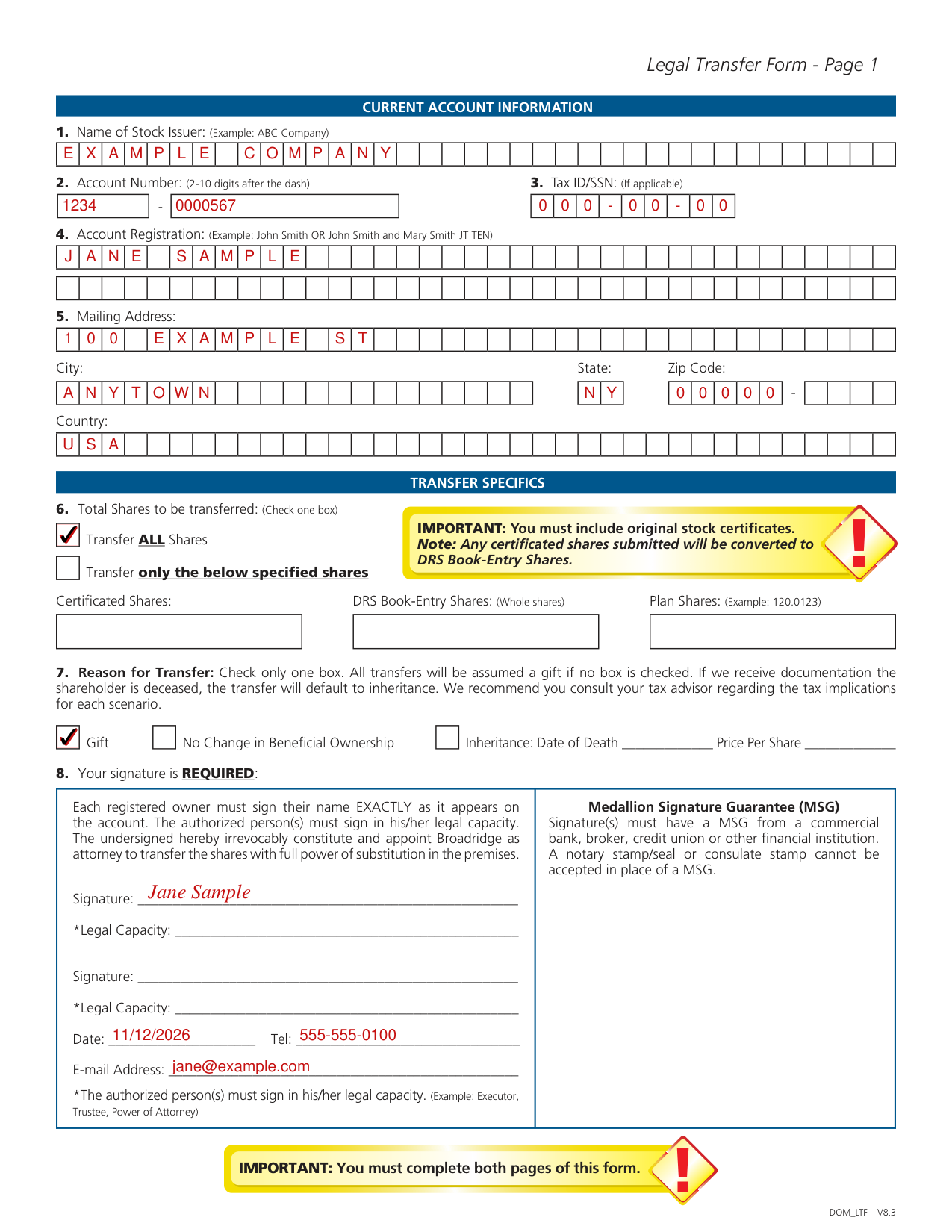
Jane Sample gifts her shares to her son with this form. She transfers all shares as a gift and signs for herself alone, with no co-owner. The picture shows the first form page, and all its values are invented. Transfer ALL Shares is checked, so the Certificated Shares, DRS Book-Entry Shares and Plan Shares boxes stay empty. Gift is the reason, so Inheritance: Date of Death and Price Per Share stay empty. Her son is an Individual new shareholder, so Joint, Estate, Custodial, Trust and Other stay empty. New Account is checked, so the Existing Account Number boxes stay empty. He checks Individual/sole proprietor on the W-9, so the other tax classification boxes stay empty. All shares go to her son, so Credit all Shares is checked and Partial Credit stays empty. Enroll in Plan: No is checked. She signs as the owner, so the second signature and both Legal Capacity lines stay empty.

How to fill out Legal Transfer Form, box by box

Current Account Information

Current Account Information: write the Name of Stock Issuer (Example: ABC Company).

Enter the Account Number (2-10 digits after the dash) and the Tax ID/SSN (If applicable).

Enter the Account Registration (Example: John Smith OR John Smith and Mary Smith JT TEN).

Under Mailing Address, fill in City, State, Zip Code and Country.

6. Total Shares to be transferred

Check one box for Total Shares to be transferred: Transfer ALL Shares or Transfer only the specified shares.

You must include original stock certificates.

Any certificated shares submitted will be converted to DRS Book-Entry Shares.

For Transfer only the specified shares, enter Certificated Shares, Plan Shares (Example: 120.0123) and DRS Book-Entry Shares (Whole shares).

7. Reason for Transfer

Check only one box for Reason for Transfer. All transfers will be assumed a gift if no box is checked.

The boxes are Gift, No Change in Beneficial Ownership, and Inheritance: Date of Death and Price Per Share.

8. Your signature is REQUIRED

Each registered owner must sign their name EXACTLY as it appears on the account.

Your signature is REQUIRED: Signature(s) must have a Medallion Signature Guarantee (MSG) from a commercial bank, broker, credit union or other financial institution.

Common mistake: A notary stamp/seal or consulate stamp cannot be accepted in place of a MSG.

The authorized person(s) must sign in his/her legal capacity (Example: Executor, Trustee, Power of Attorney).

Then fill in Date, Tel and E-mail Address.

9. New Shareholder(s) Account Type

Check one New Shareholder(s) Account Type: Individual, Joint, Estate, Custodial, or Add a Transfer on Death Beneficiary (one per account).

For Trust, enter the Trust Date.

10. New Shareholder(s) Information

Please indicate one: New Account or Existing Account Number.

Enter the Primary Shareholder Name (First, MI, Last) as Individual / Trustee / Custodian / Executor / Other.

Enter the Secondary Shareholder Name (First, MI, Last) as Joint Tenant / Co-Trustee / Minor / Transfer on Death Beneficiary / Other (if applicable).

Enter the Trust Name/Estate Name, then the Mailing Address, City, State, Zip Code and Country.

Under New Shareholder Contact Information, enter the E-mail Address and Telephone Number.

11. Share Designation

Share Designation: check Credit all Shares, or for Partial Credit provide a form for each recipient for the total shares being transferred. Enroll in Plan: Yes or No. Plan enrollment is available only if offered by the issuer.

If no signature is provided, then the shares will be placed outside of Plan into DRS Book-Entry.

Sign under New Shareholder Signature and enter the Date.

New Holder/Recipient Tax Payer ID Certification (Substitute W-9)

New Holder/Recipient Tax Payer ID Certification (Substitute W-9): on line 1, enter the Name of entity/individual. An entry is required. For a sole proprietor or disregarded entity, enter the owner's name on line 1, and enter the business/disregarded entity's name on line 2.

On line 3a, check the appropriate box for federal tax classification of the entity/individual whose name is entered on line 1. Check only one of the following seven boxes.

For LLC, check the LLC box and enter the appropriate code (C, S, or P) for the tax classification of the LLC, unless it is a disregarded entity. A disregarded entity should instead check the appropriate box for the tax classification of its owner.

Enter your TIN in the appropriate box. For individuals, this is generally your social security number (SSN). For other entities, it is your employer identification number (EIN).

By signing you certify, under penalties of perjury, that 1. the number shown on this form is your correct taxpayer identification number (or you are waiting for a number to be issued to you); and 2. you are not subject to backup withholding because (a) you are exempt from backup withholding, or (b) you have not been notified by the Internal Revenue Service (IRS) that you are subject to backup withholding as a result of a failure to report all interest or dividends, or (c) the IRS has notified you that you are no longer subject to backup withholding; and 3. you are a U.S. citizen or other U.S. person; and 4. the FATCA code(s) entered on this form (if any) indicating that you are exempt from FATCA reporting is correct.

Under Sign Here, enter the Signature of U.S. person and the Date.

Other situations

The new holder is not a U.S. person

If the new holder/recipient is not a U.S. person (including a U.S. resident alien), please complete the applicable IRS Form W-8.

A new custodial or joint tenant account is being created

If a new custodial account is being created, provide the minor's TIN and have the custodian sign the form.

For joint tenant accounts, provide the primary account holder's TIN (the primary account holder is the first joint tenant listed on the account).

If requested information is not known at time of transfer, or the new owner is not available to sign, an IRS Form W-9 will be mailed to the new shareholder(s) once the shares are transferred.

Deceased owner transfers

The following documents are required for all deceased owner transfers, whether submitted with an MSG or under the MSG waiver option: Affidavit of Domicile and Inheritance Tax Waiver, if required by the decedent's State of residence.

Affidavit of Domicile: do not submit this form for a living-owner transfer or by itself. A notary stamp is required.

Request an MSG waiver

If eligible, you may request an MSG waiver instead of providing an MSG for accounts valued under $10,000. To do so, mail a $100 non-refundable check or money order in USD payable to Broadridge, a valid government-issued photo ID with signature, and the required legal documents listed on the enclosed Medallion Signature Guarantee Waiver Requirements page (checked November 12, 2026).

Transfers of $10,000 or more require an MSG (checked November 12, 2026).

Your name has changed

Provide a copy of your marriage certificate, divorce decree, or a court order confirming the new name. If you use the waiver, also attach your photo ID showing the updated name.

You move shares to or from a brokerage account

Do not use this form to move shares to or from a brokerage account. Your broker must initiate that transfer. Provide your broker with the DRS number 7824 and a copy of your statement.

The new owner wants to sell shares after the transfer

Sale Request After Transfer Form (optional): please complete and return the optional Sale Request After Transfer Form with your transfer documents ONLY if the new owner wants to sell shares after the transfer is completed. If you do not want to sell shares, no action is required and this form does not need to be returned.

Common questions about Legal Transfer Form

Where do I file it?

Regular Mail: Broadridge Corporate Issuer Solutions P.O. Box 1342 Brentwood, NY 11717-0718. Overnight Mail: Broadridge Corporate Issuer Solutions Attn: BCIS IWS 51 Mercedes Way Edgewood, NY 11717-8368.

Sources

[1] Legal Transfer Form Domestic Shareholders (DOM_LTF - V8.3), Broadridge Corporate Issuer Solutions (the Official source link on this page).