
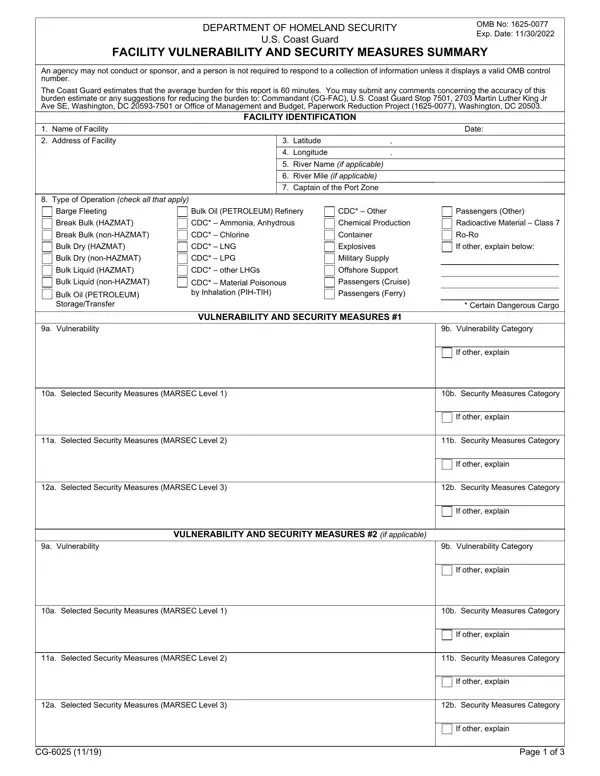
What Is the CG 6025A Form?

The CG 6025A form is the USCG Facility Vulnerability and Security Measures Summary Addendum. The U.S. Coast Guard issues this PDF document under the Department of Homeland Security. It works alongside the CG-6025 Facility Security Plan. Facility Security Officers (FSOs) use it to document additional vulnerability assessments and security measures that go beyond the base CG-6025 submission. Regulated facilities under 33 CFR Part 105 must file this PDF as part of their required USCG security documentation.

Maritime facilities subject to USCG oversight must complete this PDF form. These include cargo handling terminals, passenger vessel berths, ferry facilities, tank vessel berths, and barge fleeting areas. The addendum addresses three Maritime Security (MARSEC) levels. Each level requires progressively enhanced security measures from the facility.

MARSEC levels covered in this PDF

For each vulnerability, the facility lists its selected security measures and the applicable category (A, B, or C). Vulnerability areas covered in the PDF form include the following:

The PDF is submitted to the Captain of the Port (COTP) during the facility security assessment renewal. FSOs must also submit the document when major changes occur at the facility. The form is provided under OMB approval as required for federal maritime security programs. Completing all details accurately is essential for demonstrating compliance with USCG requirements. Please ensure all vulnerability and security measures information is correct before signing and submitting. Contact your local COTP office for guidance on the submission process or for support with specific security policy requirements.

Other useful USCG PDF forms: CG-2692 Serious Marine Incident Report, Building Security Plan, and the Advance Security Application Form. For Coast Guard vessel documentation, see the CG-1258 Certificate of Documentation.

QuestionAnswer
Form NameCG-6025A Form
Form Length3 pages
Fillable?No
Fillable fields0
Avg. time to fill out45 sec
AgencyU.S. Coast Guard (USCG), Dept. of Homeland Security
Other namesuscg 6025a, coast guard form 6025a, form cg 6025a, cg 6025 addendum, vulnerability and security measures addendum

How to Edit Cg 6025A Form Online for Free

FormsPal lets you fill out this USCG PDF online and download the completed file. This addendum PDF is the Facility Vulnerability and Security Measures Summary required under 33 CFR Part 105. Have your facility security plan records and security policy information ready before you begin. Follow this guide to complete each section of the PDF accurately for the U.S. Coast Guard.

Step 1: Click the "Get Form" button above. This opens the USCG PDF in the FormsPal editor. All three pages load right away. No software is needed. The PDF is ready to fill out in your browser. Please read through the entire PDF before entering any information to understand all the vulnerability areas and security measures it covers.

Step 2: Fill out the Level 1 security measures section first. This is the Level 1 baseline posture required by the U.S. Coast Guard. Each vulnerability area has its own row in the PDF. For each row, select the security measure your site uses. Then enter the Security Measures Category (Category A, B, or C). If you select a non-standard measure, fill in the "If other, explain" box with full details. Level 1 is the minimum security posture that USCG oversight requires for all regulated facilities at all times. Enter information in every row in this section before moving on. Do not leave any vulnerability row blank in the Level 1 section of the PDF.

The right way to fill in 6025 form part 1

Step 3: Fill out the Level 2 section next. Level 2 security measures apply during elevated threat periods. For each vulnerability category, enter the security measures your facility activates at this level. Select the Security Measures Category for each item. Key vulnerability and security areas include access control, cargo and baggage monitoring, personnel screening, vessel and vehicle restrictions, surveillance equipment, communications systems, and drills. After Level 2, fill out the Level 3 section. Level 3 covers maximum protective security measures for specific threat scenarios. The U.S. Coast Guard requires that every vulnerability row in the PDF be addressed and documented at all three security levels. Do not leave any row unfilled.

Completing part 2 of 6025 form

Step 4: Verify the final section of the PDF carefully. Check each "Selected Security Measures" entry. Confirm the Security Measures Category is entered correctly for each row. Verify the response actions and incident reporting section. Look over the procedural policies for restricted areas. Confirm vessel and aircraft restriction entries are filled in. These entries are common sources of errors. The USCG requires that all vulnerability and security measures information in the PDF is accurate and complete. Once you are satisfied, sign and date the PDF where indicated. This USCG document must be signed by an authorized representative before submission. Confirm all page number entries are also correct in this section.

The best way to complete 6025 form portion 3

Step 5: Click "Done" when all sections are filled out. Download the finished PDF. Submit it to the cognizant Captain of the Port (COTP) with your full facility security plan records. The USCG requires that the PDF and all supporting records are included in the submission package. Contact the local U.S. Coast Guard COTP office if you need support with the approval process or guidance on specific PDF entries. Keep signed copies of the PDF and all related records for your site files. USCG regulations require facilities to retain security records for compliance purposes.

Frequently asked questions about this USCG PDF form

What is this USCG PDF form used for?

This USCG PDF is the Facility Vulnerability and Security Measures Summary Addendum. Facility Security Officers (FSOs) fill out this PDF to document vulnerability assessments and security measures at USCG-regulated maritime facilities across three security levels. Filing the PDF is required under 33 CFR Part 105. It is submitted to the U.S. Coast Guard Captain of the Port as part of the facility security plan records and documentation package.

Who needs to fill out this USCG PDF?

Facility Security Officers at USCG-regulated maritime facilities must fill out and file this PDF. It applies to cargo terminals, passenger vessel berths, ferry facilities, tank vessel berths, and barge fleeting areas. Any facility subject to U.S. Coast Guard maritime security regulations has a legal obligation to fill out and submit the PDF. Contact your local COTP office for information about your facility's specific filing requirements and the submission process for USCG maritime security PDF forms.

What is the difference between the CG-6025 PDF and the CG 6025A Addendum?

The CG-6025 is the primary Facility Vulnerability and Security Measures Summary PDF. The CG 6025A Addendum is used to document additional vulnerability assessments and security measures beyond the base PDF submission. Both are submitted together as part of the complete facility security plan records provided to the U.S. Coast Guard Captain of the Port. Do not substitute one PDF for the other when filing your facility security documentation.

What security levels must be filled out in this PDF?

The PDF requires FSOs to fill out all three Maritime Security (MARSEC) levels. Level 1 is the baseline security posture maintained at all times. Level 2 is filled out for elevated threat conditions. Level 3 covers the most severe threat scenarios. The USCG requires specific security measures to be filled in and documented for all three levels. Please verify all three sections of the PDF and ensure every vulnerability row is filled out correctly before signing and submitting the PDF to the Captain of the Port.

What vulnerability areas must be filled out in this PDF?

The PDF requires FSOs to fill out vulnerability and security measures details for: physical access controls, personnel identification and screening, cargo and baggage monitoring, restricted areas, surveillance and detection equipment, communications systems, vessel and aircraft restrictions, and security incident response procedures. Each vulnerability area must be filled out and documented across all three security levels. The U.S. Coast Guard reviews these details for compliance with 33 CFR Part 105. Facilities operating cargo terminals, passenger vessel berths, ferry terminals, and tank vessel berths must ensure all vulnerability categories are addressed before signing and submitting the PDF. Keep completed PDF forms and all related records for your site files.

Where do I submit the completed PDF?

Submit the completed PDF and all supporting records to the cognizant U.S. Coast Guard Captain of the Port (COTP). Submission requirements and deadlines vary by facility type and by changes in the security threat level. You must also resubmit the PDF when major changes occur at your site. Contact the COTP office directly for support and guidance on the PDF submission and approval process, and for your site's specific USCG security requirements. The U.S. Coast Guard Captain of the Port reviews the submitted PDF for compliance with all applicable maritime security regulations under 33 CFR Part 105. FSOs are responsible for ensuring that the PDF and all associated records are filed on time and retained as required by USCG maritime security policy.

For related USCG and security PDF forms, see the Security Clearance Form or the CG-2692 Marine Incident Report.