
Top 10 OCR Software: Best OCR Tools in 2026
Written by FormsPal Editorial Team
- Time to read
- 19 min
At first glance, scanned PDFs look like normal documents, but you quickly realize they're just images when you try to copy text. OCR software fixes this, but how well it works depends on the tool. Some programs can accurately rebuild an invoice, while others might jumble columns. Prices range from free online tools to desktop licenses that cost hundreds.
Here's a list of the top OCR software for 2026. We tested ten of them on the identical set of files, and below you'll find how each one performed, what it costs, and who it suits.
Quick Answer: Best OCR Recognition Software
|
Tool |
Key features |
Best for |
Price* |
|
FormsPal OCR |
Text, Word, searchable PDF, Excel; 82 languages; no account |
Free all-round accuracy |
Free, 20 files/day; from $8/mo |
|
OCR.space |
Three engines, handwriting mode, table recognition, EU servers |
Mixed pages |
Free in browser; paid API |
|
iLoveOCR |
Queue upload, editable result panel, ten formats across tiers |
Hand-printed forms |
Free, 5 credits/day; from $6.99/mo |
|
Wondershare PDFelement |
Desktop editing, three output modes, batch OCR, font detection |
Fixing scans in place |
$79.99/year or $129.99 perpetual |
|
ABBYY FineReader PDF |
Side-by-side check, 198 languages, direct export to seven formats |
Typed tables and contracts |
$99/year or $16/mo; Mac $69/year |
|
i2OCR |
128 languages, two engines, six outputs, Google Docs handoff |
Single-page scans |
Free, one page at a time |
|
Adobe Acrobat Online |
Text layer under the untouched page, searchable in the viewer |
Searchable archives |
Free to run; Pro $19.99/mo |
|
Veryfi |
Text, JSON, Excel, CSV; receipt and bank statement tools |
Invoice data extraction |
Free tools; API from $0.08/receipt |
|
Smallpdf |
One-step searchable PDF, original look kept, files wiped after |
One-off typed scans |
Free, 2/day; Pro from $9/mo |
|
OnlineOCR.net |
46 languages, free Word and Excel output, automatic deskew |
Free Word or Excel |
Free, 5 files/hour; from $5.95/week |
*Pricing checked July 2026.
What Is OCR Software?
Optical Character Recognition (or OCR for short) looks at pixels in a scan or photo, works out which shapes are letters and numbers, then writes them back as text you can select, search, and edit. Your scanner produces a picture of a page. Then, OCR technology turns that picture into words a computer understands.
There are basically two kinds of products that get labeled as OCR these days, and each tries to solve a different problem:
- Traditional document recognition software chases raw accuracy across languages and fonts, then hands you a searchable PDF or a Word file.
- OCR AI software goes after structure - which numbers belong to which column, where a table starts, whether a scribbled line is a signature or a date.
If you're pulling invoice line items into a spreadsheet, that second group wins. For a scanned lease you just want to edit, the first group is faster and cheaper.
Handwriting doesn't fit into either of the two categories, and that is where ICR (intelligent character recognition) is useful. ICR is based on trained models, not on fixed-pattern matching. So, it can handle an individual's slant and adjust from sample to sample, rather than failing when something isn't in a specific font. ICR performs well with block capital letters in enclosed fields, but cursive script is still difficult to read.
How We Put the Best OCR Tools to the Test
We gave each tool the same three files, uploading them in the same order and using the free tier when available. The test set is the following:
- A printed contract page , scanned on a flatbed at 300 dpi. It had about 450 words in 11-point serif font. We measured baseline accuracy by comparing a fixed 200-word section to a typed version.
- An invoice photographed on a phone. Shot at an angle with a shadow across one corner, nine line items, subtotal, tax, and total. The check involves deskewing, verifying the table structure, and ensuring that numbers are correct.
- A handwritten form combining printed labels, hand-printed entries in digit boxes, and a passage copied out in longhand. We chose this file to test the ICR features if they were available.
Each file stayed under 2 MB to meet free-tier upload limits. We counted character errors and checked how many of the invoice’s nine rows remained intact. When a tool returned only a PDF, we tested whether its text was searchable. We also noted how long each document took to process.
Knowing what we were up against, here's what we found out - a rundown of our OCR software reviews.
1. FormsPal OCR - Best Free OCR Tool Overall
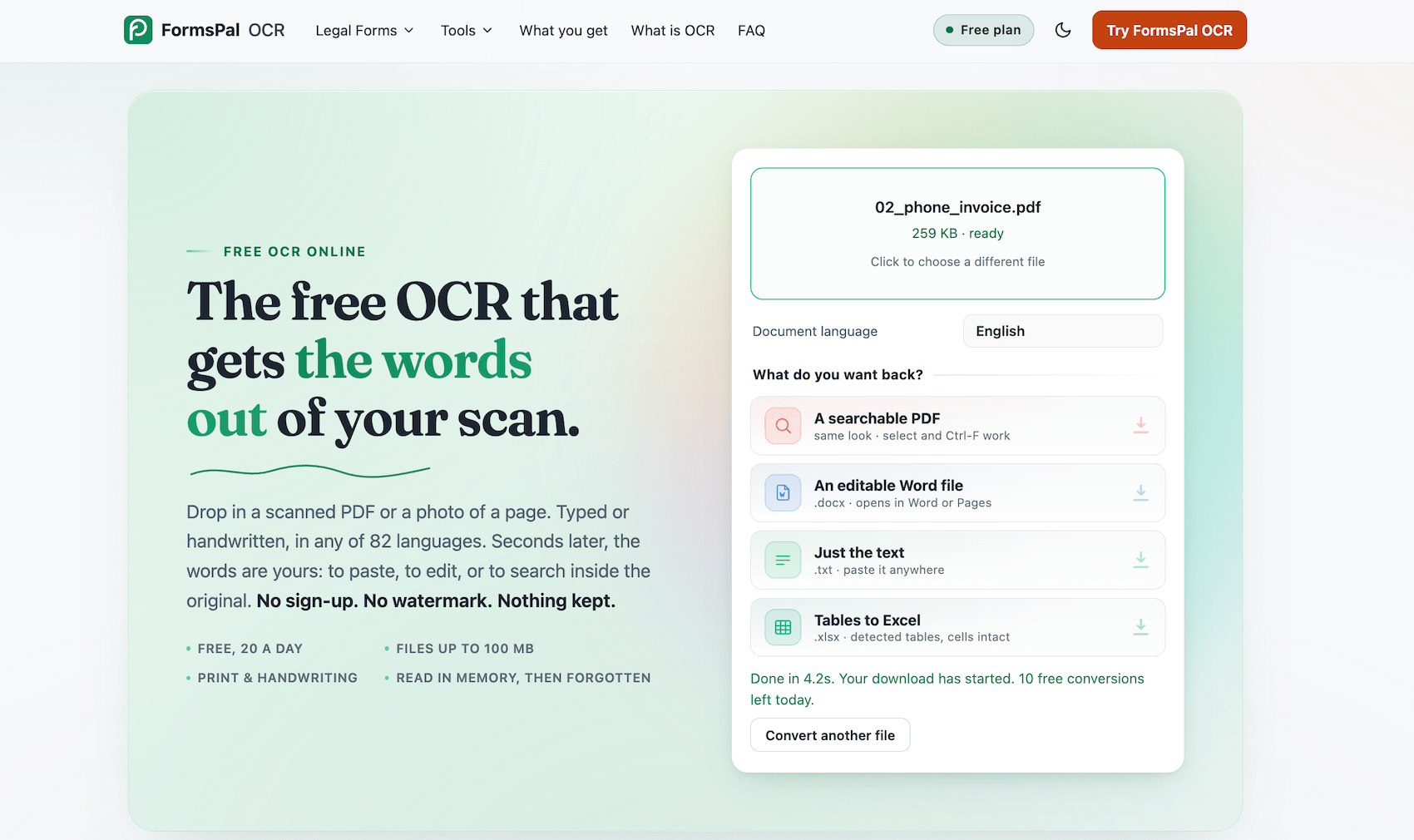
FormsPal runs its free OCR online , so you open a tab, drop in a scan, and read your text back a few seconds later. No account, no watermark, nothing lingering on a server afterward. You choose the result: plain text, a Word file, a searchable PDF, or an Excel sheet when the page holds a table. Twenty files a day cost nothing, in any of 82 languages.
How It Performed
A full page of printed contract text came back word for word, with apostrophes, section numbering, and dollar figures all intact.
Even an invoice photo taken at a slightly awkward angle didn't trip it up. Every quantity, rate, and total read correctly, the arithmetic balanced, and the Excel export kept each description beside its own figures. Choose that output for anything with a table.
Hand-printed figures in the form's boxes came back strong, with only a handful of digits slipping. Cursive thins out, staying readable while word spacing collapses in a couple of spots.
Overall, the 7-9-second wait resulted in output that required almost no repair. FormsPal handled plain text, tables, and block handwriting with equal confidence, making it the strongest all-purpose option in the test.
Pros & Cons
|
Pros |
Cons |
|
Free with no account, no watermark, and nothing kept on a server |
Files cap at 10 pages, so longer documents need splitting |
|
Four outputs from one upload: text, Word, searchable PDF, Excel |
Free use stops at 20 conversions a day |
|
82 languages across more than a dozen writing systems |
Heavy cursive stays unreliable |
|
Reads print and handwriting together |
|
Pricing
Free for 20 conversions a day, with files capped at 100 MB and 10 pages. Paid plans start at $8/month billed annually; $20 month-to-month.
Verdict
The free pick that holds up whether you feed it print, tables, or block handwriting.
2. OCR.space - Best Free OCR for Mixed Documents
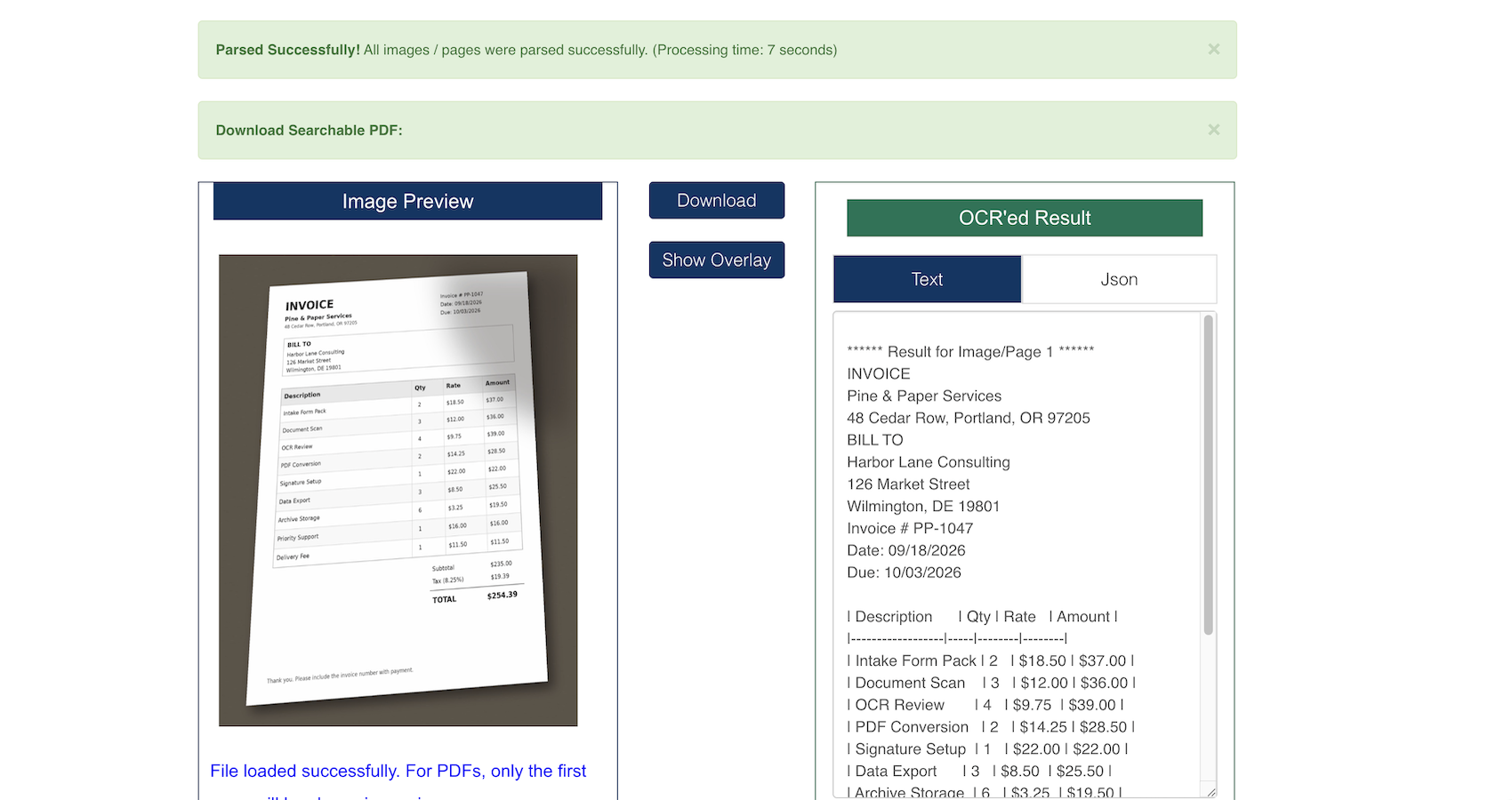
OCR.space shows you what its freebie API demo looks like - which is to say a fairly basic landing page splattered with demo features. You pick one of three engines, and one of them reads handwriting. Checkboxes let you straighten crooked scans or tell it to watch for tables. Text or a searchable PDF comes back, no sign-up stands in the way, and your file gets deleted the moment it's done.
How It Performed
The printed contract came back spot on - it did a great job of keeping the line breaks intact as well. As for the invoice, OCR.space turned it into a nice tidy table with quantities and totals all in the right columns.
And the handwriting performed pretty well too - so the date, city, state, and zip all got read spot on, and they even got the copied passage more right than wrong.
Where it costs you is capacity. Free files cap at 5MB, the web dropdown lists 21 languages, and there's no Word or Excel among the outputs.
Speed is a part of OCR.space’s appeal. Its two-to-ten-second processing paired well with accurate tables and capable handwriting recognition, giving it one of the strongest free-tier results.
Pros & Cons
|
Pros |
Cons |
|
Handwriting engine free, no registration |
5MB cap on free uploads |
|
Three engines to pick between, plus table recognition |
21 languages in the browser dropdown |
|
Searchable PDF with a visible or invisible text layer |
No Word or Excel output |
|
EU servers, files deleted after processing |
Built as an API demo, so the page expects developers |
Pricing
The browser OCR tool is free for files up to 5 MB. API plans run from free to $60/month, while paid tiers raise the file-size and page limits.
Verdict
Best free choice when a single file contains typed text, a table, and handwriting at once.
3. iLoveOCR - Best for Hand-Printed Forms
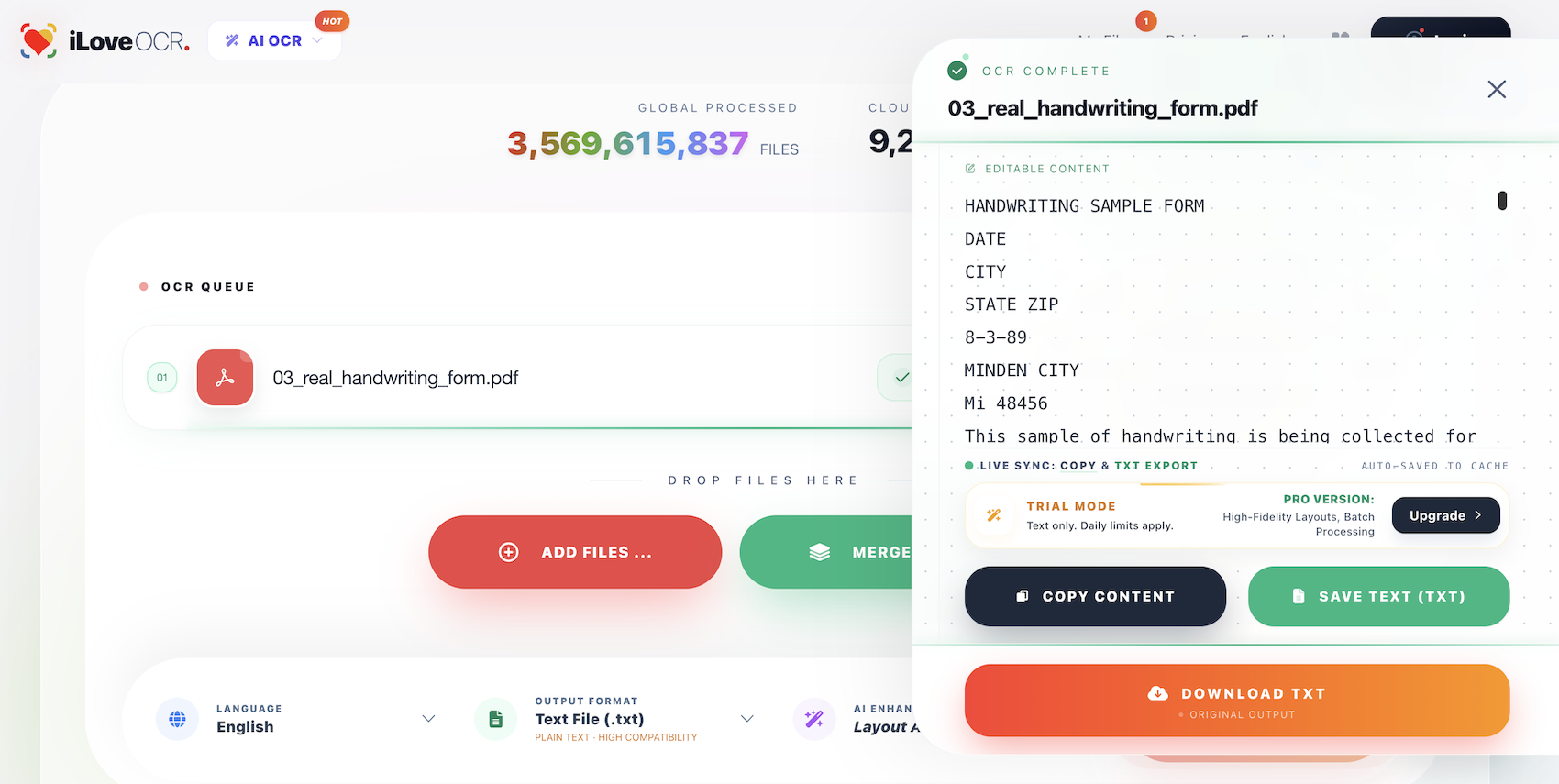
iLoveOCR keeps the process simple: upload your files, choose a language and output format, then run the conversion. The format menu also shows what’s free and what requires payment. Word files that keep the original layout, Excel files with proper table structure, PowerPoint, and searchable PDFs are paid options. Plain text and basic Word and Excel exports are free. After OCR finishes, you can edit the result on the page before copying it.
How It Performed
The printed contract came back exactly as written, including line breaks.
Every figure on the tilted invoice read correctly, subtotal, tax, and total among them, though the output lists values column by column in reverse - rate, amount, quantity, then the item name - so rebuilding the table means reordering it yourself.
Handwriting was the standout thanks to their AI OCR. The filled-in date, city, state, and zip all read correctly, and across thirty hand-printed numbers, only two came back wrong.
For the most part, hand-printed forms give iLoveOCR its strongest reason to exist. The seven-second conversion captured the content accurately, but invoice columns still needed rearranging before the data was ready for use.
Pros & Cons
|
Pros |
Cons |
|
Text, basic Word, and basic Excel open on the free plan |
Free uploads cap at 2MB, the tightest here |
|
Result panel stays editable before export |
Free Excel exports lose table structure |
|
Reads hand-printed entries reliably |
Layout-preserving Word and searchable PDF cost extra |
|
Queue takes a batch of files at once |
Ads on the free tier |
Pricing
The free plan gives you five credits per day and accepts files up to 2 MB. Paid plans start at $6.99/month billed annually or $9.99 month-to-month.
Verdict
Reliable on hand-printed forms under 2MB, and rough on anything cursive.
4. Wondershare PDFelement - Best for Editing What You Scan
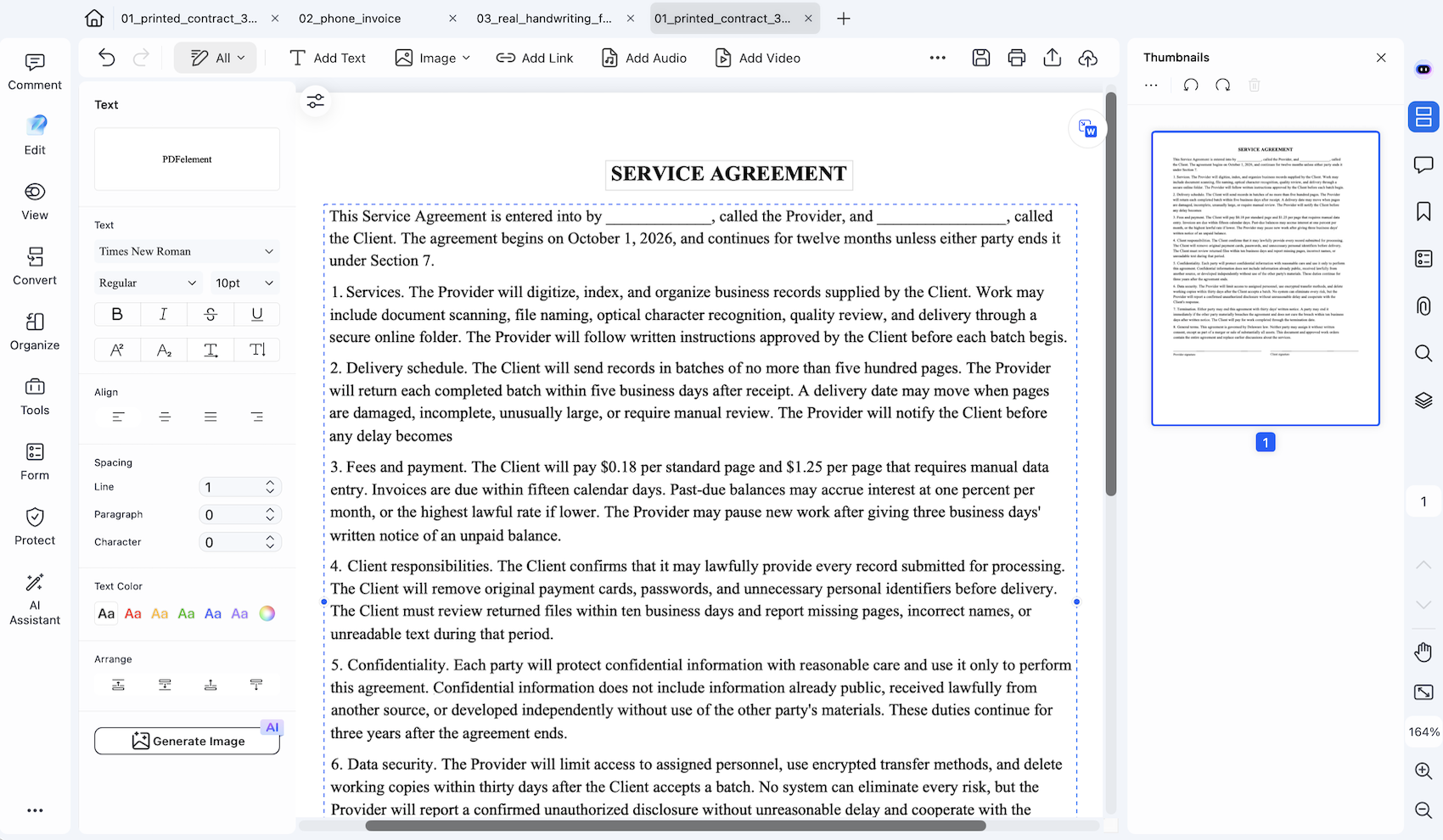
PDFelement spots a scanned PDF the moment you open one and offers to read it for you. Say yes and a small dialog wants three answers: which language, which pages, and what kind of text you want back - live and editable, tucked invisibly behind the picture, or stripped down to words alone. There is also a batch option for taller stacks of scans.
How It Performed
Editable text is the mode that justifies the price, and the tilted invoice showed why. The whole table rebuilt into individually editable cells, nine rows of description, quantity, rate, and amount with the totals beneath, every figure correct. After OCR, you can convert the file to another format - our invoice looked almost perfect when exported to Excel.
The printed contract behaved the same way, with the live text at Times New Roman 10pt, so changing a clause takes a click rather than a round trip through Word.
Handwriting is outside its range. Printed labels are read fine, while filled-in entries are returned as symbols.
In our test, PDFelement earned its place through table reconstruction. It turned scans into editable content in only three seconds, though its handwriting result shows that the software belongs firmly in the typed-document camp.
Pros & Cons
|
Pros |
Cons |
|
Text becomes editable inside the PDF, no export needed |
Handwriting is beyond it |
|
Fonts detected, so edits match the page |
No free tier |
|
Converts onward to Word, Excel, and other formats after OCR |
Desktop install rather than a browser tab |
|
Batch OCR with page-range control |
$129.99 up front for a perpetual license |
Pricing
There’s no permanent free plan. Paid options cost $79.99/year or $129.99 for a perpetual license.
Verdict
A strong choice for scanned invoices and contracts that you want to edit or convert to another format.
5. ABBYY FineReader PDF - Best for Structured Documents
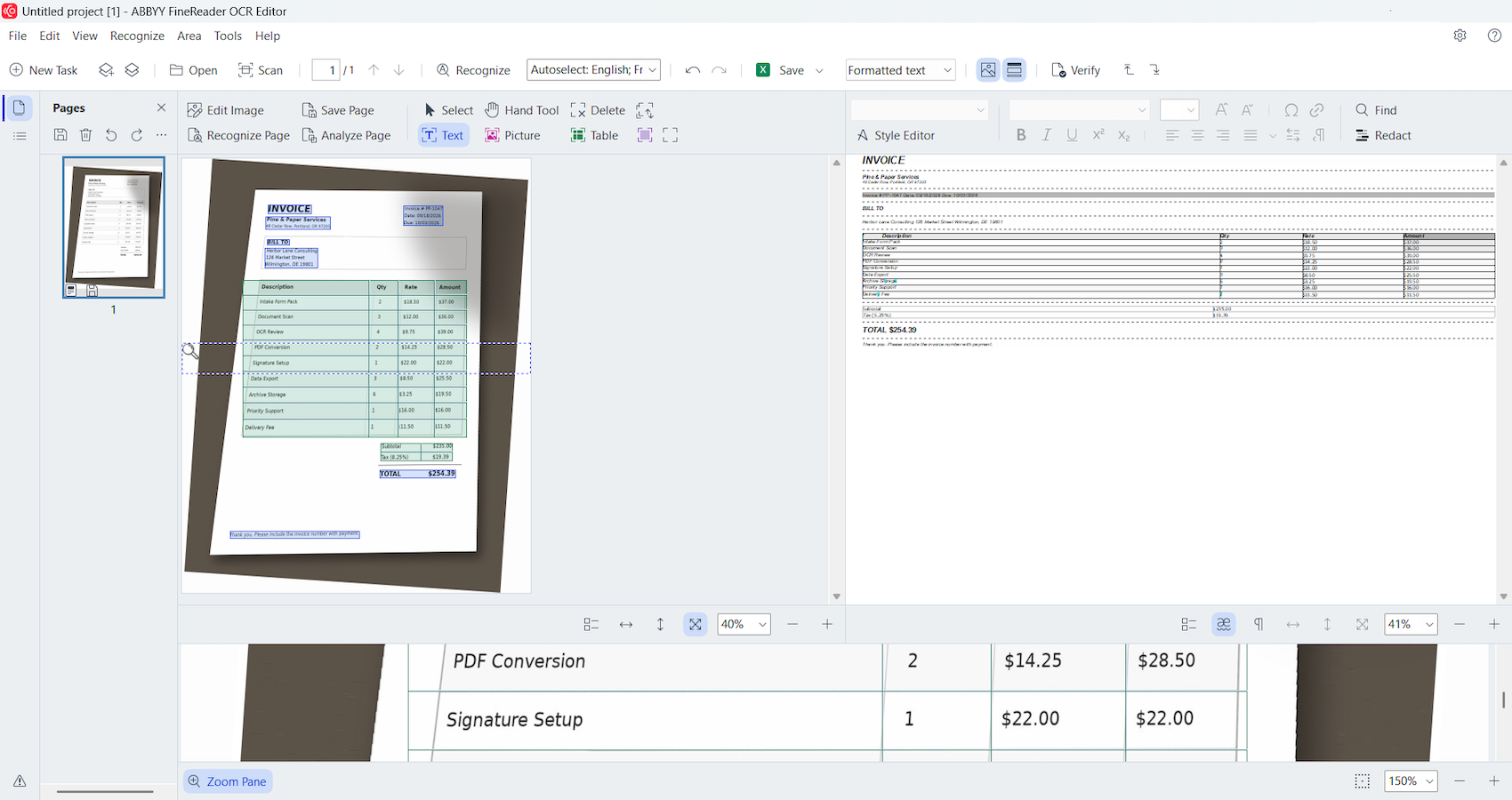
ABBYY puts your scan and the recognized text side by side, so proofreading a conversion never means juggling two windows. Three recognition modes decide how much of the original layout survives the trip. Once you're happy with it, the Send menu drops the result straight into Word, Excel, PDF, EPUB, HTML, or Kindle. Mac users get a leaner edition with fewer editing tools.
How It Performed
The contract exported to Word cleanly, with one quirk: numbered clauses came back as an unordered bullet list, and the two signature lines swapped order.
The invoice was the strongest table result tested, landing as a genuine Word table with all nine rows and every figure correct, the tax percentage included, except for "8.25%" misread as "S.25%."
Handwriting split badly. Boxed digits and the filled-in date, city, state, and zip all came back accurate. The alphabet strings and the full handwritten passage, though, returned as complete gibberish, worse than any free tool tested.
ABBYY feels built for typed business records, especially invoices that need editable tables. Its seven-second processing was quick, but formatting slips and complete cursive failure weaken the case for using it with mixed document sets.
Pros & Cons
|
Pros |
Cons |
|
Tables export to Word as genuine tables |
Handwritten running text failed outright |
|
Direct export to Word, Excel, and five formats beyond |
Numbered clauses convert to bullets |
|
Source and recognition side by side for proofing |
Trial runs seven days, capped at 100 pages |
|
198 languages, the widest count here |
Mac edition runs narrower and subscription-only |
Pricing
There’s no free plan, but the seven-day trial covers up to 100 pages. Windows pricing starts at $99/year or $16/month, while the Mac version costs $69/year.
Verdict
Perfect when scans need to land in Word, Excel, or five other formats with their structure intact. Handwritten pages are another story.
6. i2OCR - Best Free Single-Page Conversions
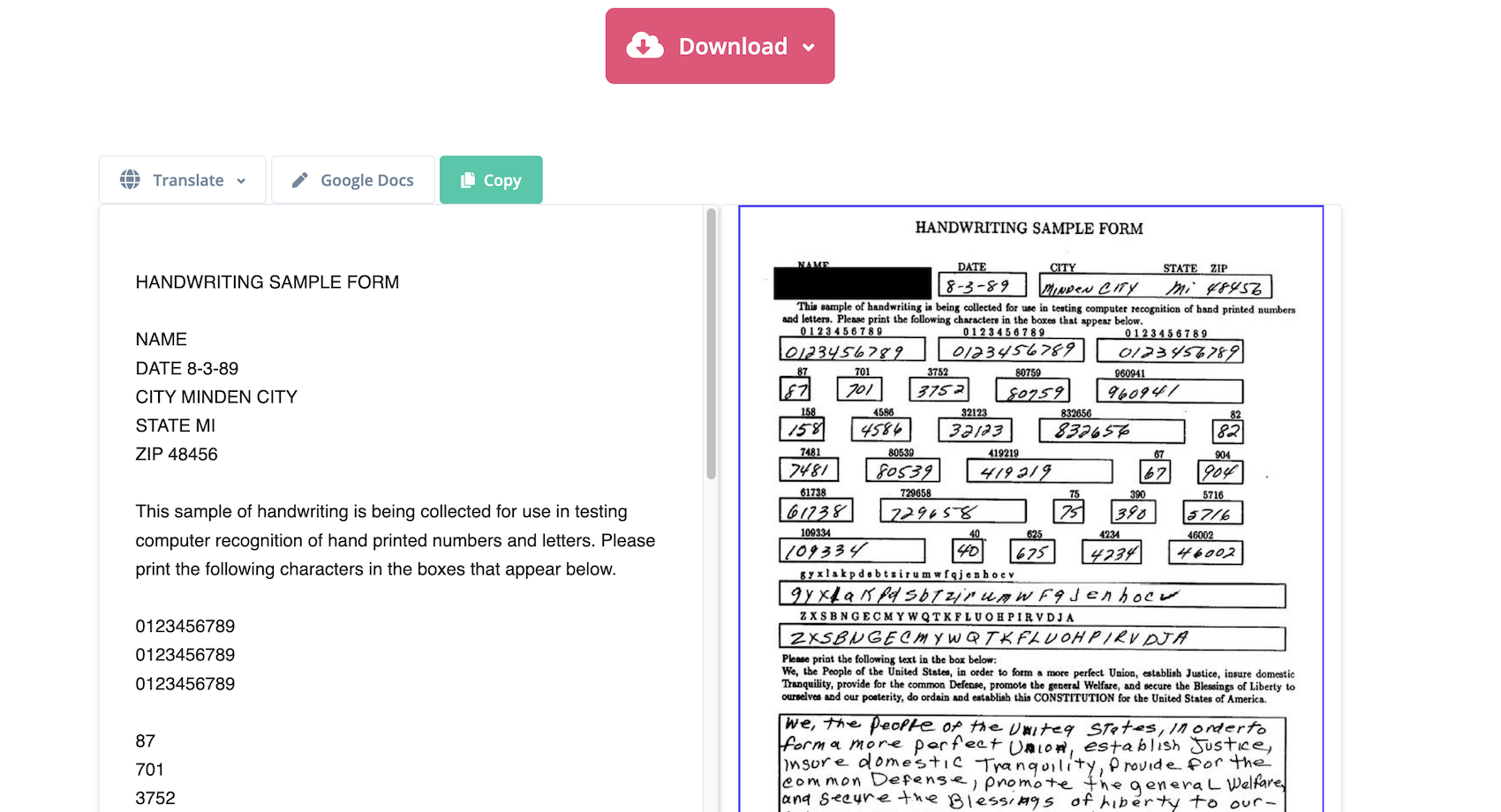
i2OCR reads one page at a time, and that single fact colors everything else about it. Upload an image or a lone PDF page, choose from 128 languages, then decide between two engines the site calls Future and Classic - the newer one is where the best AI OCR software claim rests. Your words come back as plain text, a Doc, a searchable PDF, HTML, or a zip file. Batch conversion is part of the premium plan.
How It Performed
The printed contract came back accurately, with paragraph spacing preserved.
Even with the invoice tilted in the photo, it preserved the table structure, captured all quantities, and placed the totals correctly. The handwritten entries read well, even the form fields.
Volume is where it costs you. Our files were single pages; a nine-page contract means nine separate uploads, one at a time, and multi-page documents are exactly what sends people looking for OCR to begin with.
So, i2OCR performs well on single-page files. Its seven-second processing time and solid table recognition make it a good fit for occasional conversions, but the page-by-page workflow grows tedious with larger batches.
Pros & Cons
|
Pros |
Cons |
|
128 languages at no cost |
One page per conversion on the free tier |
|
Six outputs, searchable PDF among them |
Batch OCR priced by quote |
|
Two engines, so a weak result gets a second attempt |
Free uploads cap at 10 MB |
|
Copy out or push straight into Google Docs |
Bulk pricing hidden behind a quote request |
Pricing
Free conversions are unlimited, though you must process pages one at a time. Multi-page and bulk OCR require a paid service; pricing is available by quote.
Verdict
Solid for one page at a time. Longer documents cost you either patience or money.
7. Adobe Acrobat Online - Best for Searchable Archives
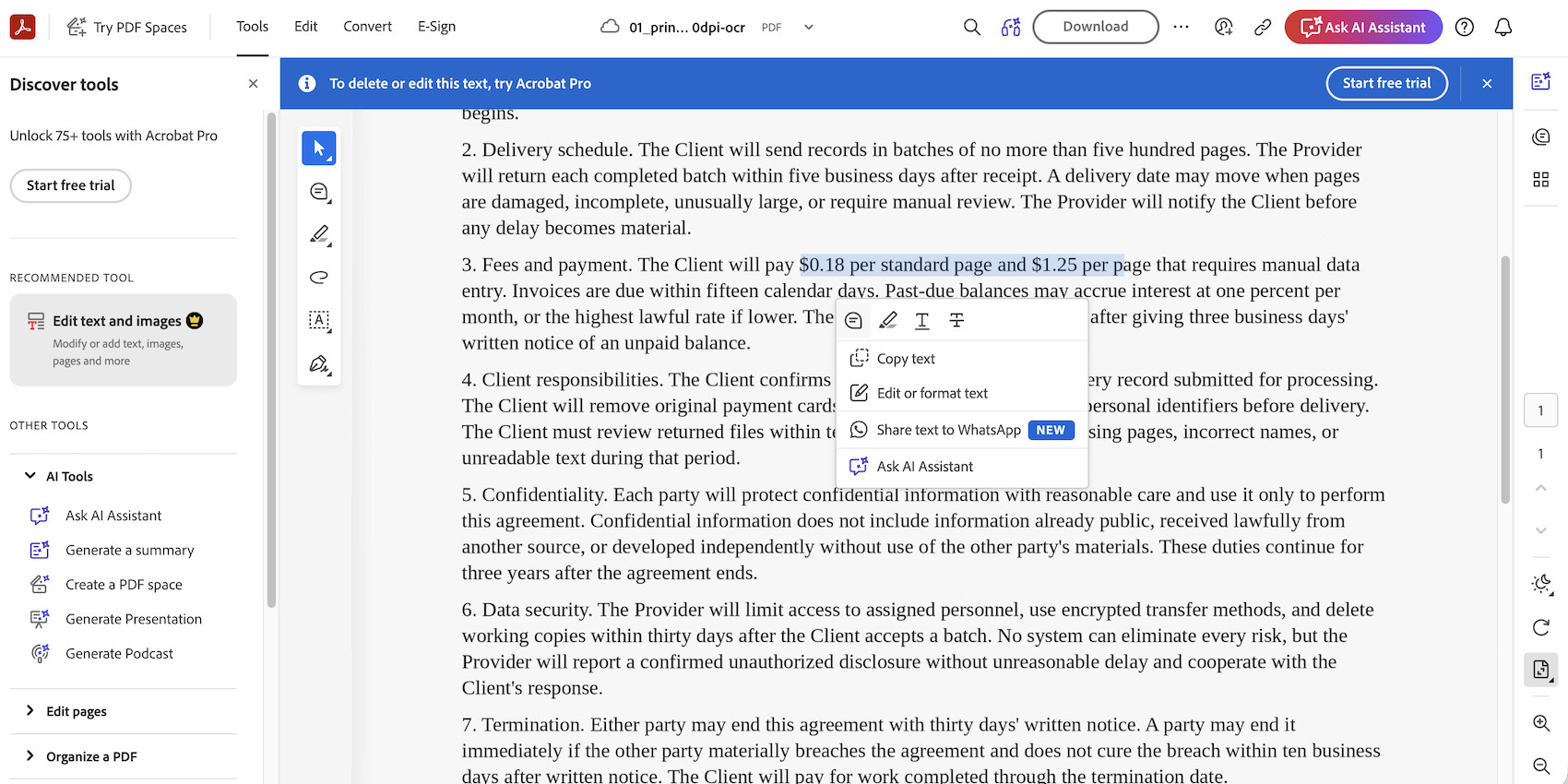
Adobe's browser OCR runs with no install or account required, at least until you want the file. Drop in a scan, hit Recognize text, and it opens in Acrobat's web viewer with a text layer beneath the original page, ready to select, copy, or search. The sign-in appears at download, and editing the recognized words is available in Acrobat Pro.
How It Performed
The printed contract came through cleanly, with clause numbering and both per-page rates copyable straight out of the viewer.
Where Adobe pulled ahead was the crooked invoice photo. Every one of the nine rows survived, including quantities, and the subtotal and tax figures were reconciled against the total. Worth checking after conversion: three amounts came back with commas standing in for decimal points.
Handwritten pages get the identical treatment - a searchable PDF, nothing extractable.
Taken together, Adobe makes the most sense as an archive tool, not a data extractor. Search worked well after the eight-second conversion, but the decimal substitutions mean financial figures need checking before you copy them elsewhere.
Pros & Cons
|
Pros |
Cons |
|
Page looks untouched, with a search layer beneath |
Searchable PDF is the only output |
|
Text selectable and copyable right in the browser |
Downloading requires an Adobe account |
|
Handles printed and handwritten pages alike |
Editing recognized text means Acrobat Pro at $19.99/month |
|
Reads angled phone photos without losing rows |
Figures worth checking, decimals can appear as commas |
Pricing
Online OCR is free, but you’ll need an Adobe account to download the converted file. Acrobat Pro costs $19.99/month with an annual commitment after a seven-day trial.
Verdict
Suits archives you'll search rather than edit, if signing in for the download doesn't bother you.
8. Veryfi - Best for Pulling Data Out of Invoices
Veryfi sells document-extraction software to accounting teams while maintaining a collection of free browser tools open to everyone. Users can convert PDFs and images into text, JSON, Excel, or CSV, then use separate tools for receipts and bank statements without creating an account. This is OCR AI in the strict sense: it doesn’t return a readable copy of the page, it pulls out the underlying data.
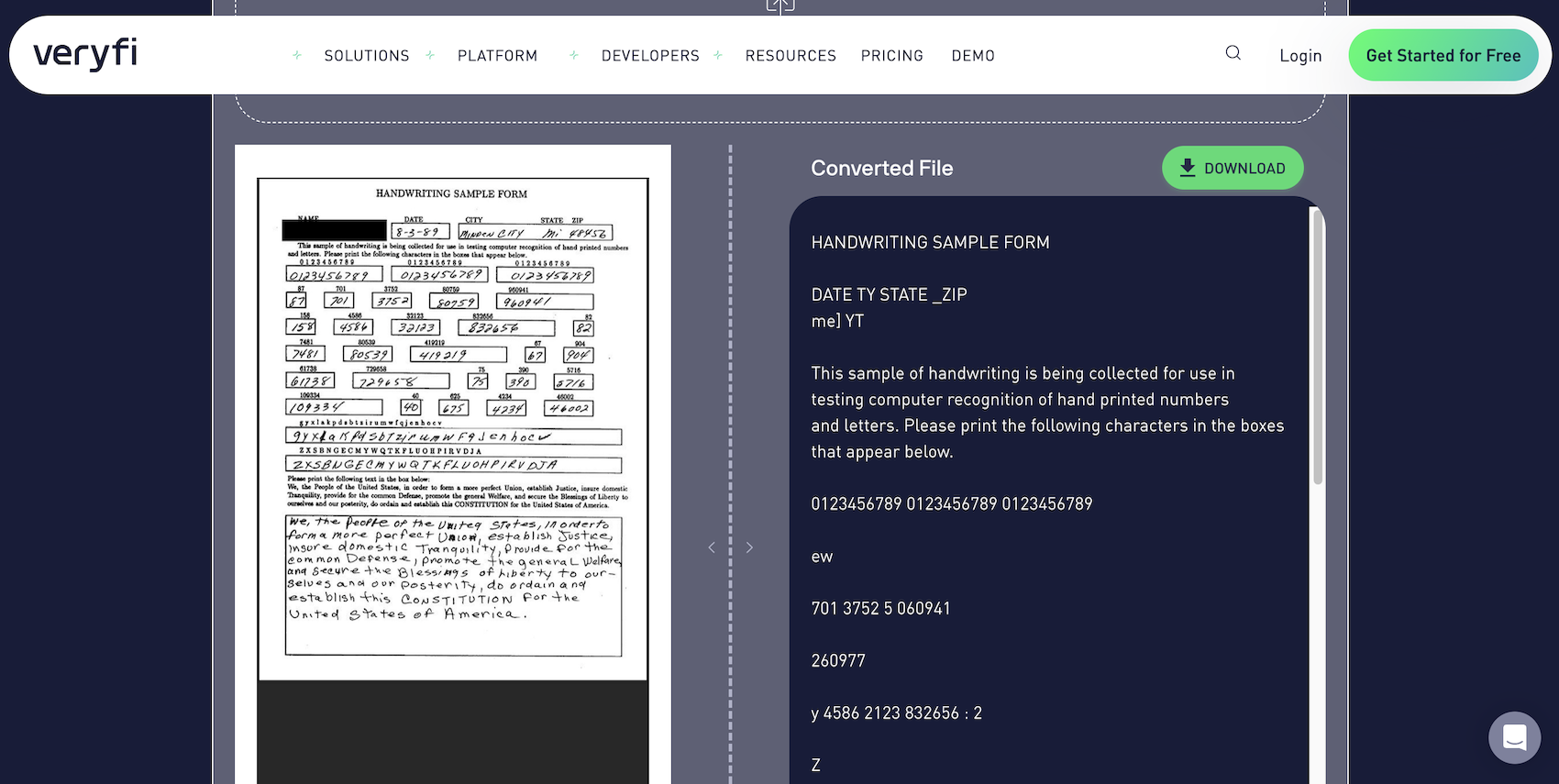
How It Performed
The printed contract produced the cleanest result of anything tested, paragraph breaks and section spacing preserved exactly as written.
Behavior on the tilted invoice splits by format. Plain text got every rate, amount, and total right, all reconciling - while dropping the quantity column. Excel instead returns labeled fields: billing address, invoice number, both dates, and nine line items each paired with its rate. Check the subtotal, which came back as $254.39 rather than $235.00.
Handwriting split oddly, with figures in boxes returning as fragments while the handwritten passage of running text stayed followable.
In summary, Veryfi behaves more like a field extractor than a regular OCR converter. Its 10-second result can save data-entry time, but the incorrect subtotal means invoice exports need a manual cross-check before they reach accounting.
Pros & Cons
|
Pros |
Cons |
|
Structured JSON, CSV, or Excel free, no signup |
No searchable PDF and no Word output |
|
Invoice fields read by name instead of dumped raw |
Line items crammed into a single cell |
|
Receipt scanner and bank statement converters alongside |
Totals need a cross-check before they reach accounting |
|
Free API allowance of 100 documents a month |
Free tools lead into a paid platform |
Pricing
Free browser converters with no signup. The API covers 100 documents a month free, then runs on a $500 monthly minimum at $0.08 per receipt and $0.16 per invoice.
Verdict
Good for lifting invoice fields into a system, provided someone checks the totals afterward.
9. Smallpdf - Best for One-Off Searchable PDFs
Smallpdf returns your scanned PDF looking untouched, with a text layer hiding beneath the picture. Select a sentence, copy it, run Ctrl-F through a document that used to be an image. Nothing to install, no account to create, and it works in any browser on a laptop, tablet, or phone. Turning that result into Word or another format takes a second trip through their PDF converter.
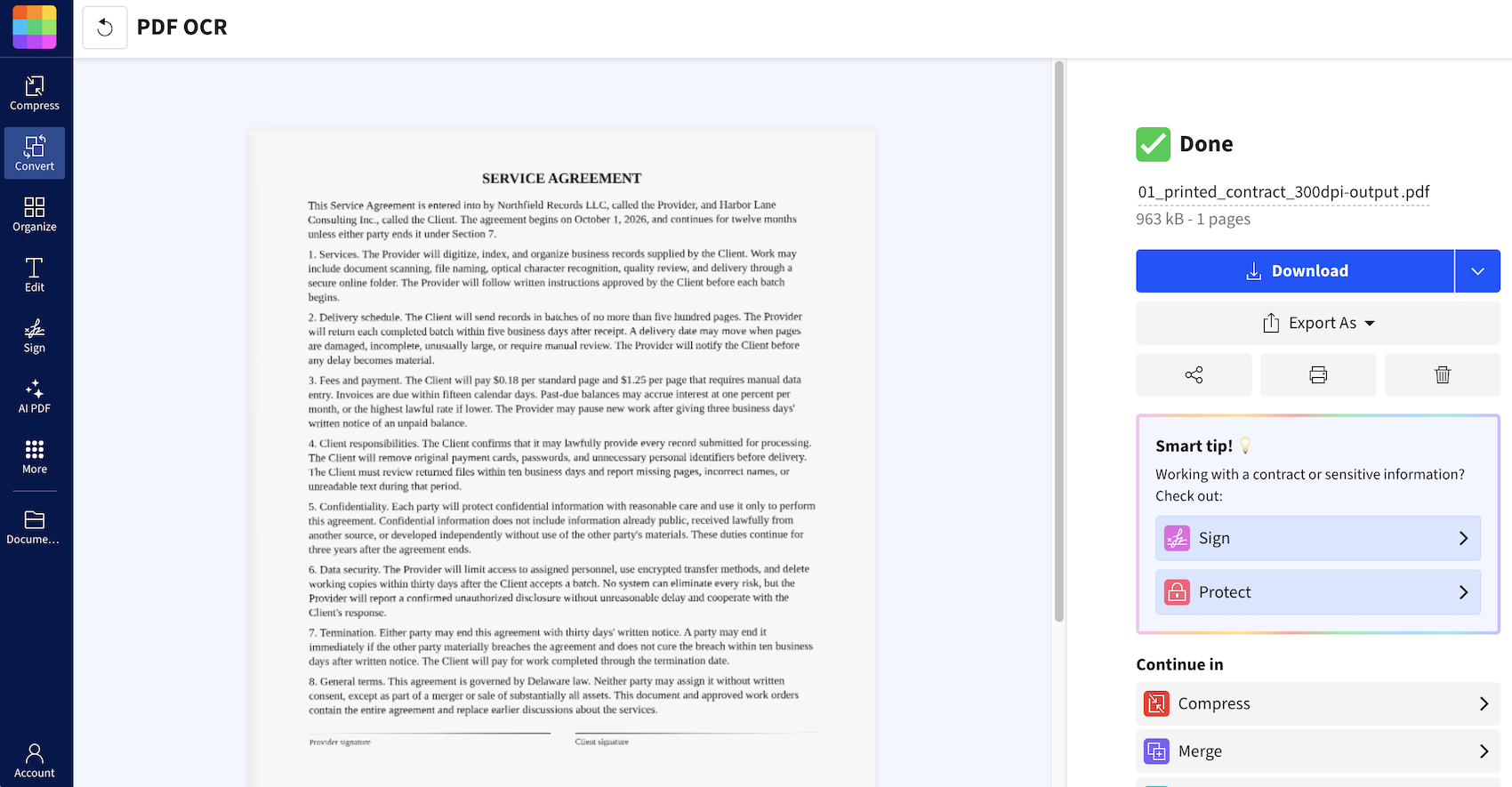
How It Performed
Typed pages are where it shines. A full contract page came back nearly letter-perfect, with one character slip across eight sections and every date and dollar figure intact, which is the result most readers will meet.
The angled invoice photo showed where the tool draws its line. All nine item names came through with the subtotal, tax, and total intact. The quantity column vanished as Smallpdf reads text rather than table structure.
Handwriting is outside its range, so filled-in forms and notes belong elsewhere.
Eleven seconds is reasonable for a one-off scan, but Smallpdf works within a narrow lane. It suits searchable copies of typed pages, whereas tables and handwriting quickly expose its limits.
Pros & Cons
|
Pros |
Cons |
|
Free OCR with no install and no account |
Handwriting unreadable, so forms belong elsewhere |
|
Original page look kept, search layer added underneath |
Word or Excel takes a second conversion |
|
Runs in any browser on desktop, tablet, or phone |
Free use stops at two conversions a day |
|
Files deleted from the servers after processing |
Built for readable text, not structured data |
Pricing
Free users get two conversions per day without creating an account. Pro starts at $9/month, removes daily limits, and includes a 7-day trial.
Verdict
A quick searchable copy of a typed page, no sign-in required. Nothing beyond that.
10. OnlineOCR.net - Best Free Route to Word and Excel
OnlineOCR.net asks for three decisions and then gets out of your way. Upload the file, choose one of 46 languages, and say whether you want plain text, a Word document, or an Excel sheet. All three come free, which is rare, since most rivals hold spreadsheet output back for paying customers. Your result appears in a box on the page with Copy and Download beside it, and crooked images get straightened first.
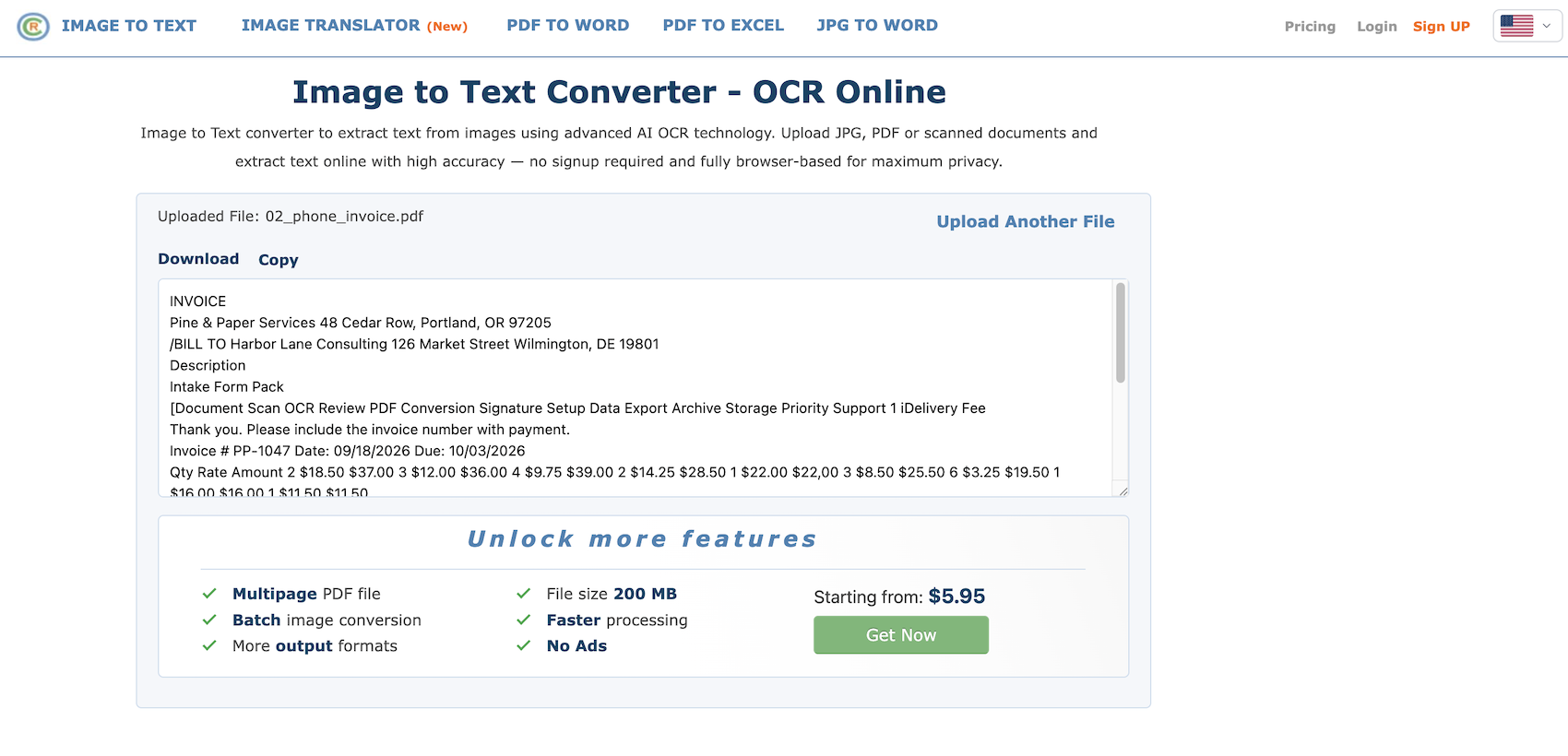
How It Performed
The contract page came through accurate word for word. Paragraph breaks didn't survive, so the whole page reads as a single block until you put the spacing back.
The tilted invoice photo came through with its figures intact - rates, quantities, and amounts all correct, apart from one $22.00 that picked up a comma. The item names were in a separate block from the numbers, which is better suited to Excel output if you plan to rebuild the table.
Handwritten entries proved beyond it, while the printed labels on the identical page read cleanly.
The 10-12-second wait wasn’t the real drawback, cleanup was. OnlineOCR.net can pull words from a basic scan, but contracts lose their layout, invoices lose their structure, and handwriting falls outside its range.
Pros & Cons
|
Pros |
Cons |
|
Word, Excel, and plain text without paying |
Paragraph breaks collapse into one block |
|
46 languages, chosen before conversion |
Handwritten entries proved beyond it |
|
Automatic deskew on rotated images |
Free guests get 5 files an hour, 15MB each, first PDF page only |
|
Result copyable on the page or downloadable |
Ads beside the results |
Pricing
You can process five files per hour for free, each up to 15 MB, but PDFs are limited to the first page. Paid access starts at $5.95 per week for 2,000 pages.
Verdict
The plainest way to turn a scan into a Word or Excel file at no cost.
How to Choose the Most Accurate OCR Software
The accuracy of an OCR tool is going to be based on the type of document you're feeding it. A tool that reads a flatbed scan word for word can still scramble a phone photo of an invoice, and one that nails hand-printed digits will turn cursive into rubble.
Choose the Right Tool for Your Document Type
It turns out that typed text reads just fine with just about any tool, so at that point it's not so much about accuracy and more about what else the tool has to offer. Tables, on the other hand, are a bit of a problem, and handwriting is just about impossible in most cases.
If you're dealing with a lot of hand-printed forms, something like FormsPal or iLoveOCR might be a good bet, but if you've got a lot of cursive writing, even the paid desktop programs are going to struggle.
Check the Output Before You Upload
A searchable PDF and an Excel sheet solve different problems. Adobe and Smallpdf hand you the first and nothing beyond it. If you plan to rebuild a table, pick a tool with real spreadsheet export, or you'll retype nine rows by hand.
Pay Attention to the Limitations of the Free Version
When you're looking at free OCR tools, the things to keep in mind are the file size limit, the page count limit, and the number of conversions you're allowed to do each day.
Some of them are pretty generous - FormsPal will let you upload 20 files a day at 10 pages each - but others are much more restrictive. iLoveOCR, for example, will only handle files up to 2MB, while OnlineOCR.net will only read the first page of a PDF unless you're paying.
Verify the Numbers Yourself
Always compare the totals against what the original page says - before anything gets to accounting. We had one where the subtotal was off by $19 - every line item was correct, but it was the error people always tend to skim over.
So What Is the Best OCR Software?
FormsPal is the best OCR software overall for people who need more than plain text. In our tests, it handled typed contracts, angled invoice photos, tables, and block handwriting with very little cleanup.
You can export results as text, Word, Excel, or a searchable PDF, while the free tier covers 20 conversions a day with no watermark. It also processes files in memory and discards them afterward.
Get started with FormsPal and run your first scan for free - no account needed.
FAQs
What is the most accurate OCR software?
Its accuracy really depends on what you're feeding it. Printed pages came back near-perfect from nearly every tool we ran, so the ranking above turns on harder material - angled photos, tables, and filled-in forms. FormsPal, OCR.space, and i2OCR held their ground across all three files.
What is AI OCR software?
Traditional document recognition software matches letter shapes against known fonts, which works on typed pages and falls apart elsewhere. AI OCR software reads structure too - which figure belongs in which column, where a table starts. That showed up in our invoice test, where i2OCR and OCR.space rebuilt every row.
Can OCR software read handwriting?
Partly, and the split is predictable. Block capitals written inside boxes read well on most tools we tested, with only a few digits slipping. Cursive thins out, returning text you can follow but not trust.
How do I run PDF to Word OCR on a scanned file?
Choose a tool that lists .docx among its outputs, since a searchable PDF alone won't get you there. FormsPal, OnlineOCR.net, and i2OCR all export Word at no cost. Smallpdf makes it a second conversion on a paid plan.
When do you need enterprise OCR software?
It usually comes down to file volume and compliance needs. For larger workloads, ABBYY Corporate, Veryfi’s API platform, and OCR.space on-premise license offer batch processing, data retention controls, and deployment within your own network.